Online Cinema Movies WordPress Theme



Edit Template Offline
2. Create new page and search for id 6637729
Edit Template Online
Create Awesome Websites


Free Nicepage Builder
Keywords
Film Cards and Genre Content Suit a Publishable Movie Theme
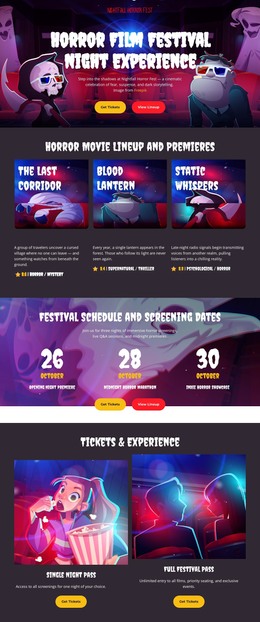
The four movie cards provide the strongest page-oriented content pattern in this design. Each combines poster artwork with a title, genre label, and release or feature metadata, making the group suitable as a visual model for featured or regularly updated movie information without claiming that WordPress Posts or a blog already exist. The five genre controls add a second content relationship by grouping browsing choices into Action & Adventure, Drama & Romance, Sci-Fi & Fantasy, Horror & Thriller, and Documentary.
The hero and final Watch Now block frame those content areas with a consistent viewing purpose. Browse Library supports movement toward movie information, while Watch Now returns attention to the service response after visitors have seen featured titles and categories. The three benefits add stable page content around Ultra HD Streaming, No Ads Experience, and Multi-Device Access, helping distinguish service explanation from changing film material. In a WordPress-managed project, the dark backgrounds, white headings, red and yellow accents, poster treatment, and theater imagery can keep permanent page content and future published material within one visual system. The design therefore maps naturally to a theme interpretation centered on content areas: a featured movie presentation, genre-oriented browsing, service information, and shared site identity. It does not require the CMS name to replace the template’s meaning; the relationship between publishable movie content and the existing visual regions provides the actual rationale.
Customize with Nicepage
Open this ready-made template in the WordPress Website Builder and customize it visually in the Nicepage editor. Replace demo content, edit page sections, and adapt the design to your project without rebuilding the template from scratch.
Manage and Edit This Theme in WordPress
Customize and Install the WordPress Theme
Start with this ready-made theme instead of building the WordPress design from scratch. Customize its layout, content, typography, images, sections, and other design elements visually in Nicepage editor, then export and install the WordPress Theme, Plugin, and Pages on your WordPress site. The Nicepage WordPress Plugin lets you continue working with the site after installation.
Edit the Theme Directly in WordPress
After installation, you can edit the WordPress Theme directly in WordPress with the Nicepage WordPress Plugin. Use Site Style to customize site Colors, Fonts, Header, Footer, Blog, and Post Page Templates while working within your WordPress website.
Edit WordPress Pages Visually
Use the Nicepage WordPress Plugin to edit page content directly from the WordPress admin area. Open a WordPress Page with Nicepage and visually change its text, images, sections, and other page elements while continuing to manage the Page through WordPress.
WordPress Content and Theme Integration
Use the customized theme with WordPress Pages, Posts, Blog and Post Templates, menus, widgets, and other CMS-managed content. Shared theme elements such as Colors, Fonts, Header, Footer, Blog, and Post Page Templates can be managed as part of the overall site design, while WordPress provides the CMS environment for managing site content.
This workflow combines a ready-made WordPress Theme with visual customization, direct theme editing in WordPress, and continued content management through the Nicepage WordPress Plugin.