Outstanding quality of music WordPress Theme


Edit Template Offline
2. Create new page and search for id 17189
Edit Template Online
Create Awesome Websites


Free Nicepage Builder
Keywords
Permanent product content leaves room for managed updates
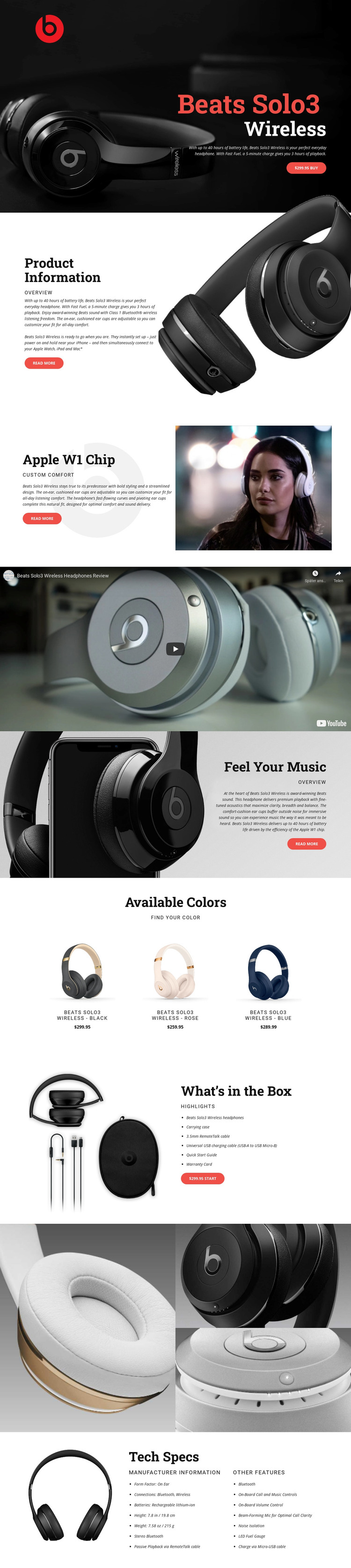
The page contains clear permanent content areas that suit a WordPress-managed product presentation. The hero can carry the main headphone introduction and purchase action, while Product Information, Apple W1 Chip, and Feel Your Music divide the product story into stable page sections. Their image-and-copy relationships make the content easier to understand without depending on one undifferentiated block of text.
The Available Colors grid offers a second content pattern: three repeated items show black, rose, and blue variants with corresponding names and prices. That arrangement can support product-oriented page content while retaining a consistent visual presentation. The What’s in the Box section is more reference-driven, grouping the headphones, carrying case, charging cable, Quick Start Guide, and Warranty Card beside an image and purchase prompt. These areas provide different roles for page content rather than simply repeating the same product claim.
The video, close-up gallery, and Tech Specs section create additional places for content that may need to be maintained separately from the opening promotion. The gallery communicates physical details through three images, while the specifications organize form factor, Bluetooth and wireless connections, rechargeable battery information, weight, dimensions, and other features. If the project later adds related editorial or product information, the same design character can surround it without changing the core page composition. The WordPress Plugin supports editing page content in WordPress, while the template’s verified content areas determine what should be managed.
Customize with Nicepage
Open this ready-made template in the WordPress Website Builder and customize it visually in the Nicepage editor. Replace demo content, edit page sections, and adapt the design to your project without rebuilding the template from scratch.
Manage and Edit This Theme in WordPress
Customize and Install the WordPress Theme
Start with this ready-made theme instead of building the WordPress design from scratch. Customize its layout, content, typography, images, sections, and other design elements visually in Nicepage editor, then export and install the WordPress Theme, Plugin, and Pages on your WordPress site. The Nicepage WordPress Plugin lets you continue working with the site after installation.
Edit the Theme Directly in WordPress
After installation, you can edit the WordPress Theme directly in WordPress with the Nicepage WordPress Plugin. Use Site Style to customize site Colors, Fonts, Header, Footer, Blog, and Post Page Templates while working within your WordPress website.
Edit WordPress Pages Visually
Use the Nicepage WordPress Plugin to edit page content directly from the WordPress admin area. Open a WordPress Page with Nicepage and visually change its text, images, sections, and other page elements while continuing to manage the Page through WordPress.
WordPress Content and Theme Integration
Use the customized theme with WordPress Pages, Posts, Blog and Post Templates, menus, widgets, and other CMS-managed content. Shared theme elements such as Colors, Fonts, Header, Footer, Blog, and Post Page Templates can be managed as part of the overall site design, while WordPress provides the CMS environment for managing site content.
This workflow combines a ready-made WordPress Theme with visual customization, direct theme editing in WordPress, and continued content management through the Nicepage WordPress Plugin.