Nature in art WordPress Theme


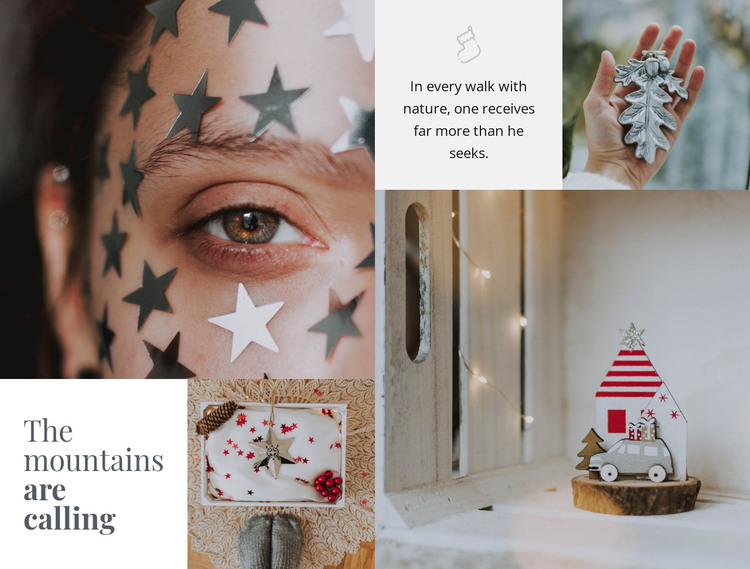
A Mountain Message Anchored by Four Photographic Areas
The four image areas make the collage visually immediate, but the section’s page content is organized by two separate text tiles. The lower-left tile gives the composition its main statement with “The mountains are calling.” Across the mosaic, the upper-right light tile carries the reflective quote “In every walk with nature, one receives far more than he seeks.” This placement creates a deliberate relationship between a short heading, a longer thought, and the surrounding nature photography rather than presenting the images as unrelated decoration.
For a WordPress-managed project, the block can function as stable page content on an editorial, inspiration, or visual storytelling page. Its heading and quotation are self-contained enough to remain a recognizable section while additional WordPress-managed content is placed before or after it. The four photographs provide visual continuity, and the pale panels keep the text readable against the larger image areas. Dark serif typography reinforces the reflective tone without requiring a separate interactive component. Because the layout is static, it works as a consistent content section that can be maintained alongside other page material while preserving its original mosaic arrangement. It remains a reusable block within the wider WordPress site, not a standalone theme.
Customize with Nicepage
Open this ready-made template in the WordPress Website Builder and customize it visually in the Nicepage editor. Replace demo content, edit page sections, and adapt the design to your project without rebuilding the template from scratch.
Edit Template Offline
2. Create a new page or select existing
3. Click Add new block, search for id 56083 and click enter
Edit Template Online
Create Awesome Websites


Free Nicepage Builder
Keywords
Manage and Edit This Theme in WordPress
Customize and Install the WordPress Theme
Start with this ready-made theme instead of building the WordPress design from scratch. Customize its layout, content, typography, images, sections, and other design elements visually in Nicepage editor, then export and install the WordPress Theme, Plugin, and Pages on your WordPress site. The Nicepage WordPress Plugin lets you continue working with the site after installation.
Edit the Theme Directly in WordPress
After installation, you can edit the WordPress Theme directly in WordPress with the Nicepage WordPress Plugin. Use Site Style to customize site Colors, Fonts, Header, Footer, Blog, and Post Page Templates while working within your WordPress website.
Edit WordPress Pages Visually
Use the Nicepage WordPress Plugin to edit page content directly from the WordPress admin area. Open a WordPress Page with Nicepage and visually change its text, images, sections, and other page elements while continuing to manage the Page through WordPress.
WordPress Content and Theme Integration
Use the customized theme with WordPress Pages, Posts, Blog and Post Templates, menus, widgets, and other CMS-managed content. Shared theme elements such as Colors, Fonts, Header, Footer, Blog, and Post Page Templates can be managed as part of the overall site design, while WordPress provides the CMS environment for managing site content.
This workflow combines a ready-made WordPress Theme with visual customization, direct theme editing in WordPress, and continued content management through the Nicepage WordPress Plugin.