Horror Film Festival WordPress Theme


Edit Template Offline
2. Create new page and search for id 6638013
Edit Template Online
Create Awesome Websites


Free Nicepage Builder
Keywords
Film Cards and Event Pages Fit a Publishable Festival Structure
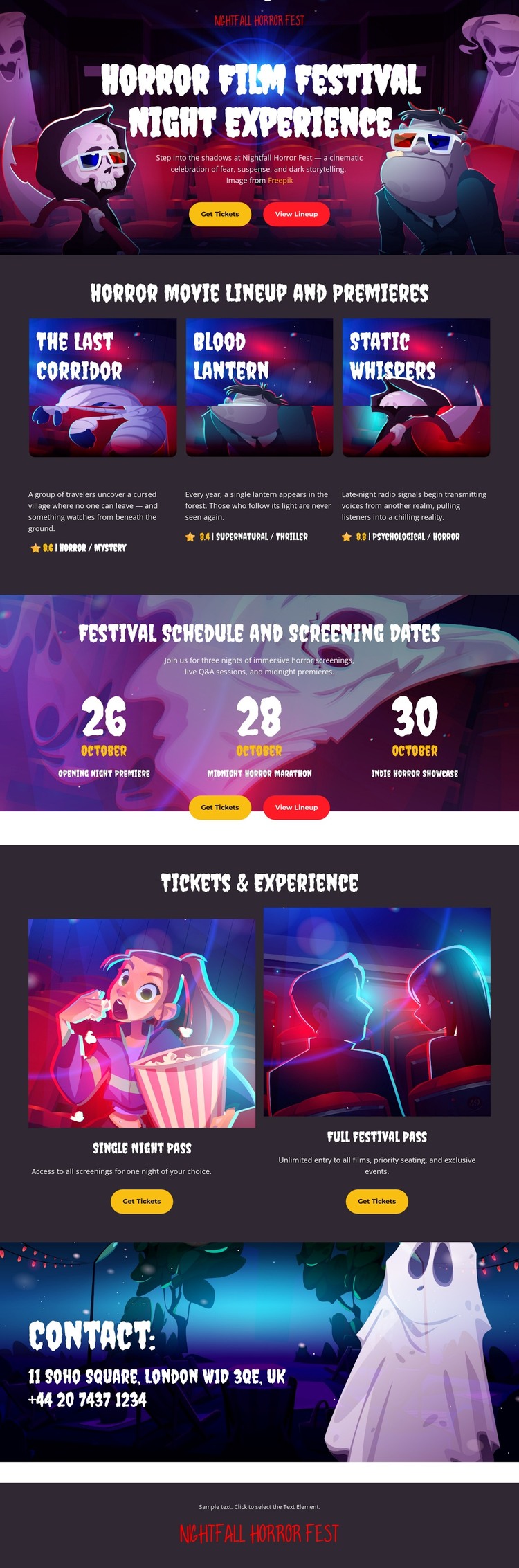
The three featured film cards create clear permanent content areas for The Last Corridor, Blood Lantern, and Static Whispers. Together they give the design a program-oriented center: visitors can encounter individual film information within a shared visual system rather than reading one undifferentiated event description. The hero’s View Lineup action reinforces that relationship, while Get Tickets points toward the separate attendance content.
The three displayed festival dates add another page-oriented information group. They connect the program with when screenings occur, but remain visually separate from the film cards so date information can be updated or expanded without losing the page’s hierarchy. The two ticket cards provide a third content role, distinguishing Opening Night Pass and Full Festival Pass and pairing both with direct purchase actions. This combination creates a useful relationship between featured content, scheduled event information, and attendance choices.
The contact section and dark branded footer act as shared site regions around those areas. In a WordPress-managed project, the design could support permanent festival pages alongside regularly updated announcements or other event content, but the current analysis does not prove that posts or blog structures already exist. Its strength as a WordPress Theme interpretation comes from the clear separation of film, date, pass, and contact content, together with a visual identity that can remain consistent as the event site’s information changes.
Customize with Nicepage
Open this ready-made template in the WordPress Website Builder and customize it visually in the Nicepage editor. Replace demo content, edit page sections, and adapt the design to your project without rebuilding the template from scratch.
Manage and Edit This Theme in WordPress
Customize and Install the WordPress Theme
Start with this ready-made theme instead of building the WordPress design from scratch. Customize its layout, content, typography, images, sections, and other design elements visually in Nicepage editor, then export and install the WordPress Theme, Plugin, and Pages on your WordPress site. The Nicepage WordPress Plugin lets you continue working with the site after installation.
Edit the Theme Directly in WordPress
After installation, you can edit the WordPress Theme directly in WordPress with the Nicepage WordPress Plugin. Use Site Style to customize site Colors, Fonts, Header, Footer, Blog, and Post Page Templates while working within your WordPress website.
Edit WordPress Pages Visually
Use the Nicepage WordPress Plugin to edit page content directly from the WordPress admin area. Open a WordPress Page with Nicepage and visually change its text, images, sections, and other page elements while continuing to manage the Page through WordPress.
WordPress Content and Theme Integration
Use the customized theme with WordPress Pages, Posts, Blog and Post Templates, menus, widgets, and other CMS-managed content. Shared theme elements such as Colors, Fonts, Header, Footer, Blog, and Post Page Templates can be managed as part of the overall site design, while WordPress provides the CMS environment for managing site content.
This workflow combines a ready-made WordPress Theme with visual customization, direct theme editing in WordPress, and continued content management through the Nicepage WordPress Plugin.