Alternative daycare canter WordPress Theme



Stable School Content With a Clear Page-Section Role
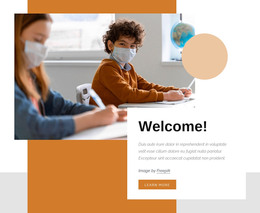
The heading “Welcome to the Children’s School” and the accompanying learning-approach paragraph read as stable page content rather than a time-sensitive update. The paragraph addresses small-group settings, teacher-child ratios, and activities that may be planned by teachers or initiated by children. In a WordPress-managed project, this makes the block suitable for a persistent school or about section while other content areas handle changing announcements, posts, or deeper program information.
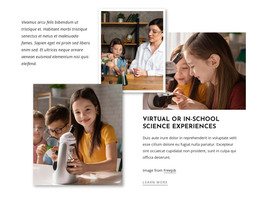
A second heading gives the section another content layer by focusing on spontaneity, curiosity, and joy of learning. The two child-focused photographs support these ideas without requiring the block to function as a gallery or interactive component. The larger left-side image works with the introductory explanation, while the right-side statement sits above a second image that is layered over a yellow rectangular accent. This arrangement keeps the content visually recognizable as one section with two connected messages.
The bright white background, orange uppercase primary heading, muted blue-gray secondary text, and generous whitespace provide a consistent presentation that can sit within a broader WordPress page design. The block can be adapted as publishable visual content while the surrounding CMS-managed project supplies other pages and content types. Its role remains focused: explain the school’s learning approach through structured copy, child-centered imagery, and an asymmetrical layout.
Customize with Nicepage
Open this ready-made template in the WordPress Website Builder and customize it visually in the Nicepage editor. Replace demo content, edit page sections, and adapt the design to your project without rebuilding the template from scratch.
Edit Template Offline
2. Create a new page or select existing
3. Click Add new block, search for id 53687 and click enter
Edit Template Online
Create Awesome Websites


Free Nicepage Builder
Keywords
Manage and Edit This Theme in WordPress
Customize and Install the WordPress Theme
Start with this ready-made theme instead of building the WordPress design from scratch. Customize its layout, content, typography, images, sections, and other design elements visually in Nicepage editor, then export and install the WordPress Theme, Plugin, and Pages on your WordPress site. The Nicepage WordPress Plugin lets you continue working with the site after installation.
Edit the Theme Directly in WordPress
After installation, you can edit the WordPress Theme directly in WordPress with the Nicepage WordPress Plugin. Use Site Style to customize site Colors, Fonts, Header, Footer, Blog, and Post Page Templates while working within your WordPress website.
Edit WordPress Pages Visually
Use the Nicepage WordPress Plugin to edit page content directly from the WordPress admin area. Open a WordPress Page with Nicepage and visually change its text, images, sections, and other page elements while continuing to manage the Page through WordPress.
WordPress Content and Theme Integration
Use the customized theme with WordPress Pages, Posts, Blog and Post Templates, menus, widgets, and other CMS-managed content. Shared theme elements such as Colors, Fonts, Header, Footer, Blog, and Post Page Templates can be managed as part of the overall site design, while WordPress provides the CMS environment for managing site content.
This workflow combines a ready-made WordPress Theme with visual customization, direct theme editing in WordPress, and continued content management through the Nicepage WordPress Plugin.