Facts and questions psge WordPress Theme


Edit Template Offline
2. Create new page and search for id 6324511
Edit Template Online
Create Awesome Websites


Free Nicepage Builder
Keywords
Questions, support content, and contact fields fit page-based publishing
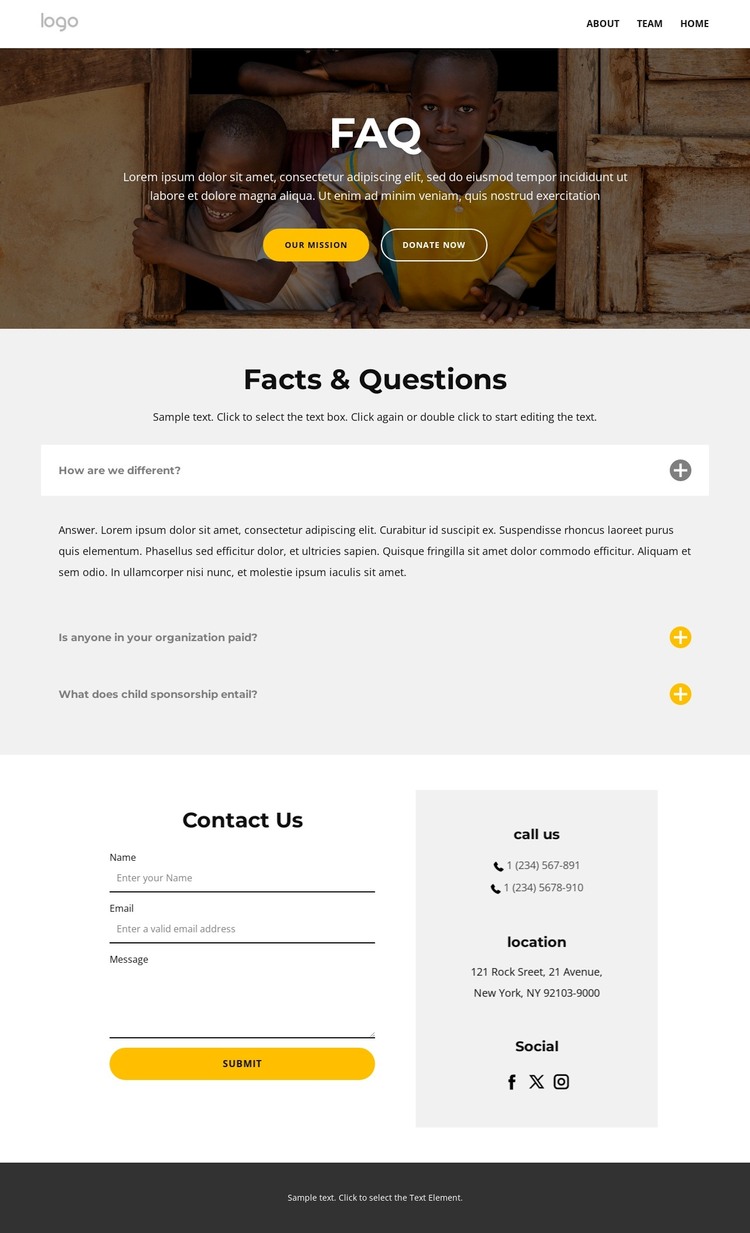
The template separates permanent informational content from direct visitor contact in a way that suits a WordPress-managed site. The hero can carry the page’s introductory charity message and its Our Mission and Donate now actions, while the three-item accordion provides a focused area for frequently updated answers about the organization or child sponsorship. These are different content roles, but the design keeps them within one recognizable visual system.
The map-and-form section is especially clear as page-oriented contact content. The map supplies a location reference, and the name, email, and message fields establish the information visitors can send through the Submit action. The footer adds reusable site regions through quick links, social links, contact channels, and lower navigation. If the project later adds related informational pages or regularly updated content, these regions can continue to frame that material without asserting that posts, categories, or other WordPress structures already exist here.
The WordPress interpretation is therefore based on the template’s content relationships rather than a CMS label alone. The FAQ area can remain a dedicated page section, contact content can retain its separate response role, and shared navigation and footer elements can support a wider site. The existing palette and section contrast help preserve a consistent theme character as the surrounding content develops.
Customize with Nicepage
Open this ready-made template in the WordPress Website Builder and customize it visually in the Nicepage editor. Replace demo content, edit page sections, and adapt the design to your project without rebuilding the template from scratch.
Manage and Edit This Theme in WordPress
Customize and Install the WordPress Theme
Start with this ready-made theme instead of building the WordPress design from scratch. Customize its layout, content, typography, images, sections, and other design elements visually in Nicepage editor, then export and install the WordPress Theme, Plugin, and Pages on your WordPress site. The Nicepage WordPress Plugin lets you continue working with the site after installation.
Edit the Theme Directly in WordPress
After installation, you can edit the WordPress Theme directly in WordPress with the Nicepage WordPress Plugin. Use Site Style to customize site Colors, Fonts, Header, Footer, Blog, and Post Page Templates while working within your WordPress website.
Edit WordPress Pages Visually
Use the Nicepage WordPress Plugin to edit page content directly from the WordPress admin area. Open a WordPress Page with Nicepage and visually change its text, images, sections, and other page elements while continuing to manage the Page through WordPress.
WordPress Content and Theme Integration
Use the customized theme with WordPress Pages, Posts, Blog and Post Templates, menus, widgets, and other CMS-managed content. Shared theme elements such as Colors, Fonts, Header, Footer, Blog, and Post Page Templates can be managed as part of the overall site design, while WordPress provides the CMS environment for managing site content.
This workflow combines a ready-made WordPress Theme with visual customization, direct theme editing in WordPress, and continued content management through the Nicepage WordPress Plugin.