Transforming lives blog WordPress Theme


Edit Template Offline
2. Create new page and search for id 6479325
Edit Template Online
Create Awesome Websites


Free Nicepage Builder
Keywords
Editorial Cards Give the Charity Page a WordPress Content Pattern
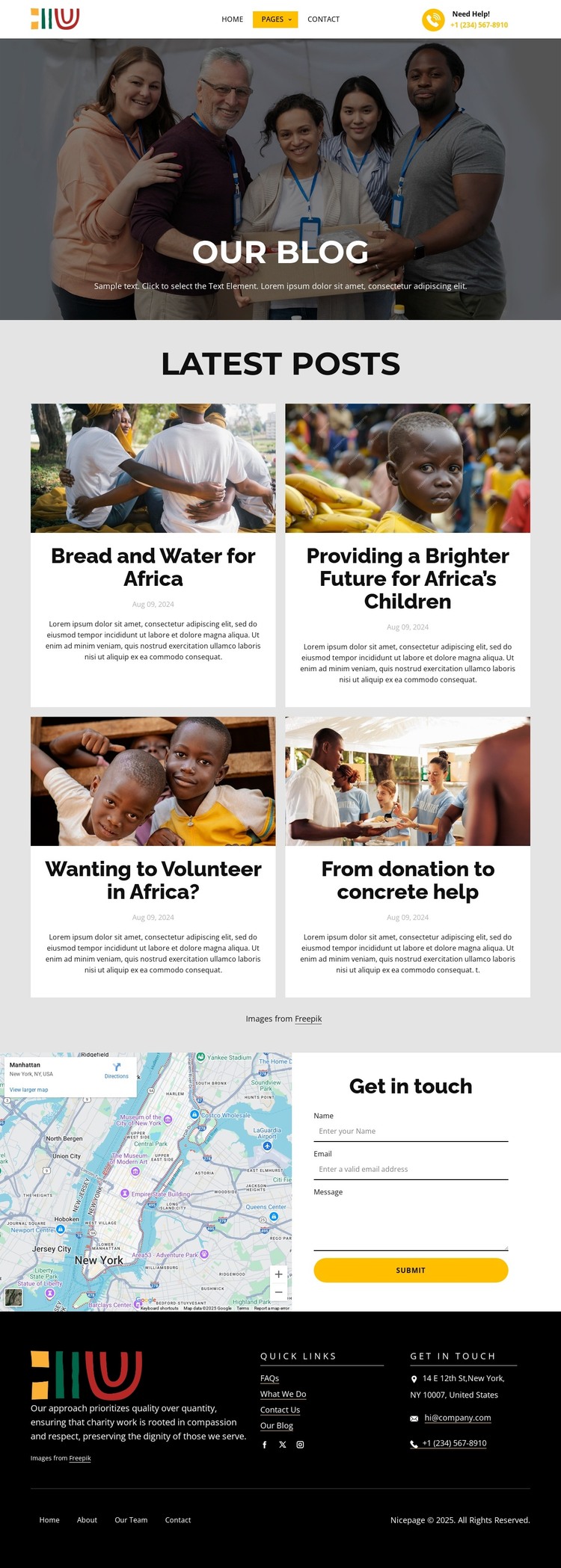
The strongest recurring structure is the four-card “Latest Posts” area. Every card combines an article image, title, publication date, and excerpt, creating a consistent presentation for page-based editorial content. The sample wording and dates should be replaced or independently verified, but the repeated card relationship is clear: visual context introduces each entry, while concise text identifies and previews it. This makes the design suitable for a charitable blog direction without asserting that WordPress Posts or categories already exist.
The page also leaves room for permanent organizational content. The opening “Our Blog” block frames the editorial area, and the “Get in touch” section combines a map with a vertically arranged contact form. A telephone number, email address, Submit action, and a dark footer with organization copy and Quick Links extend the design beyond individual articles. Facebook, Twitter, and Instagram links provide another recurring site element for audience access.
In a WordPress-managed project, these page areas can support a distinction between durable organization information and regularly updated editorial material while preserving one visual system. The supplied analysis verifies the page’s cards, form, map, footer, and social links, but it does not verify existing WordPress Pages, Posts, widgets, or blog templates. Those CMS structures remain potential implementation choices, not claims about the source design.
Customize with Nicepage
Open this ready-made template in the WordPress Website Builder and customize it visually in the Nicepage editor. Replace demo content, edit page sections, and adapt the design to your project without rebuilding the template from scratch.
Manage and Edit This Theme in WordPress
Customize and Install the WordPress Theme
Start with this ready-made theme instead of building the WordPress design from scratch. Customize its layout, content, typography, images, sections, and other design elements visually in Nicepage editor, then export and install the WordPress Theme, Plugin, and Pages on your WordPress site. The Nicepage WordPress Plugin lets you continue working with the site after installation.
Edit the Theme Directly in WordPress
After installation, you can edit the WordPress Theme directly in WordPress with the Nicepage WordPress Plugin. Use Site Style to customize site Colors, Fonts, Header, Footer, Blog, and Post Page Templates while working within your WordPress website.
Edit WordPress Pages Visually
Use the Nicepage WordPress Plugin to edit page content directly from the WordPress admin area. Open a WordPress Page with Nicepage and visually change its text, images, sections, and other page elements while continuing to manage the Page through WordPress.
WordPress Content and Theme Integration
Use the customized theme with WordPress Pages, Posts, Blog and Post Templates, menus, widgets, and other CMS-managed content. Shared theme elements such as Colors, Fonts, Header, Footer, Blog, and Post Page Templates can be managed as part of the overall site design, while WordPress provides the CMS environment for managing site content.
This workflow combines a ready-made WordPress Theme with visual customization, direct theme editing in WordPress, and continued content management through the Nicepage WordPress Plugin.