Art school education WordPress Theme


Stable Program Content for a WordPress-Managed Page Section
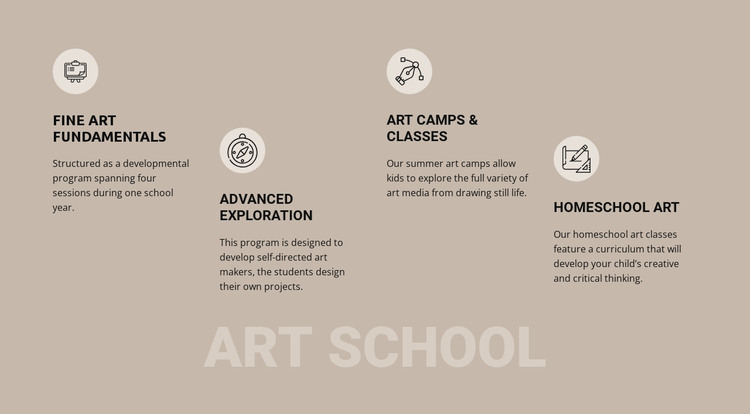
The block reads as durable program information rather than a time-sensitive list of posts. Fine Art Fundamentals, Advanced Exploration, Art Camps & Classes, and Homeschool Art are presented as four stable education categories, each with a circular icon, a title, and descriptive copy. That makes the section suitable for a WordPress-oriented page where the program overview remains a consistent part of the visual content while the wider site develops other material around it.
The content differences give each item a specific editorial role. Fine Art Fundamentals describes a four-session program across one school year; Advanced Exploration centers on student-designed projects; Art Camps & Classes cover varied art media; and Homeschool Art connects its curriculum with creative and critical thinking. These distinctions can help a page communicate the range of the school without reducing the section to generic feature labels.
The staggered columns and lower “art school” title provide the presentation structure, while the taupe background, pale icon treatments, and black typography keep the four categories visually related. In a WordPress-managed project, this block can occupy one permanent program area on a broader page, with surrounding content handling navigation, additional explanations, updates, or contact information. The section therefore contributes publishable page content without being treated as a complete theme or site.
Customize with Nicepage
Open this ready-made template in the WordPress Website Builder and customize it visually in the Nicepage editor. Replace demo content, edit page sections, and adapt the design to your project without rebuilding the template from scratch.
Edit Template Offline
2. Create a new page or select existing
3. Click Add new block, search for id 161387 and click enter
Edit Template Online
Create Awesome Websites


Free Nicepage Builder
Keywords
Manage and Edit This Theme in WordPress
Customize and Install the WordPress Theme
Start with this ready-made theme instead of building the WordPress design from scratch. Customize its layout, content, typography, images, sections, and other design elements visually in Nicepage editor, then export and install the WordPress Theme, Plugin, and Pages on your WordPress site. The Nicepage WordPress Plugin lets you continue working with the site after installation.
Edit the Theme Directly in WordPress
After installation, you can edit the WordPress Theme directly in WordPress with the Nicepage WordPress Plugin. Use Site Style to customize site Colors, Fonts, Header, Footer, Blog, and Post Page Templates while working within your WordPress website.
Edit WordPress Pages Visually
Use the Nicepage WordPress Plugin to edit page content directly from the WordPress admin area. Open a WordPress Page with Nicepage and visually change its text, images, sections, and other page elements while continuing to manage the Page through WordPress.
WordPress Content and Theme Integration
Use the customized theme with WordPress Pages, Posts, Blog and Post Templates, menus, widgets, and other CMS-managed content. Shared theme elements such as Colors, Fonts, Header, Footer, Blog, and Post Page Templates can be managed as part of the overall site design, while WordPress provides the CMS environment for managing site content.
This workflow combines a ready-made WordPress Theme with visual customization, direct theme editing in WordPress, and continued content management through the Nicepage WordPress Plugin.