Contact our professionals today WordPress Theme



Edit Template Offline
2. Create new page and search for id 432338
Edit Template Online
Create Awesome Websites


Free Nicepage Builder
Keywords
Repeated Service Content Fits a Manageable Theme Structure
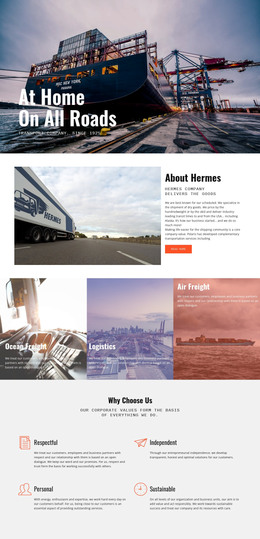
The page separates several kinds of content that commonly need distinct presentation in a managed company site. The opening introduces logistics, storage, refurbishment, and packaging and transport beside warehouse imagery, while the About Team section supplies a people-focused area. The four repeated cards in Trucking & Transportation add another content pattern for service qualities such as fast service, quality products, and company character. These relationships make the design suitable for organizing permanent company information without claiming that specific WordPress posts or categories already exist.
The middle of the page offers further page-oriented content: Warehouse & Distribution, a company overview, mission copy, latest projects, and a logistics company profile. Multiple photographs support these areas and help distinguish operational content from organizational context. If regularly updated articles or announcements are later added, the same visual direction could surround them, but the verified design itself should be understood through its existing sections rather than through an assumed blog structure.
The communication areas are especially clear. Social icons for Facebook, Twitter, Instagram, and Google sit alongside contact-oriented content, while the newsletter invitation and contact form create separate audience interactions. A bright closing section contrasts with the dark feature and mission areas, preserving the theme's visual character as content changes. This combination gives a WordPress-oriented project a stable visual framework for pages, service information, project material, and direct company communication.
Customize with Nicepage
Open this ready-made template in the WordPress Website Builder and customize it visually in the Nicepage editor. Replace demo content, edit page sections, and adapt the design to your project without rebuilding the template from scratch.
Manage and Edit This Theme in WordPress
Customize and Install the WordPress Theme
Start with this ready-made theme instead of building the WordPress design from scratch. Customize its layout, content, typography, images, sections, and other design elements visually in Nicepage editor, then export and install the WordPress Theme, Plugin, and Pages on your WordPress site. The Nicepage WordPress Plugin lets you continue working with the site after installation.
Edit the Theme Directly in WordPress
After installation, you can edit the WordPress Theme directly in WordPress with the Nicepage WordPress Plugin. Use Site Style to customize site Colors, Fonts, Header, Footer, Blog, and Post Page Templates while working within your WordPress website.
Edit WordPress Pages Visually
Use the Nicepage WordPress Plugin to edit page content directly from the WordPress admin area. Open a WordPress Page with Nicepage and visually change its text, images, sections, and other page elements while continuing to manage the Page through WordPress.
WordPress Content and Theme Integration
Use the customized theme with WordPress Pages, Posts, Blog and Post Templates, menus, widgets, and other CMS-managed content. Shared theme elements such as Colors, Fonts, Header, Footer, Blog, and Post Page Templates can be managed as part of the overall site design, while WordPress provides the CMS environment for managing site content.
This workflow combines a ready-made WordPress Theme with visual customization, direct theme editing in WordPress, and continued content management through the Nicepage WordPress Plugin.