Heavy Industry Mining WordPress Theme


Edit Template Offline
2. Create new page and search for id 6624785
Edit Template Online
Create Awesome Websites


Free Nicepage Builder
Keywords
Project Content and Corporate Pages Share One Theme Direction
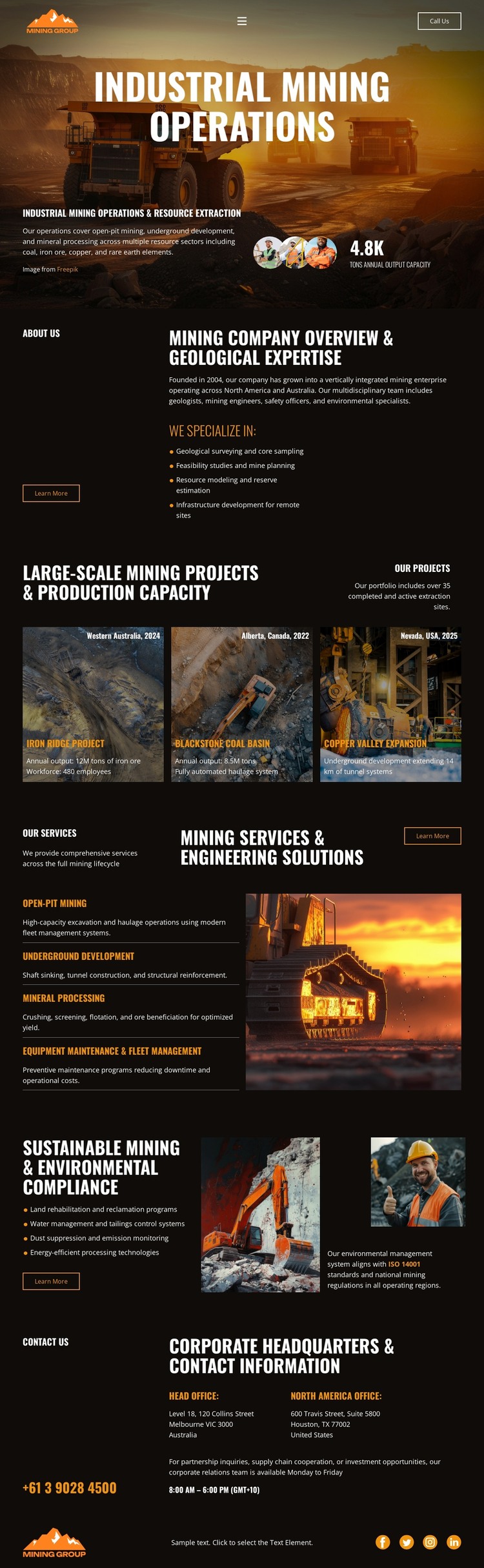
The design contains clear permanent content areas for a mining company: an operations introduction, company overview, geological expertise, service descriptions, sustainability information, and corporate contact details. These areas can be interpreted as page-oriented content in a WordPress-managed site because each has a defined informational role. The three repeated mining project cards add a different relationship. Their shared image, title, location or date label, and description pattern can support recurring project information while remaining visually connected to the permanent company sections.
The service content gives the theme another practical content category, listing Open Pit Mining, Underground Development, Mineral Sampling, Blasting and Drilling, and Equipment Maintenance & Haul Management beside heavy equipment imagery. Environmental material then adds rehabilitation, water management, dust suppression, emissions monitoring, and energy-efficient processing, which can remain part of the same visual system as company content rather than appearing as an unrelated editorial area. The closing contact block brings together office locations, phone and email channels, addresses, and social links as shared corporate information. This interpretation does not claim that WordPress Posts, blog templates, or categories already exist. Instead, it shows how the verified project cards, page sections, navigation, and contact areas can coexist within a WordPress-oriented theme while preserving the design’s industrial character.
Customize with Nicepage
Open this ready-made template in the WordPress Website Builder and customize it visually in the Nicepage editor. Replace demo content, edit page sections, and adapt the design to your project without rebuilding the template from scratch.
Manage and Edit This Theme in WordPress
Customize and Install the WordPress Theme
Start with this ready-made theme instead of building the WordPress design from scratch. Customize its layout, content, typography, images, sections, and other design elements visually in Nicepage editor, then export and install the WordPress Theme, Plugin, and Pages on your WordPress site. The Nicepage WordPress Plugin lets you continue working with the site after installation.
Edit the Theme Directly in WordPress
After installation, you can edit the WordPress Theme directly in WordPress with the Nicepage WordPress Plugin. Use Site Style to customize site Colors, Fonts, Header, Footer, Blog, and Post Page Templates while working within your WordPress website.
Edit WordPress Pages Visually
Use the Nicepage WordPress Plugin to edit page content directly from the WordPress admin area. Open a WordPress Page with Nicepage and visually change its text, images, sections, and other page elements while continuing to manage the Page through WordPress.
WordPress Content and Theme Integration
Use the customized theme with WordPress Pages, Posts, Blog and Post Templates, menus, widgets, and other CMS-managed content. Shared theme elements such as Colors, Fonts, Header, Footer, Blog, and Post Page Templates can be managed as part of the overall site design, while WordPress provides the CMS environment for managing site content.
This workflow combines a ready-made WordPress Theme with visual customization, direct theme editing in WordPress, and continued content management through the Nicepage WordPress Plugin.