Solving household problems WordPress Theme



Edit Template Offline
2. Create new page and search for id 1112428
Edit Template Online
Create Awesome Websites


Free Nicepage Builder
Keywords
Service Categories and Article Content Create Distinct WordPress Page Areas
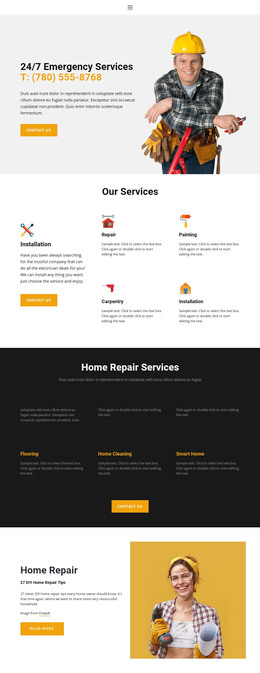
The design separates permanent service information into recognizable content areas. The opening “24/7 Emergency Services” section provides a natural page-level introduction with a worker photograph, phone contact, and contact button. It is followed by a compact overview of installation, repair, painting, and carpentry, then a darker six-item Home Repair Services section covering painting, plumbing, remodeling, flooring, home cleaning, and smart home. This division gives a WordPress-oriented project several related but distinct subjects to organize around the same visual direction.
The page also includes content with a more editorial role. The “27 DIY Home Repair Tips” feature pairs article-style copy with a repair photograph and read-more action, creating a separate information path from the service catalogue. Three testimonial cards provide repeated customer-focused content, while the roof repair section groups damaged flashing, worn sealant, quality products, and metal roofing with photographic examples. These areas can support different kinds of page content without claiming that specific posts, categories, or blog structures already exist in the template.
Primary navigation links for Home, About, and Contact, together with the repeated appointment prompts and dark footer, provide shared site regions around those content areas. A WordPress project could therefore preserve the page’s service identity while organizing permanent service information, article-like material, testimonials, and contact-oriented sections according to its own editorial needs. The design’s value lies in the relationships already visible between content subjects, not in a forced CMS-specific workflow.
Customize with Nicepage
Open this ready-made template in the WordPress Website Builder and customize it visually in the Nicepage editor. Replace demo content, edit page sections, and adapt the design to your project without rebuilding the template from scratch.
Manage and Edit This Theme in WordPress
Customize and Install the WordPress Theme
Start with this ready-made theme instead of building the WordPress design from scratch. Customize its layout, content, typography, images, sections, and other design elements visually in Nicepage editor, then export and install the WordPress Theme, Plugin, and Pages on your WordPress site. The Nicepage WordPress Plugin lets you continue working with the site after installation.
Edit the Theme Directly in WordPress
After installation, you can edit the WordPress Theme directly in WordPress with the Nicepage WordPress Plugin. Use Site Style to customize site Colors, Fonts, Header, Footer, Blog, and Post Page Templates while working within your WordPress website.
Edit WordPress Pages Visually
Use the Nicepage WordPress Plugin to edit page content directly from the WordPress admin area. Open a WordPress Page with Nicepage and visually change its text, images, sections, and other page elements while continuing to manage the Page through WordPress.
WordPress Content and Theme Integration
Use the customized theme with WordPress Pages, Posts, Blog and Post Templates, menus, widgets, and other CMS-managed content. Shared theme elements such as Colors, Fonts, Header, Footer, Blog, and Post Page Templates can be managed as part of the overall site design, while WordPress provides the CMS environment for managing site content.
This workflow combines a ready-made WordPress Theme with visual customization, direct theme editing in WordPress, and continued content management through the Nicepage WordPress Plugin.