Build your dream industrial WordPress Theme



Edit Template Offline
2. Create new page and search for id 12341
Edit Template Online
Create Awesome Websites


Free Nicepage Builder
Keywords
Service pages and recurring news can share one construction style
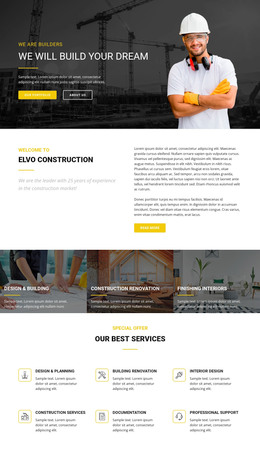
The six detailed service areas provide clear page-oriented content for a WordPress project: design and planning, building renovation, interior design, construction services, documentation, and professional support. The three image-backed panels can act as the visual overview of those areas, while the longer service descriptions or future page content can remain connected to the same design direction. This relationship is more specific than simply applying a CMS label to the template.
The eight-image project showcase and three testimonial profiles support recurring content with different publishing roles. Projects can represent a portfolio of completed work, while testimonials can present selected customer statements and roles after their demo status has been reviewed. The three news previews create a separate editorial pattern with images, titles, metadata, summaries, and read-more links. That area can accommodate regularly updated content without changing the permanent service and company sections.
The team highlight, four-step planning-to-finish process, and shared brand band add reusable site context around those content areas. A WordPress-managed interpretation can therefore keep permanent pages, project material, testimonials, and news within one coordinated visual system. WordPress Pages and Posts are a possible bridge where the content model genuinely fits, but the existing template does not by itself prove that those structures are already populated.
Customize with Nicepage
Open this ready-made template in the WordPress Website Builder and customize it visually in the Nicepage editor. Replace demo content, edit page sections, and adapt the design to your project without rebuilding the template from scratch.
Manage and Edit This Theme in WordPress
Customize and Install the WordPress Theme
Start with this ready-made theme instead of building the WordPress design from scratch. Customize its layout, content, typography, images, sections, and other design elements visually in Nicepage editor, then export and install the WordPress Theme, Plugin, and Pages on your WordPress site. The Nicepage WordPress Plugin lets you continue working with the site after installation.
Edit the Theme Directly in WordPress
After installation, you can edit the WordPress Theme directly in WordPress with the Nicepage WordPress Plugin. Use Site Style to customize site Colors, Fonts, Header, Footer, Blog, and Post Page Templates while working within your WordPress website.
Edit WordPress Pages Visually
Use the Nicepage WordPress Plugin to edit page content directly from the WordPress admin area. Open a WordPress Page with Nicepage and visually change its text, images, sections, and other page elements while continuing to manage the Page through WordPress.
WordPress Content and Theme Integration
Use the customized theme with WordPress Pages, Posts, Blog and Post Templates, menus, widgets, and other CMS-managed content. Shared theme elements such as Colors, Fonts, Header, Footer, Blog, and Post Page Templates can be managed as part of the overall site design, while WordPress provides the CMS environment for managing site content.
This workflow combines a ready-made WordPress Theme with visual customization, direct theme editing in WordPress, and continued content management through the Nicepage WordPress Plugin.