Quality solar panels WordPress Theme


Edit Template Offline
2. Create new page and search for id 6011124
Edit Template Online
Create Awesome Websites


Free Nicepage Builder
Keywords
Profile Content Gives the Theme a Clear Page Structure
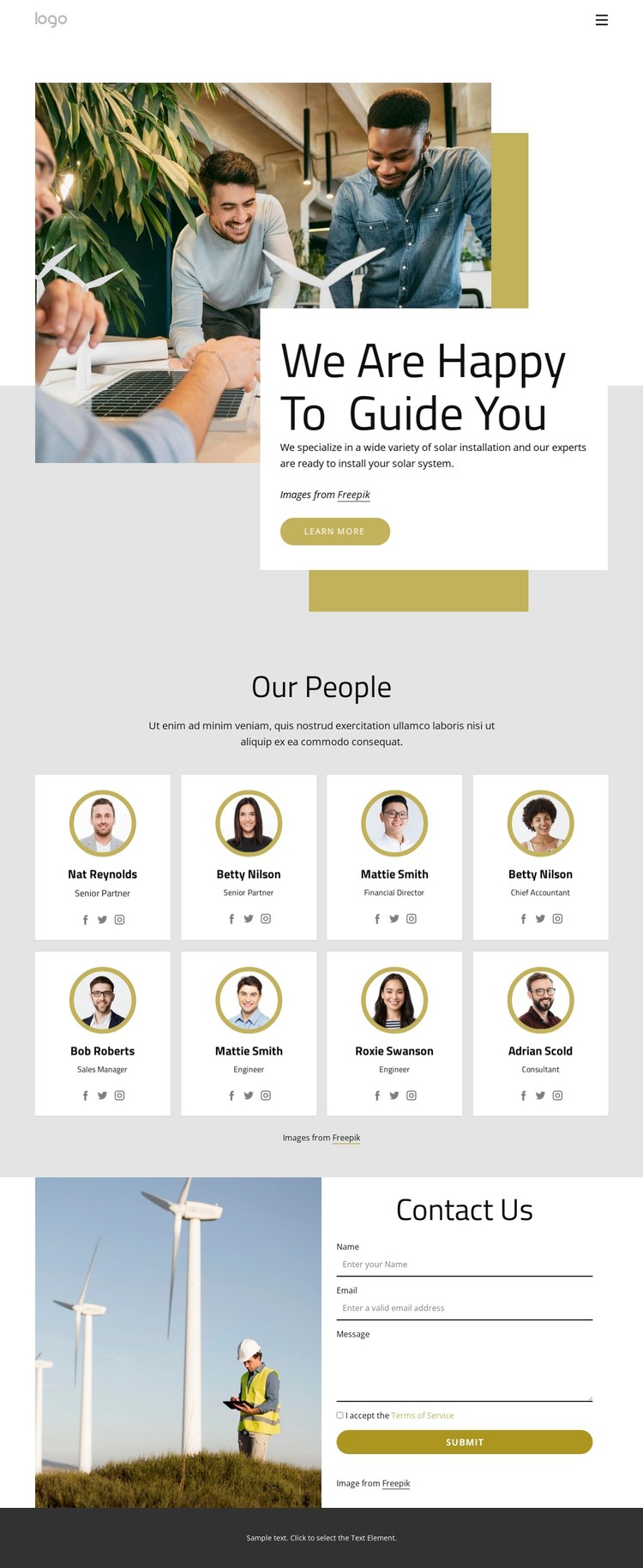
The page-oriented content is led by a team introduction rather than by an unsupported blog or product catalog. A large photograph establishes the solar installation setting, and the overlapping white panel carries “We Are Happy To Guide You,” descriptive text, and a Learn more button. This opening can function as permanent introductory content, giving a WordPress-managed project a clear page-level entry before visitors reach the staff information.
The “Our People” area is especially suitable for organizing recurring profile content. Eight cards repeat the same relationship between circular portrait, name, role label, and social link, making the section readable as a coordinated group. The roles shown in the design are structural evidence for a team directory, not claims about a verified company roster. In a WordPress-oriented project, this distinction leaves room to replace the demo content with the organization’s own people while retaining the card pattern and the solar visual context.
The navigation labels Home, Our Team, Our Projects, and Landing point toward several kinds of page content that can share the same theme direction. The contact section adds a permanent inquiry area with a renewable-energy photograph and name, email, and message fields, followed by a Submit button. Unlike a generic CMS description, the useful relationship here is between page content and shared presentation: team information, project-related navigation, imagery, and contact content can remain visually connected around the same solar installation identity.
Customize with Nicepage
Open this ready-made template in the WordPress Website Builder and customize it visually in the Nicepage editor. Replace demo content, edit page sections, and adapt the design to your project without rebuilding the template from scratch.
Manage and Edit This Theme in WordPress
Customize and Install the WordPress Theme
Start with this ready-made theme instead of building the WordPress design from scratch. Customize its layout, content, typography, images, sections, and other design elements visually in Nicepage editor, then export and install the WordPress Theme, Plugin, and Pages on your WordPress site. The Nicepage WordPress Plugin lets you continue working with the site after installation.
Edit the Theme Directly in WordPress
After installation, you can edit the WordPress Theme directly in WordPress with the Nicepage WordPress Plugin. Use Site Style to customize site Colors, Fonts, Header, Footer, Blog, and Post Page Templates while working within your WordPress website.
Edit WordPress Pages Visually
Use the Nicepage WordPress Plugin to edit page content directly from the WordPress admin area. Open a WordPress Page with Nicepage and visually change its text, images, sections, and other page elements while continuing to manage the Page through WordPress.
WordPress Content and Theme Integration
Use the customized theme with WordPress Pages, Posts, Blog and Post Templates, menus, widgets, and other CMS-managed content. Shared theme elements such as Colors, Fonts, Header, Footer, Blog, and Post Page Templates can be managed as part of the overall site design, while WordPress provides the CMS environment for managing site content.
This workflow combines a ready-made WordPress Theme with visual customization, direct theme editing in WordPress, and continued content management through the Nicepage WordPress Plugin.