Hard roads of industiral WordPress Theme


Edit Template Offline
2. Create new page and search for id 17580
Edit Template Online
Create Awesome Websites


Free Nicepage Builder
Keywords
Service Pages and Repeated Company Content Fit the Logistics Theme
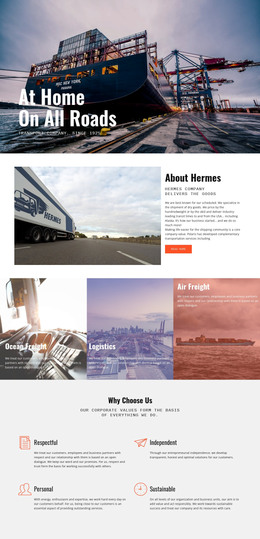
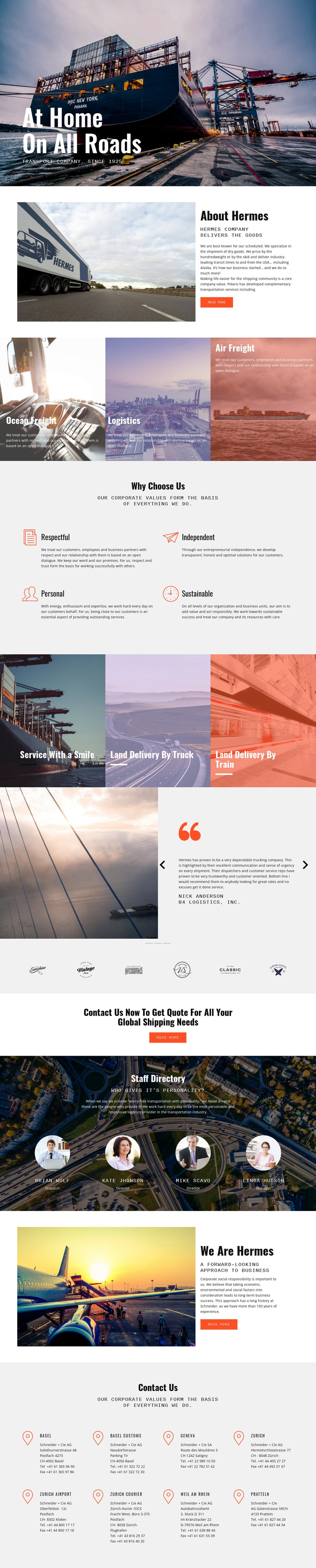
The three service tiles provide clear page-oriented content around Ocean Freight, Logistics, and Air Freight. The separate truck and train delivery panels add related transport topics that could be expanded into additional informational content while preserving the same visual direction. This relationship is useful for a WordPress-oriented theme because the page is not limited to one abstract company statement; it already separates several subjects that a growing logistics site may need to publish and maintain.
The four values beneath “Why Choose Us” work differently from the service areas. They express company principles, while the three testimonial entries provide customer-facing proof and the four staff profiles present people and roles. The two About Hermes sections can support permanent company information, and the partner-logo strip adds a compact association-oriented block. Keeping these content types visually related while giving them different roles creates a practical theme structure rather than a collection of unrelated cards.
The quote callout and office section add a strong path from information to contact. Location content names Basel, Geneva, Zurich, Weil am Rhein, and Pratteln, with Zurich Airport and Zurich Courier also visible in the office list. Those page areas can remain part of the theme’s permanent company content as the project adds regularly updated material around them. The design therefore suits a WordPress theme interpretation centered on service pages, organizational information, proof, people, and regional contact content.
Customize with Nicepage
Open this ready-made template in the WordPress Website Builder and customize it visually in the Nicepage editor. Replace demo content, edit page sections, and adapt the design to your project without rebuilding the template from scratch.
Manage and Edit This Theme in WordPress
Customize and Install the WordPress Theme
Start with this ready-made theme instead of building the WordPress design from scratch. Customize its layout, content, typography, images, sections, and other design elements visually in Nicepage editor, then export and install the WordPress Theme, Plugin, and Pages on your WordPress site. The Nicepage WordPress Plugin lets you continue working with the site after installation.
Edit the Theme Directly in WordPress
After installation, you can edit the WordPress Theme directly in WordPress with the Nicepage WordPress Plugin. Use Site Style to customize site Colors, Fonts, Header, Footer, Blog, and Post Page Templates while working within your WordPress website.
Edit WordPress Pages Visually
Use the Nicepage WordPress Plugin to edit page content directly from the WordPress admin area. Open a WordPress Page with Nicepage and visually change its text, images, sections, and other page elements while continuing to manage the Page through WordPress.
WordPress Content and Theme Integration
Use the customized theme with WordPress Pages, Posts, Blog and Post Templates, menus, widgets, and other CMS-managed content. Shared theme elements such as Colors, Fonts, Header, Footer, Blog, and Post Page Templates can be managed as part of the overall site design, while WordPress provides the CMS environment for managing site content.
This workflow combines a ready-made WordPress Theme with visual customization, direct theme editing in WordPress, and continued content management through the Nicepage WordPress Plugin.