Industrial Mining Company WordPress Theme


Edit Template Offline
2. Create new page and search for id 6624416
Edit Template Online
Create Awesome Websites


Free Nicepage Builder
Keywords
Project and Service Content Can Continue Through a WordPress Theme
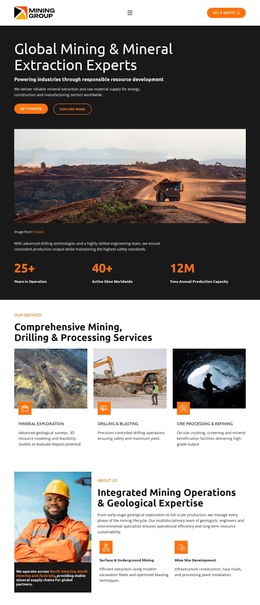
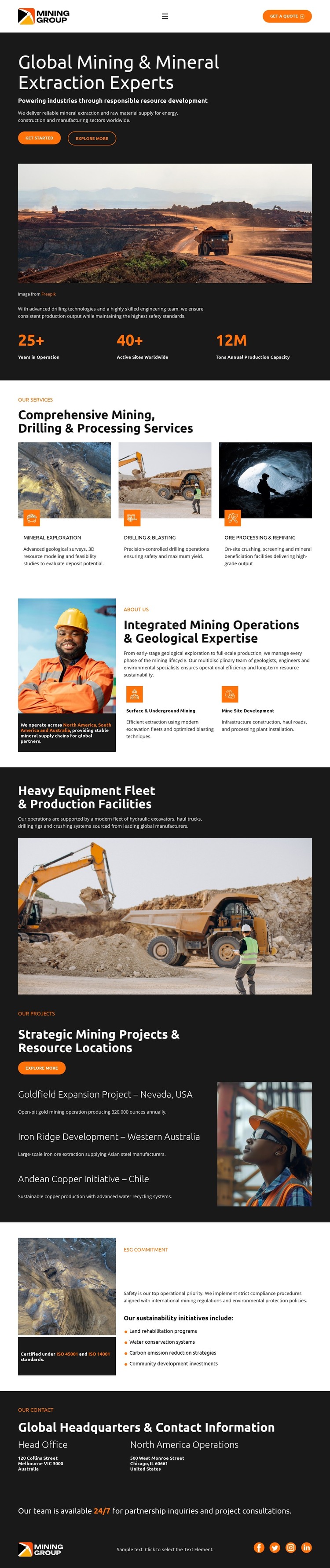
The service cards give the design a natural page-content foundation. Mineral exploration, drilling and blasting, and ore processing and refining appear as parallel topics, while the operations section adds mining and geological expertise with surface and underground mining and mine site development. In a WordPress-managed project, these areas can be interpreted as durable company content that remains connected to the same visual direction rather than as isolated promotional fragments.
The project list provides a second content relationship. Goldfield Expansion Project in Nevada, Iron Ridge Development in Western Australia, and Andean Copper Initiative in Chile are displayed as recurring project items with location context and supporting descriptions. That structure can accommodate a site where project information grows or changes, while the equipment and production section supplies a stable resource overview. The ESG section offers another page-oriented subject, bringing operational safety, water conservation, carbon reduction, and community investment into the same company story.
The closing office columns and consultation statement complete the permanent company information already visible in the design. If the site later adds regularly updated articles or announcements, those editorial items could sit around this established service, project, responsibility, and contact framework without changing its core character. The theme interpretation is based on the page’s actual content areas; it does not assume that blog posts or WordPress-specific structures are already present.
Customize with Nicepage
Open this ready-made template in the WordPress Website Builder and customize it visually in the Nicepage editor. Replace demo content, edit page sections, and adapt the design to your project without rebuilding the template from scratch.
Manage and Edit This Theme in WordPress
Customize and Install the WordPress Theme
Start with this ready-made theme instead of building the WordPress design from scratch. Customize its layout, content, typography, images, sections, and other design elements visually in Nicepage editor, then export and install the WordPress Theme, Plugin, and Pages on your WordPress site. The Nicepage WordPress Plugin lets you continue working with the site after installation.
Edit the Theme Directly in WordPress
After installation, you can edit the WordPress Theme directly in WordPress with the Nicepage WordPress Plugin. Use Site Style to customize site Colors, Fonts, Header, Footer, Blog, and Post Page Templates while working within your WordPress website.
Edit WordPress Pages Visually
Use the Nicepage WordPress Plugin to edit page content directly from the WordPress admin area. Open a WordPress Page with Nicepage and visually change its text, images, sections, and other page elements while continuing to manage the Page through WordPress.
WordPress Content and Theme Integration
Use the customized theme with WordPress Pages, Posts, Blog and Post Templates, menus, widgets, and other CMS-managed content. Shared theme elements such as Colors, Fonts, Header, Footer, Blog, and Post Page Templates can be managed as part of the overall site design, while WordPress provides the CMS environment for managing site content.
This workflow combines a ready-made WordPress Theme with visual customization, direct theme editing in WordPress, and continued content management through the Nicepage WordPress Plugin.