Building constructions WordPress Theme


Edit Template Offline
2. Create new page and search for id 18217
Edit Template Online
Create Awesome Websites


Free Nicepage Builder
Keywords
Permanent company content leaves room for future WordPress publishing
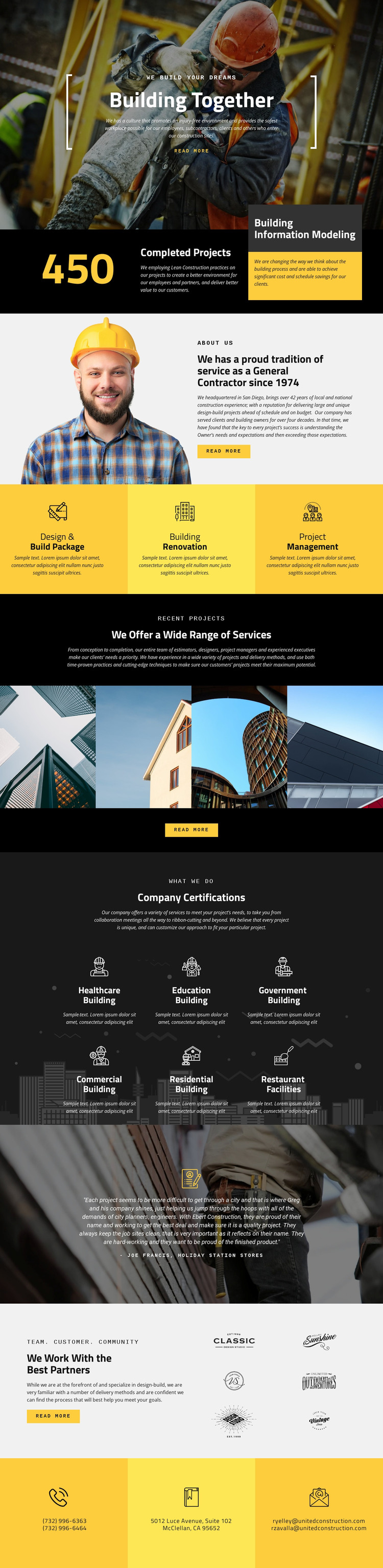
The design separates lasting company information into recognizable page areas. The company overview and the three service panels can function as permanent content describing capabilities, while the four-image Recent Projects section provides a visual area for presenting completed work. The six building categories add another useful content relationship: Healthcare, Education, Government, Commercial, Residential, and Restaurant Facilities can frame project or sector information without changing the page’s core visual direction.
The testimonial and partner sections contribute different kinds of supporting content. The testimonial offers a longer customer-oriented statement, while the six partner marks present collaboration visually. These areas can sit alongside page content in a WordPress-managed construction site, with the shared header and final contact panels maintaining continuity between company information and visitor response. The three contact channels—phone, address, and email—also remain easy to identify as stable site content.
If the project later adds regularly updated construction news or announcements, that material could be interpreted alongside the existing service, project, and partner areas. The template analysis does not verify WordPress Posts, blog layouts, or categories already being present, so those are not treated as existing components here. Its value as a WordPress theme comes from the clear division between enduring page content, visual project material, supporting proof, and contact information.
Customize with Nicepage
Open this ready-made template in the WordPress Website Builder and customize it visually in the Nicepage editor. Replace demo content, edit page sections, and adapt the design to your project without rebuilding the template from scratch.
Manage and Edit This Theme in WordPress
Customize and Install the WordPress Theme
Start with this ready-made theme instead of building the WordPress design from scratch. Customize its layout, content, typography, images, sections, and other design elements visually in Nicepage editor, then export and install the WordPress Theme, Plugin, and Pages on your WordPress site. The Nicepage WordPress Plugin lets you continue working with the site after installation.
Edit the Theme Directly in WordPress
After installation, you can edit the WordPress Theme directly in WordPress with the Nicepage WordPress Plugin. Use Site Style to customize site Colors, Fonts, Header, Footer, Blog, and Post Page Templates while working within your WordPress website.
Edit WordPress Pages Visually
Use the Nicepage WordPress Plugin to edit page content directly from the WordPress admin area. Open a WordPress Page with Nicepage and visually change its text, images, sections, and other page elements while continuing to manage the Page through WordPress.
WordPress Content and Theme Integration
Use the customized theme with WordPress Pages, Posts, Blog and Post Templates, menus, widgets, and other CMS-managed content. Shared theme elements such as Colors, Fonts, Header, Footer, Blog, and Post Page Templates can be managed as part of the overall site design, while WordPress provides the CMS environment for managing site content.
This workflow combines a ready-made WordPress Theme with visual customization, direct theme editing in WordPress, and continued content management through the Nicepage WordPress Plugin.