Modern Fire Department WordPress Theme


Edit Template Offline
2. Create new page and search for id 6664207
Edit Template Online
Create Awesome Websites


Free Nicepage Builder
Keywords
Service Pages and Capability Content Can Share One Emergency-Response Direction
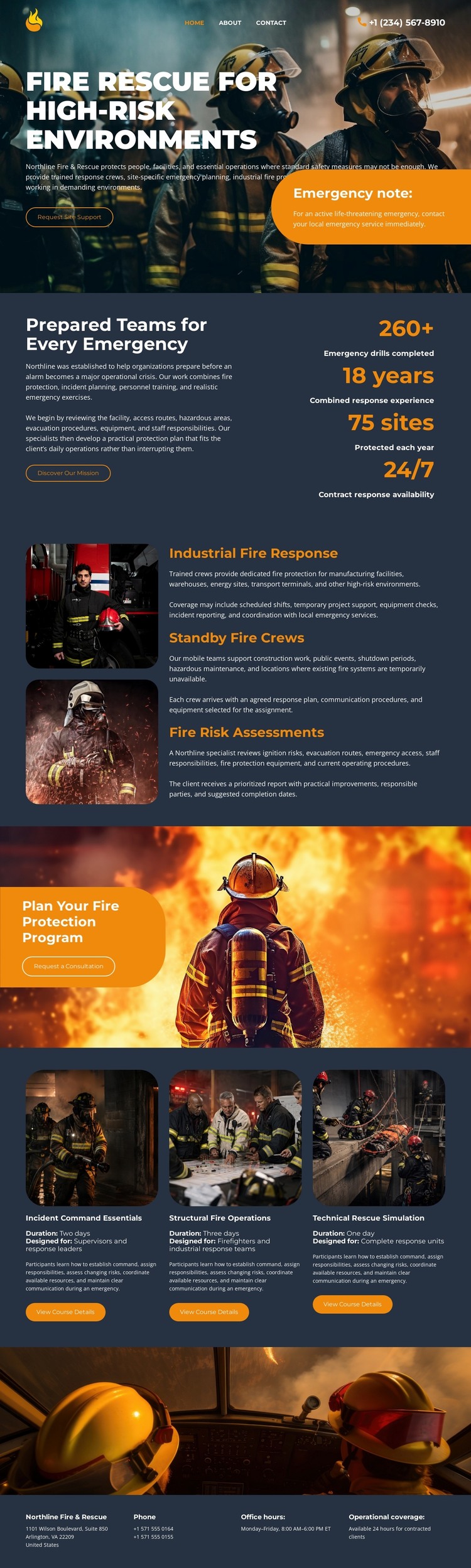
The page’s strongest WordPress-oriented content relationship is between its permanent service information and its repeated capability content. Industrial fire response, standby fire crews, and fire risk assessments appear as three distinct service rows, each with an image-and-text treatment. That makes them useful starting points for page-oriented fire-safety content, while preserving a shared visual direction across related subjects. The template analysis does not verify WordPress Posts, categories, or blog structures, so those should not be treated as existing parts of the design.
The three capability cards create a second editorial grouping. Industrial Command Essentials, Structural Fire Operations, and Tactical Rescue Simulation are parallel topics that can support supporting descriptions, training information, or operational explanations while remaining visually connected. The overview section provides another reusable content role by placing explanatory text beside four displayed metrics. Those values are sample structural content, not verified claims, but the layout clearly accommodates compact operational summaries.
The consultation panel and closing contact area give the page a durable communication framework. A protection-program request can remain distinct from service descriptions, while phone, office-hours, and operational-coverage labels provide a final information zone. In a WordPress-managed project, these page areas can form the stable content layer around which regularly updated emergency-services material may later be organized, without changing the core identity of the theme.
Customize with Nicepage
Open this ready-made template in the WordPress Website Builder and customize it visually in the Nicepage editor. Replace demo content, edit page sections, and adapt the design to your project without rebuilding the template from scratch.
Manage and Edit This Theme in WordPress
Customize and Install the WordPress Theme
Start with this ready-made theme instead of building the WordPress design from scratch. Customize its layout, content, typography, images, sections, and other design elements visually in Nicepage editor, then export and install the WordPress Theme, Plugin, and Pages on your WordPress site. The Nicepage WordPress Plugin lets you continue working with the site after installation.
Edit the Theme Directly in WordPress
After installation, you can edit the WordPress Theme directly in WordPress with the Nicepage WordPress Plugin. Use Site Style to customize site Colors, Fonts, Header, Footer, Blog, and Post Page Templates while working within your WordPress website.
Edit WordPress Pages Visually
Use the Nicepage WordPress Plugin to edit page content directly from the WordPress admin area. Open a WordPress Page with Nicepage and visually change its text, images, sections, and other page elements while continuing to manage the Page through WordPress.
WordPress Content and Theme Integration
Use the customized theme with WordPress Pages, Posts, Blog and Post Templates, menus, widgets, and other CMS-managed content. Shared theme elements such as Colors, Fonts, Header, Footer, Blog, and Post Page Templates can be managed as part of the overall site design, while WordPress provides the CMS environment for managing site content.
This workflow combines a ready-made WordPress Theme with visual customization, direct theme editing in WordPress, and continued content management through the Nicepage WordPress Plugin.