Peonies are fashionable WordPress Theme


Editorial Text and Floral Imagery Form Stable Page Content
The left column reads as a compact editorial content area rather than a collection of disconnected text elements. “Flower Trends” establishes the subject, the first paragraph introduces the Spring/Summer 2019 fashion-show context, and the lighter secondary paragraph extends that discussion toward designers’ views of women. This hierarchy gives the section a natural progression from headline to explanation, while the three social links below the copy offer a separate supporting detail that can remain visually subordinate to the article-like text.
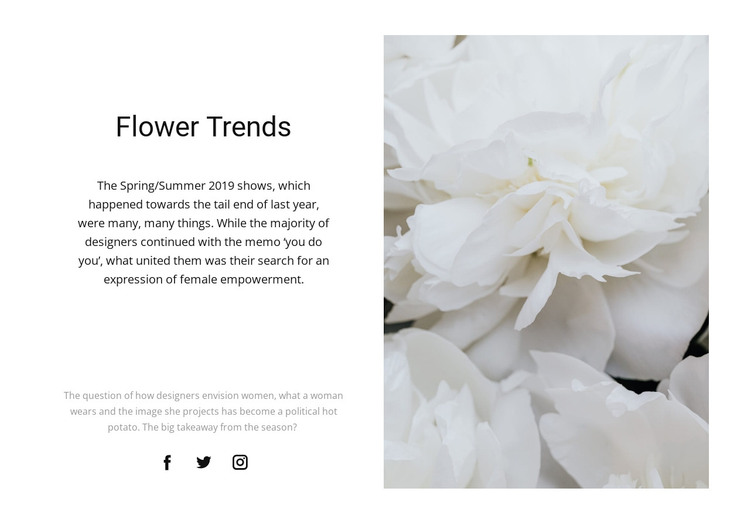
The tall close-up image of white flowers occupies the right side of the two-column composition and balances the text without competing with its reading order. Its vertical scale contrasts with the open white space around the centered text, while the black and light-gray typography maintains a restrained editorial tone. Because the content is grouped into one heading, two paragraphs, one image, and a small link set, the block can function as a recognizable page-content region inside a broader WordPress-managed site.
This interpretation suits a stable fashion or beauty feature that needs visual continuity alongside surrounding content. The block can remain a reusable section on a page while other CMS-managed areas handle different editorial subjects. Its existing structure provides the visual presentation; the wider WordPress project supplies the surrounding page and publishing context.
Customize with Nicepage
Open this ready-made template in the WordPress Website Builder and customize it visually in the Nicepage editor. Replace demo content, edit page sections, and adapt the design to your project without rebuilding the template from scratch.
Edit Template Offline
2. Create a new page or select existing
3. Click Add new block, search for id 204324 and click enter
Edit Template Online
Create Awesome Websites


Free Nicepage Builder
Keywords
Manage and Edit This Theme in WordPress
Customize and Install the WordPress Theme
Start with this ready-made theme instead of building the WordPress design from scratch. Customize its layout, content, typography, images, sections, and other design elements visually in Nicepage editor, then export and install the WordPress Theme, Plugin, and Pages on your WordPress site. The Nicepage WordPress Plugin lets you continue working with the site after installation.
Edit the Theme Directly in WordPress
After installation, you can edit the WordPress Theme directly in WordPress with the Nicepage WordPress Plugin. Use Site Style to customize site Colors, Fonts, Header, Footer, Blog, and Post Page Templates while working within your WordPress website.
Edit WordPress Pages Visually
Use the Nicepage WordPress Plugin to edit page content directly from the WordPress admin area. Open a WordPress Page with Nicepage and visually change its text, images, sections, and other page elements while continuing to manage the Page through WordPress.
WordPress Content and Theme Integration
Use the customized theme with WordPress Pages, Posts, Blog and Post Templates, menus, widgets, and other CMS-managed content. Shared theme elements such as Colors, Fonts, Header, Footer, Blog, and Post Page Templates can be managed as part of the overall site design, while WordPress provides the CMS environment for managing site content.
This workflow combines a ready-made WordPress Theme with visual customization, direct theme editing in WordPress, and continued content management through the Nicepage WordPress Plugin.