
Atelier of modern fashion WordPress Theme


Edit Template Offline
2. Create new page and search for id 38010
Edit Template Online
Create Awesome Websites


Free Nicepage Builder
Keywords
Editorial Collections and Product Cards Suit Managed Fashion Content
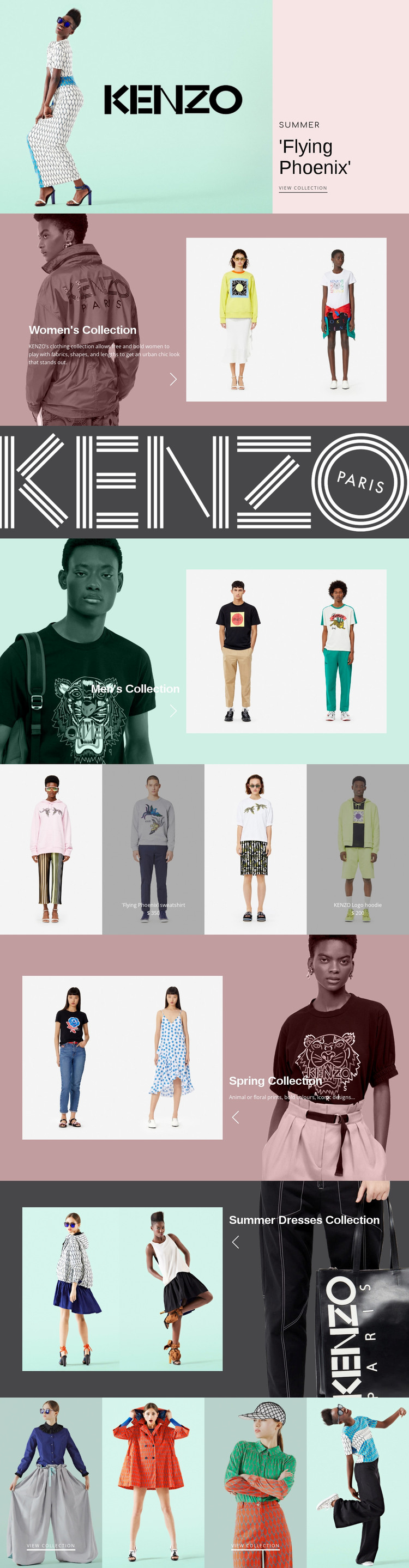
The page’s content areas map naturally to a WordPress-oriented fashion environment because they distinguish broad collection information from selected apparel content. The Flying Phoenix introduction can represent a seasonal editorial entry point, while the Women’s Collection and Men’s Collection sections provide separate page-oriented themes supported by model photography. Their paired text and image arrangements allow collection descriptions to remain visually connected to the clothing they present.
The four-panel apparel row offers a different content relationship. It groups selected merchandise into repeated visual cards, including the Flying Phoenix sweatshirt and KENZO Logo hoodie with displayed prices. These values are sample content rather than verified live offers, but the structure demonstrates how product-oriented information can sit alongside more permanent collection presentation. The KENZO wordmark band and repeated image treatment help keep these areas within one theme direction.
Spring Collection and Summer Dresses Collection create additional seasonal publishing areas, while the final four-tile gallery can support further visual discovery through selected view collection links. In a WordPress project, the design can therefore accommodate permanent collection pages and regularly refreshed fashion content without changing its core character. The interpretation is based on the verified page areas themselves; it does not assume that WordPress Posts, categories, or product records already exist. The main benefit is a clear visual system for organizing editorial collections, featured apparel, and seasonal imagery.
Customize with Nicepage
Open this ready-made template in the WordPress Website Builder and customize it visually in the Nicepage editor. Replace demo content, edit page sections, and adapt the design to your project without rebuilding the template from scratch.
Manage and Edit This Theme in WordPress
Customize and Install the WordPress Theme
Start with this ready-made theme instead of building the WordPress design from scratch. Customize its layout, content, typography, images, sections, and other design elements visually in Nicepage editor, then export and install the WordPress Theme, Plugin, and Pages on your WordPress site. The Nicepage WordPress Plugin lets you continue working with the site after installation.
Edit the Theme Directly in WordPress
After installation, you can edit the WordPress Theme directly in WordPress with the Nicepage WordPress Plugin. Use Site Style to customize site Colors, Fonts, Header, Footer, Blog, and Post Page Templates while working within your WordPress website.
Edit WordPress Pages Visually
Use the Nicepage WordPress Plugin to edit page content directly from the WordPress admin area. Open a WordPress Page with Nicepage and visually change its text, images, sections, and other page elements while continuing to manage the Page through WordPress.
WordPress Content and Theme Integration
Use the customized theme with WordPress Pages, Posts, Blog and Post Templates, menus, widgets, and other CMS-managed content. Shared theme elements such as Colors, Fonts, Header, Footer, Blog, and Post Page Templates can be managed as part of the overall site design, while WordPress provides the CMS environment for managing site content.
This workflow combines a ready-made WordPress Theme with visual customization, direct theme editing in WordPress, and continued content management through the Nicepage WordPress Plugin.





















