Spa & Massage WordPress Theme


Spa and Skincare Messages Form Reusable Page Content
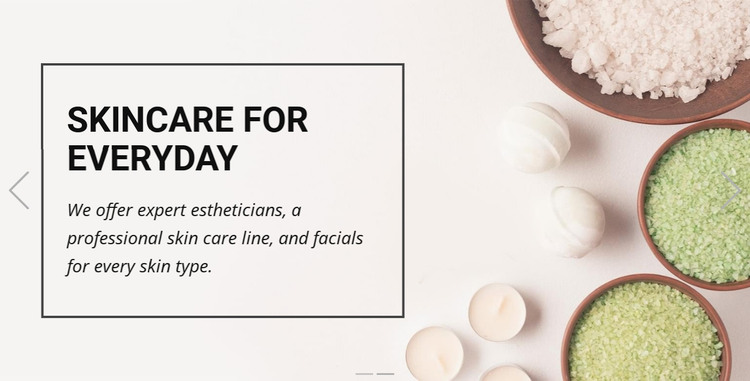
The block reads as a focused content area rather than time-sensitive editorial material. “Spa & Massage” establishes a broad service theme, while “Skincare for everyday” provides more specific page content through its reference to expert estheticians, a professional skincare line, and facials for every skin type. The full-width images and consistent bordered panels keep those two messages visually connected, allowing the section to remain recognizable when placed within a WordPress-managed services or introduction page.
The carousel controls and indicators support the block’s own presentation, while the wider WordPress project can provide deeper service descriptions, booking information, articles, or contact content around it. This separation is useful when permanent page content needs to retain a designed visual pattern without making the section responsible for the entire site structure. The longer skincare copy may also need careful content editing if the page owner changes the wording, because its panel must continue to balance readable text with the background image. Nicepage supports WordPress-oriented page workflows through its WordPress Theme, Plugin, and Pages workflow, while this block remains one reusable content section within the resulting project.
Customize with Nicepage
Open this ready-made template in the WordPress Website Builder and customize it visually in the Nicepage editor. Replace demo content, edit page sections, and adapt the design to your project without rebuilding the template from scratch.
Edit Template Offline
2. Create a new page or select existing
3. Click Add new block, search for id 76694 and click enter
Edit Template Online
Create Awesome Websites


Free Nicepage Builder
Keywords
Manage and Edit This Theme in WordPress
Customize and Install the WordPress Theme
Start with this ready-made theme instead of building the WordPress design from scratch. Customize its layout, content, typography, images, sections, and other design elements visually in Nicepage editor, then export and install the WordPress Theme, Plugin, and Pages on your WordPress site. The Nicepage WordPress Plugin lets you continue working with the site after installation.
Edit the Theme Directly in WordPress
After installation, you can edit the WordPress Theme directly in WordPress with the Nicepage WordPress Plugin. Use Site Style to customize site Colors, Fonts, Header, Footer, Blog, and Post Page Templates while working within your WordPress website.
Edit WordPress Pages Visually
Use the Nicepage WordPress Plugin to edit page content directly from the WordPress admin area. Open a WordPress Page with Nicepage and visually change its text, images, sections, and other page elements while continuing to manage the Page through WordPress.
WordPress Content and Theme Integration
Use the customized theme with WordPress Pages, Posts, Blog and Post Templates, menus, widgets, and other CMS-managed content. Shared theme elements such as Colors, Fonts, Header, Footer, Blog, and Post Page Templates can be managed as part of the overall site design, while WordPress provides the CMS environment for managing site content.
This workflow combines a ready-made WordPress Theme with visual customization, direct theme editing in WordPress, and continued content management through the Nicepage WordPress Plugin.