The Bakery WordPress Theme


Edit Template Offline
2. Create new page and search for id 19182
Edit Template Online
Create Awesome Websites


Free Nicepage Builder
Keywords
Permanent Bakery Content and Recurring Dining Information Share One Theme
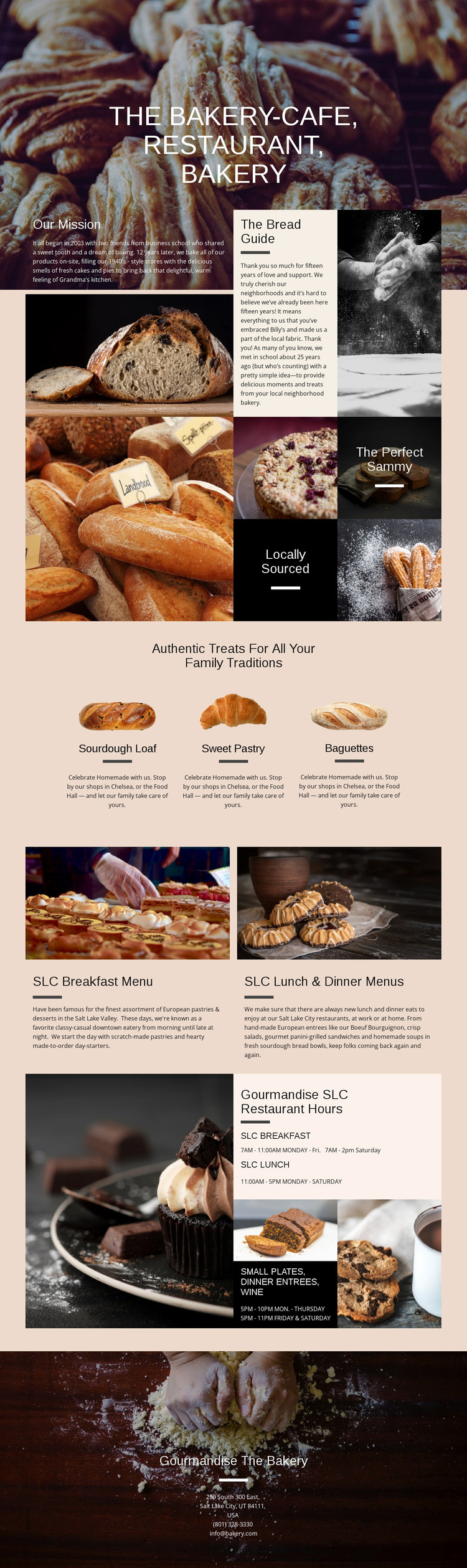
The page separates relatively permanent bakery information from recurring dining content in a way that suits a WordPress-oriented content structure. Our Mission and The Bread Guide can represent stable page material that explains the bakery’s background, while the three product presentations organize core offerings around Sourdough Loaf, Sweet Pastry, and Baguettes. Their repeated visual treatment helps these content areas remain recognizable if the wording or images change over time.
The breakfast and lunch-and-dinner panels provide a different type of content relationship. They group meal information with supporting photography, making the restaurant side of the design distinct from the bakery product area. The hours section adds operational information, and the final contact block gathers address, telephone, and email details into a clear permanent destination. If the project later adds regularly updated announcements or editorial material, that content would need to be verified and created separately rather than assumed to exist in this template. The design’s main WordPress value is therefore its division between story, products, menus, hours, and contact content, all held together by one food-focused visual system. Nicepage’s WordPress Plugin can support direct theme editing when that CMS workflow is relevant.
Customize with Nicepage
Open this ready-made template in the WordPress Website Builder and customize it visually in the Nicepage editor. Replace demo content, edit page sections, and adapt the design to your project without rebuilding the template from scratch.
Manage and Edit This Theme in WordPress
Customize and Install the WordPress Theme
Start with this ready-made theme instead of building the WordPress design from scratch. Customize its layout, content, typography, images, sections, and other design elements visually in Nicepage editor, then export and install the WordPress Theme, Plugin, and Pages on your WordPress site. The Nicepage WordPress Plugin lets you continue working with the site after installation.
Edit the Theme Directly in WordPress
After installation, you can edit the WordPress Theme directly in WordPress with the Nicepage WordPress Plugin. Use Site Style to customize site Colors, Fonts, Header, Footer, Blog, and Post Page Templates while working within your WordPress website.
Edit WordPress Pages Visually
Use the Nicepage WordPress Plugin to edit page content directly from the WordPress admin area. Open a WordPress Page with Nicepage and visually change its text, images, sections, and other page elements while continuing to manage the Page through WordPress.
WordPress Content and Theme Integration
Use the customized theme with WordPress Pages, Posts, Blog and Post Templates, menus, widgets, and other CMS-managed content. Shared theme elements such as Colors, Fonts, Header, Footer, Blog, and Post Page Templates can be managed as part of the overall site design, while WordPress provides the CMS environment for managing site content.
This workflow combines a ready-made WordPress Theme with visual customization, direct theme editing in WordPress, and continued content management through the Nicepage WordPress Plugin.