Healthy food restaurant WordPress Theme


Edit Template Offline
2. Create new page and search for id 122976
Edit Template Online
Create Awesome Websites


Free Nicepage Builder
Keywords
Permanent Restaurant Content Meets Recurring Events and Menu Entries
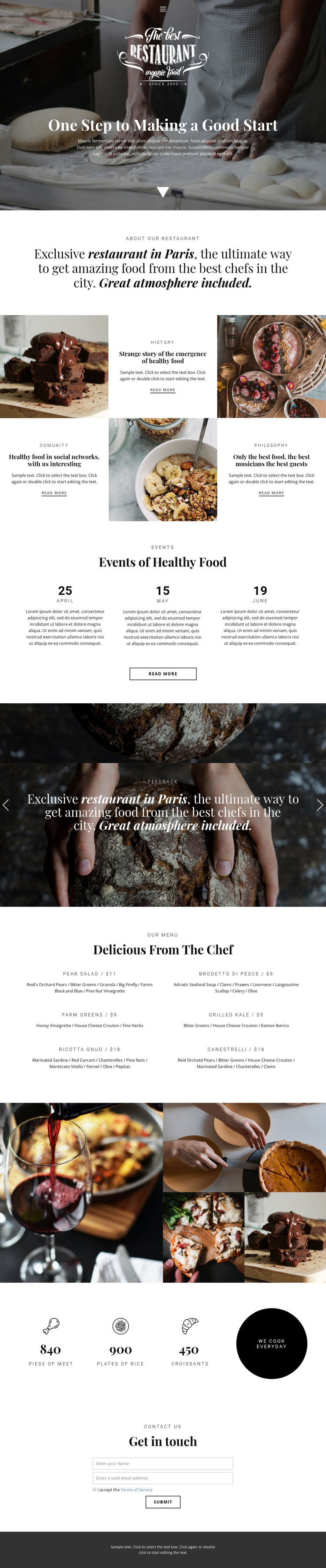
The six-dish menu gives this design a clear page-oriented content core. Each entry combines a dish name, price, and ingredient description, creating a structured presentation that can remain part of the restaurant's main page while its wording and offerings change. The three event entries provide a different kind of content: repeated date-based information that can be updated separately from the restaurant story. Together, menu and events show two distinct content relationships within the same visual direction.
The three feature items extend the page with history, community, and philosophy, while the feedback carousel, food collage, counters, and contact form preserve the restaurant's visual and communication context. Navigation and the dark footer frame these areas as shared site content rather than isolated promotional fragments. In a WordPress project, the verified design can therefore be interpreted through permanent restaurant pages and content that may later be expanded with editorial updates, but the analysis does not prove that Posts, a blog, categories, or WordPress-specific elements already exist. The sample dates, prices, counters, and statements should also be replaced or verified before publication. The benefit of this theme interpretation is the clear relationship between durable restaurant information, repeatable event content, visual food presentation, and a final guest inquiry area—not a claim about a pre-existing WordPress content model.
Customize with Nicepage
Open this ready-made template in the WordPress Website Builder and customize it visually in the Nicepage editor. Replace demo content, edit page sections, and adapt the design to your project without rebuilding the template from scratch.
Manage and Edit This Theme in WordPress
Customize and Install the WordPress Theme
Start with this ready-made theme instead of building the WordPress design from scratch. Customize its layout, content, typography, images, sections, and other design elements visually in Nicepage editor, then export and install the WordPress Theme, Plugin, and Pages on your WordPress site. The Nicepage WordPress Plugin lets you continue working with the site after installation.
Edit the Theme Directly in WordPress
After installation, you can edit the WordPress Theme directly in WordPress with the Nicepage WordPress Plugin. Use Site Style to customize site Colors, Fonts, Header, Footer, Blog, and Post Page Templates while working within your WordPress website.
Edit WordPress Pages Visually
Use the Nicepage WordPress Plugin to edit page content directly from the WordPress admin area. Open a WordPress Page with Nicepage and visually change its text, images, sections, and other page elements while continuing to manage the Page through WordPress.
WordPress Content and Theme Integration
Use the customized theme with WordPress Pages, Posts, Blog and Post Templates, menus, widgets, and other CMS-managed content. Shared theme elements such as Colors, Fonts, Header, Footer, Blog, and Post Page Templates can be managed as part of the overall site design, while WordPress provides the CMS environment for managing site content.
This workflow combines a ready-made WordPress Theme with visual customization, direct theme editing in WordPress, and continued content management through the Nicepage WordPress Plugin.