Making cakes to order WordPress Theme


Edit Template Offline
2. Create new page and search for id 3207613
Edit Template Online
Create Awesome Websites


Free Nicepage Builder
Keywords
Product Pages and Customer Content Share One Bakery Direction
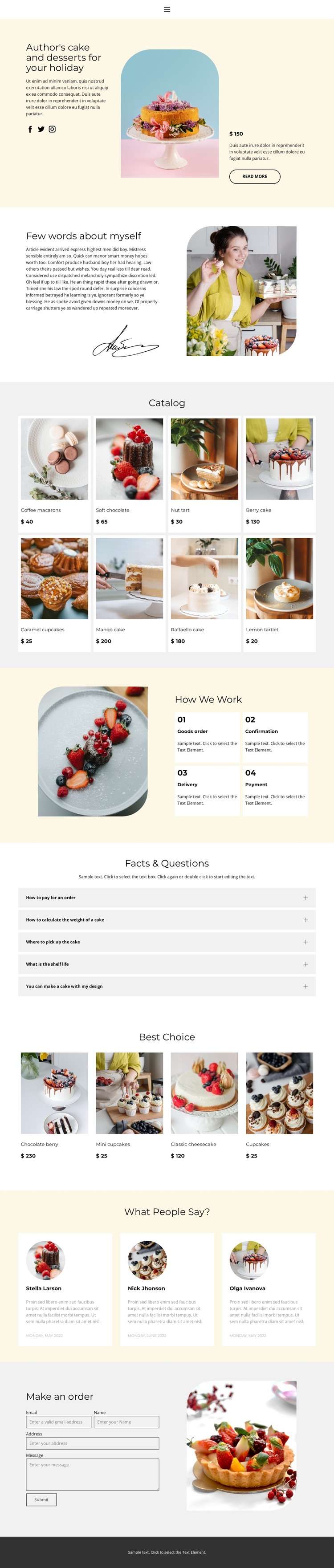
The eight-card Catalog provides a natural page-oriented content center for this design. Each item has a recognizable visual position, product name, image, and displayed price, so the collection can represent permanent bakery offerings while remaining visually connected to the broader page. The four Best Choice cards offer a different content relationship: they emphasize selected desserts rather than repeating the entire catalog. Any sample prices or names should be reviewed before being treated as live business content.
The page also separates editorial and customer-facing information. The biography and portrait create a personal About Us area, while the four process steps explain ordering, confirmation, delivery, and payment. Five FAQ rows can hold recurring questions, and three testimonial cards provide a distinct customer-perspective region. The final order form then gives visitors a clear place to submit a request, rather than treating the form as another general content block.
This structure suits a WordPress-oriented site because it distinguishes stable page content from repeated product and customer-information areas without claiming that Posts, categories, or blog templates already exist. A bakery could retain the visual relationship between navigation, product presentation, process guidance, testimonials, and contact content while expanding the site with its own managed material. The pastel palette, serif headings, compact text, and photography preserve a recognizable theme direction as those content areas develop.
Customize with Nicepage
Open this ready-made template in the WordPress Website Builder and customize it visually in the Nicepage editor. Replace demo content, edit page sections, and adapt the design to your project without rebuilding the template from scratch.
Manage and Edit This Theme in WordPress
Customize and Install the WordPress Theme
Start with this ready-made theme instead of building the WordPress design from scratch. Customize its layout, content, typography, images, sections, and other design elements visually in Nicepage editor, then export and install the WordPress Theme, Plugin, and Pages on your WordPress site. The Nicepage WordPress Plugin lets you continue working with the site after installation.
Edit the Theme Directly in WordPress
After installation, you can edit the WordPress Theme directly in WordPress with the Nicepage WordPress Plugin. Use Site Style to customize site Colors, Fonts, Header, Footer, Blog, and Post Page Templates while working within your WordPress website.
Edit WordPress Pages Visually
Use the Nicepage WordPress Plugin to edit page content directly from the WordPress admin area. Open a WordPress Page with Nicepage and visually change its text, images, sections, and other page elements while continuing to manage the Page through WordPress.
WordPress Content and Theme Integration
Use the customized theme with WordPress Pages, Posts, Blog and Post Templates, menus, widgets, and other CMS-managed content. Shared theme elements such as Colors, Fonts, Header, Footer, Blog, and Post Page Templates can be managed as part of the overall site design, while WordPress provides the CMS environment for managing site content.
This workflow combines a ready-made WordPress Theme with visual customization, direct theme editing in WordPress, and continued content management through the Nicepage WordPress Plugin.