
Fresh Grocery Delivery WordPress Theme


Edit Template Offline
2. Create new page and search for id 6651161
Edit Template Online
Create Awesome Websites


Free Nicepage Builder
Keywords
Category Cards and Editorial Sections Support Managed Grocery Content
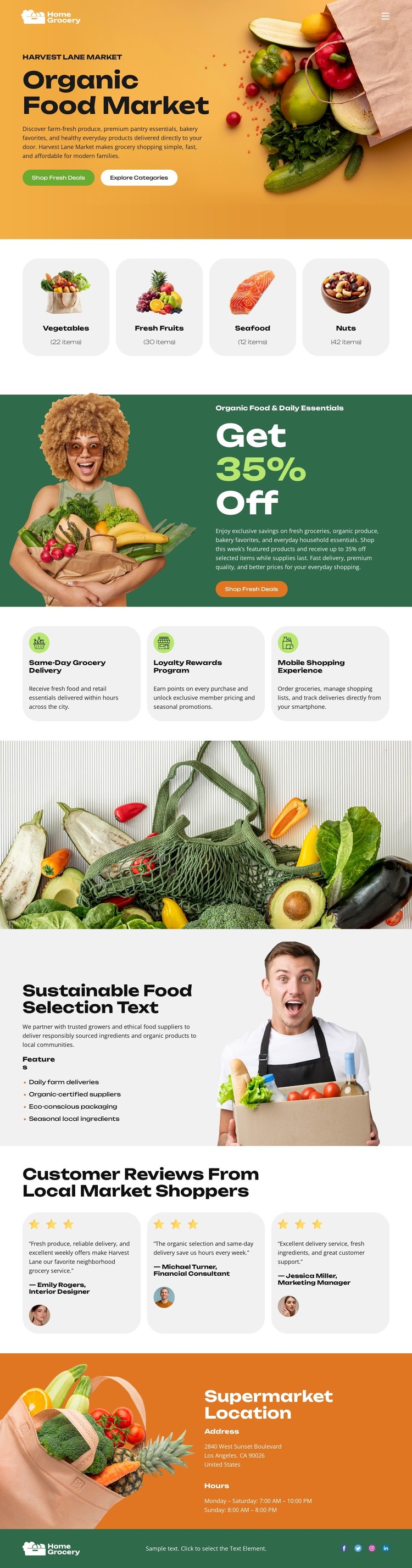
The four category cards give the design a clear page-oriented content structure for vegetables, fresh fruits, seafood, and nuts. Each group has a defined role within the Organic Food Market message, while the hero’s Shop Fresh Deals and Explore Categories actions connect the opening presentation with product discovery. This makes the design suitable for a grocery project where permanent market content needs to remain visually organized as the site develops.
The 35% promotion and the three benefit cards create a second content relationship. Delivery, loyalty rewards, and express shopping can be presented as distinct service messages alongside the store’s product direction. The sustainability section adds a longer editorial area with supporting text and feature bullets, giving the page a place for values-based content instead of limiting the theme to short retail labels. These areas can be interpreted as content sections without claiming that posts, categories, or other CMS records already exist.
The review cards and supermarket location panel provide two further content roles. Three short reviews with portraits offer a repeatable proof pattern, while the closing orange panel gathers address information, opening hours, social links, and footer content. In a WordPress-oriented project, such page content can sit alongside a wider editorial or product environment while retaining the theme’s grocery character. The design’s value lies in mapping product, promotion, service, sustainability, trust, and store-access information into one coherent content system rather than in a generic CMS promise.
Customize with Nicepage
Open this ready-made template in the WordPress Website Builder and customize it visually in the Nicepage editor. Replace demo content, edit page sections, and adapt the design to your project without rebuilding the template from scratch.
Manage and Edit This Theme in WordPress
Customize and Install the WordPress Theme
Start with this ready-made theme instead of building the WordPress design from scratch. Customize its layout, content, typography, images, sections, and other design elements visually in Nicepage editor, then export and install the WordPress Theme, Plugin, and Pages on your WordPress site. The Nicepage WordPress Plugin lets you continue working with the site after installation.
Edit the Theme Directly in WordPress
After installation, you can edit the WordPress Theme directly in WordPress with the Nicepage WordPress Plugin. Use Site Style to customize site Colors, Fonts, Header, Footer, Blog, and Post Page Templates while working within your WordPress website.
Edit WordPress Pages Visually
Use the Nicepage WordPress Plugin to edit page content directly from the WordPress admin area. Open a WordPress Page with Nicepage and visually change its text, images, sections, and other page elements while continuing to manage the Page through WordPress.
WordPress Content and Theme Integration
Use the customized theme with WordPress Pages, Posts, Blog and Post Templates, menus, widgets, and other CMS-managed content. Shared theme elements such as Colors, Fonts, Header, Footer, Blog, and Post Page Templates can be managed as part of the overall site design, while WordPress provides the CMS environment for managing site content.
This workflow combines a ready-made WordPress Theme with visual customization, direct theme editing in WordPress, and continued content management through the Nicepage WordPress Plugin.





















