The nicest beaches WordPress Theme


Named Destinations Provide Stable Travel Page Content
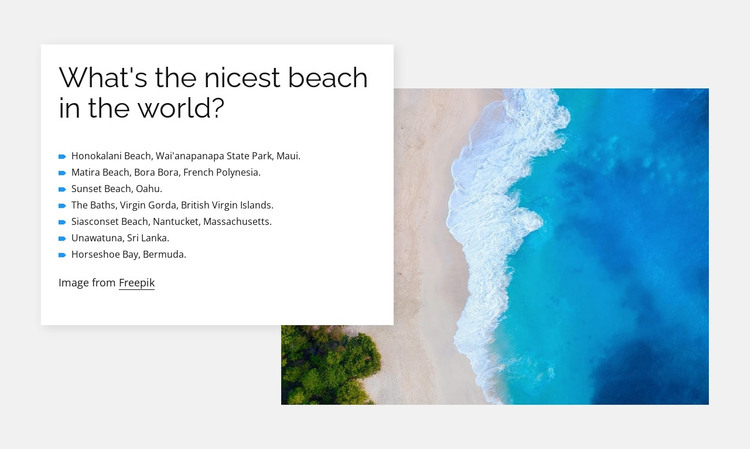
The heading and seven destination entries read as stable informational content that can fit naturally within a WordPress-managed travel page. The list names locations across Maui, Bora Bora, Oahu, the British Virgin Islands, Nantucket, Sri Lanka, and Bermuda. That spread gives the section a durable destination-focused role, while the associated locations add useful context to selected entries such as Honokalani Beach, Matira Beach, and The Baths. The content can remain a focused section without being mistaken for an entire travel site or theme.
The visual structure supports that page-content role. A white card holds the heading and compact black list text on the left, overlapping a large aerial beach image on the right. Small blue markers help separate the seven entries, and generous whitespace keeps the list readable. The light gray background frames the composition, while the image credit below the list preserves an attribution detail that belongs with the section’s presentation.
Within a WordPress-oriented project, this block could provide a stable beaches or destination area on a page while the wider site handles navigation, additional travel content, galleries, or regularly maintained material. Nicepage’s WordPress workflow can support visual page sections in a broader CMS-managed environment, but the practical value here comes first from the block’s clear, publishable travel content and its contained image-to-text arrangement.
Customize with Nicepage
Open this ready-made template in the WordPress Website Builder and customize it visually in the Nicepage editor. Replace demo content, edit page sections, and adapt the design to your project without rebuilding the template from scratch.
Edit Template Offline
2. Create a new page or select existing
3. Click Add new block, search for id 803102 and click enter
Edit Template Online
Create Awesome Websites


Free Nicepage Builder
Keywords
Manage and Edit This Theme in WordPress
Customize and Install the WordPress Theme
Start with this ready-made theme instead of building the WordPress design from scratch. Customize its layout, content, typography, images, sections, and other design elements visually in Nicepage editor, then export and install the WordPress Theme, Plugin, and Pages on your WordPress site. The Nicepage WordPress Plugin lets you continue working with the site after installation.
Edit the Theme Directly in WordPress
After installation, you can edit the WordPress Theme directly in WordPress with the Nicepage WordPress Plugin. Use Site Style to customize site Colors, Fonts, Header, Footer, Blog, and Post Page Templates while working within your WordPress website.
Edit WordPress Pages Visually
Use the Nicepage WordPress Plugin to edit page content directly from the WordPress admin area. Open a WordPress Page with Nicepage and visually change its text, images, sections, and other page elements while continuing to manage the Page through WordPress.
WordPress Content and Theme Integration
Use the customized theme with WordPress Pages, Posts, Blog and Post Templates, menus, widgets, and other CMS-managed content. Shared theme elements such as Colors, Fonts, Header, Footer, Blog, and Post Page Templates can be managed as part of the overall site design, while WordPress provides the CMS environment for managing site content.
This workflow combines a ready-made WordPress Theme with visual customization, direct theme editing in WordPress, and continued content management through the Nicepage WordPress Plugin.