
Travel Assistant WordPress Theme


Edit Template Offline
2. Create new page and search for id 12890
Edit Template Online
Create Awesome Websites


Free Nicepage Builder
Keywords
Travel content areas support a page-led WordPress theme structure
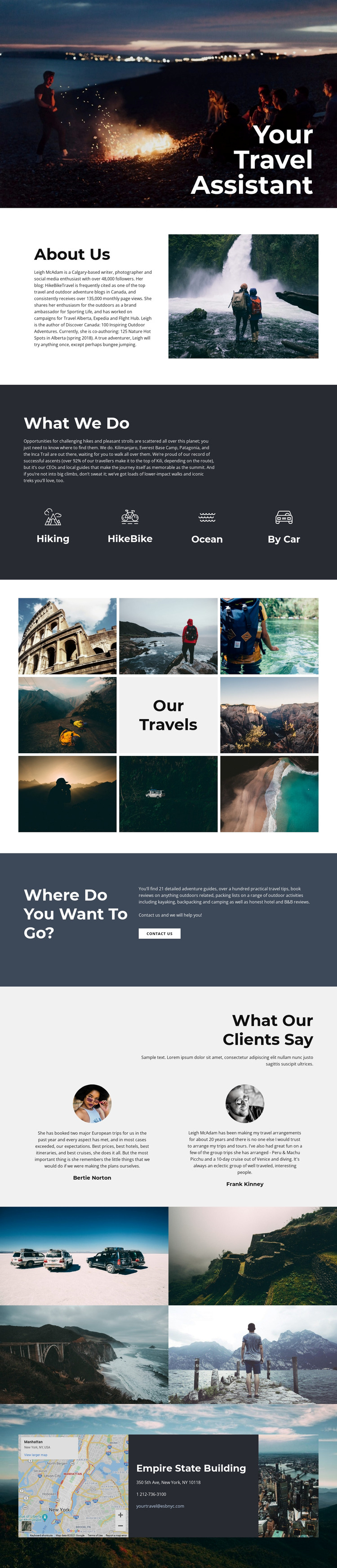
The design already separates several kinds of page-oriented content that can be maintained within a WordPress-oriented site. The About Us section gives the travel assistant a clear profile area, combining biography text with a hiking image. The What We Do block then organizes the subject into four travel categories—Hiking, HikeBike, Ocean, and By Car—so permanent information can be presented as related but distinct content rather than one uninterrupted paragraph.
The image mosaics and testimonials add recurring content possibilities. The first gallery contains eight travel photographs around the Our travels tile, and the later mosaic presents four additional scenic images. These areas can support project, destination, or portfolio-style material when populated with the site’s own verified content. The two testimonial profiles provide a separate client-perspective region, while their sample names and statements should be replaced or verified before publication.
The inquiry and contact areas connect the page content to communication. The Where do you want to go? panel contains a Contact us button, and the final section places a map beside telephone and email details with a city photograph. In a WordPress theme context, these page sections can remain part of one visual system while the project grows around managed travel content. The design therefore suits a site that combines a stable personal profile, structured travel topics, visual material, testimonials, and practical contact information rather than relying only on an image-led homepage.
Customize with Nicepage
Open this ready-made template in the WordPress Website Builder and customize it visually in the Nicepage editor. Replace demo content, edit page sections, and adapt the design to your project without rebuilding the template from scratch.
Manage and Edit This Theme in WordPress
Customize and Install the WordPress Theme
Start with this ready-made theme instead of building the WordPress design from scratch. Customize its layout, content, typography, images, sections, and other design elements visually in Nicepage editor, then export and install the WordPress Theme, Plugin, and Pages on your WordPress site. The Nicepage WordPress Plugin lets you continue working with the site after installation.
Edit the Theme Directly in WordPress
After installation, you can edit the WordPress Theme directly in WordPress with the Nicepage WordPress Plugin. Use Site Style to customize site Colors, Fonts, Header, Footer, Blog, and Post Page Templates while working within your WordPress website.
Edit WordPress Pages Visually
Use the Nicepage WordPress Plugin to edit page content directly from the WordPress admin area. Open a WordPress Page with Nicepage and visually change its text, images, sections, and other page elements while continuing to manage the Page through WordPress.
WordPress Content and Theme Integration
Use the customized theme with WordPress Pages, Posts, Blog and Post Templates, menus, widgets, and other CMS-managed content. Shared theme elements such as Colors, Fonts, Header, Footer, Blog, and Post Page Templates can be managed as part of the overall site design, while WordPress provides the CMS environment for managing site content.
This workflow combines a ready-made WordPress Theme with visual customization, direct theme editing in WordPress, and continued content management through the Nicepage WordPress Plugin.





















