
Happy people deserve travel WordPress Theme


Edit Template Offline
2. Create new page and search for id 100553
Edit Template Online
Create Awesome Websites


Free Nicepage Builder
Keywords
Page content and recurring travel cards fit a managed theme structure
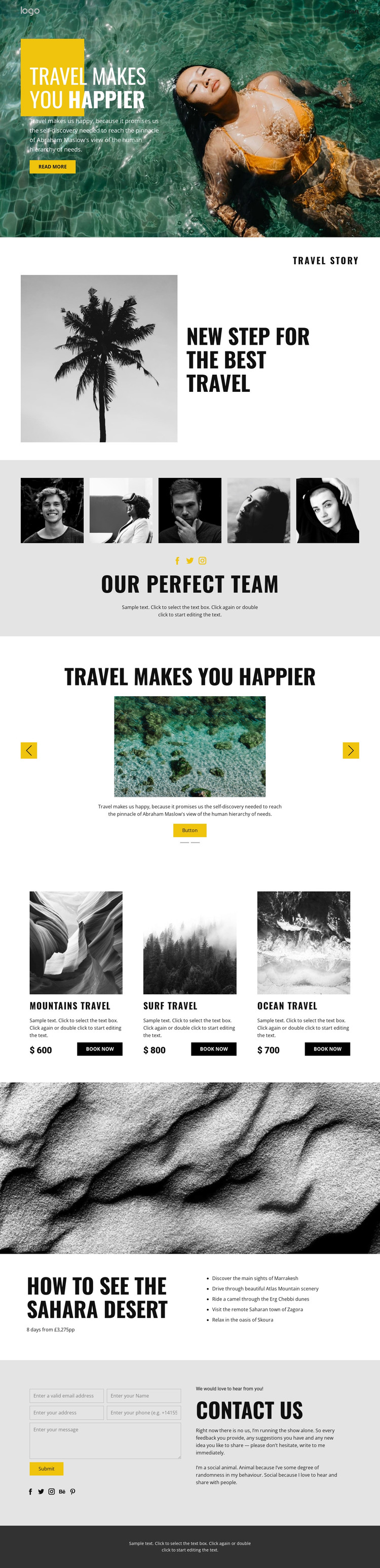
The design contains several kinds of permanent travel content that can remain part of a WordPress-managed visual system. The hero and split story establish the main page message, while the five-image portrait gallery supplies a distinct team or people section. The two-slide featured story area introduces repeated destination storytelling, with each slide combining an image, explanatory copy, action button, and controls. These relationships give the theme more content variation than a page built only around one headline and a single offer.
The three travel cards are especially suited to a recurring content pattern. Mountains, Surf, and Ocean travel each have an image, title, price, description, and Book now action, allowing the design to present comparable experiences in a consistent visual format. The Sahara area works differently: it is a detailed route presentation that names Marrakesh, the Atlas Mountains, Erg Chebbi, Zagora, and Skoura. Together, the cards and itinerary distinguish broad package content from a more editorial destination explanation.
The contact form and social links create a separate inquiry and connection area, while navigation and the dark footer supply shared page framing. A WordPress project could interpret these areas through permanent pages and other managed content, but the analysis does not verify Posts, a blog, or categories already existing in the template. Sample prices and demonstration text should therefore be replaced with the project’s own confirmed content.
Customize with Nicepage
Open this ready-made template in the WordPress Website Builder and customize it visually in the Nicepage editor. Replace demo content, edit page sections, and adapt the design to your project without rebuilding the template from scratch.
Manage and Edit This Theme in WordPress
Customize and Install the WordPress Theme
Start with this ready-made theme instead of building the WordPress design from scratch. Customize its layout, content, typography, images, sections, and other design elements visually in Nicepage editor, then export and install the WordPress Theme, Plugin, and Pages on your WordPress site. The Nicepage WordPress Plugin lets you continue working with the site after installation.
Edit the Theme Directly in WordPress
After installation, you can edit the WordPress Theme directly in WordPress with the Nicepage WordPress Plugin. Use Site Style to customize site Colors, Fonts, Header, Footer, Blog, and Post Page Templates while working within your WordPress website.
Edit WordPress Pages Visually
Use the Nicepage WordPress Plugin to edit page content directly from the WordPress admin area. Open a WordPress Page with Nicepage and visually change its text, images, sections, and other page elements while continuing to manage the Page through WordPress.
WordPress Content and Theme Integration
Use the customized theme with WordPress Pages, Posts, Blog and Post Templates, menus, widgets, and other CMS-managed content. Shared theme elements such as Colors, Fonts, Header, Footer, Blog, and Post Page Templates can be managed as part of the overall site design, while WordPress provides the CMS environment for managing site content.
This workflow combines a ready-made WordPress Theme with visual customization, direct theme editing in WordPress, and continued content management through the Nicepage WordPress Plugin.





















