General information about reserving with us WordPress Theme


Stable Reservation Information for a WordPress-Managed Page
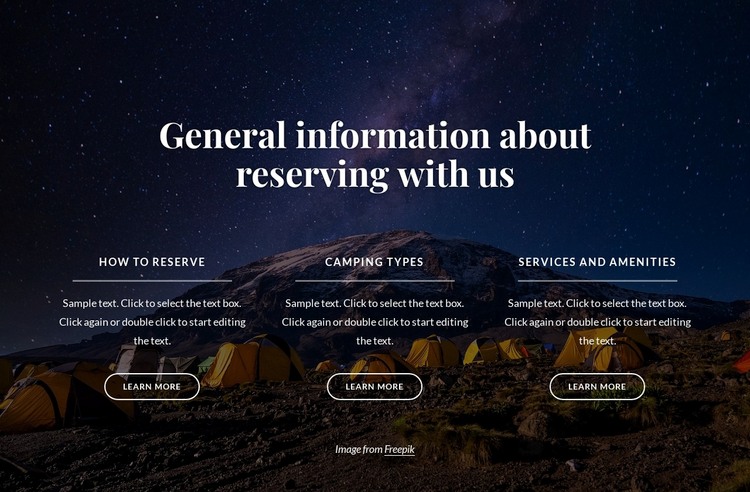
The block reads as a stable page-content area because its three categories explain a defined subject rather than presenting a changing feed. “How to reserve” can hold practical booking guidance, “Camping types” can organize information about available stays, and “Services and amenities” can describe related facilities. Supporting text and a “Learn more” action sit within each category, so the three units can remain visually consistent while pointing visitors toward more detailed content elsewhere in the surrounding project.
The layout gives this content a strong shared presentation. A dark mountain-and-campsite image spans the block, with an overlay that preserves contrast for the centered white serif heading and the card text. The three columns are evenly spaced and aligned beneath the introduction, while thin divider lines and outlined rounded buttons reinforce the repeated structure. The centered image-attribution line remains below the cards as a small visual-credit area associated with the background.
In a WordPress-managed page, this section can provide a reusable services or reservation-information region within the broader theme and content system. The page may contain other sections for booking, accommodation details, or contact information, while this block keeps its own three-part explanation intact. Its WordPress-oriented value comes from fitting stable, publishable page content into a coherent visual section, not from turning the block itself into a complete theme.
Customize with Nicepage
Open this ready-made template in the WordPress Website Builder and customize it visually in the Nicepage editor. Replace demo content, edit page sections, and adapt the design to your project without rebuilding the template from scratch.
Edit Template Offline
2. Create a new page or select existing
3. Click Add new block, search for id 4529039 and click enter
Edit Template Online
Create Awesome Websites


Free Nicepage Builder
Keywords
Manage and Edit This Theme in WordPress
Customize and Install the WordPress Theme
Start with this ready-made theme instead of building the WordPress design from scratch. Customize its layout, content, typography, images, sections, and other design elements visually in Nicepage editor, then export and install the WordPress Theme, Plugin, and Pages on your WordPress site. The Nicepage WordPress Plugin lets you continue working with the site after installation.
Edit the Theme Directly in WordPress
After installation, you can edit the WordPress Theme directly in WordPress with the Nicepage WordPress Plugin. Use Site Style to customize site Colors, Fonts, Header, Footer, Blog, and Post Page Templates while working within your WordPress website.
Edit WordPress Pages Visually
Use the Nicepage WordPress Plugin to edit page content directly from the WordPress admin area. Open a WordPress Page with Nicepage and visually change its text, images, sections, and other page elements while continuing to manage the Page through WordPress.
WordPress Content and Theme Integration
Use the customized theme with WordPress Pages, Posts, Blog and Post Templates, menus, widgets, and other CMS-managed content. Shared theme elements such as Colors, Fonts, Header, Footer, Blog, and Post Page Templates can be managed as part of the overall site design, while WordPress provides the CMS environment for managing site content.
This workflow combines a ready-made WordPress Theme with visual customization, direct theme editing in WordPress, and continued content management through the Nicepage WordPress Plugin.