
African safari tour company WordPress Theme
Edit Template Offline
2. Create new page and search for id 19080
Edit Template Online
Create Awesome Websites


Free Nicepage Builder
Keywords
The Inquiry, Package, and Destination Areas Organize Travel Content
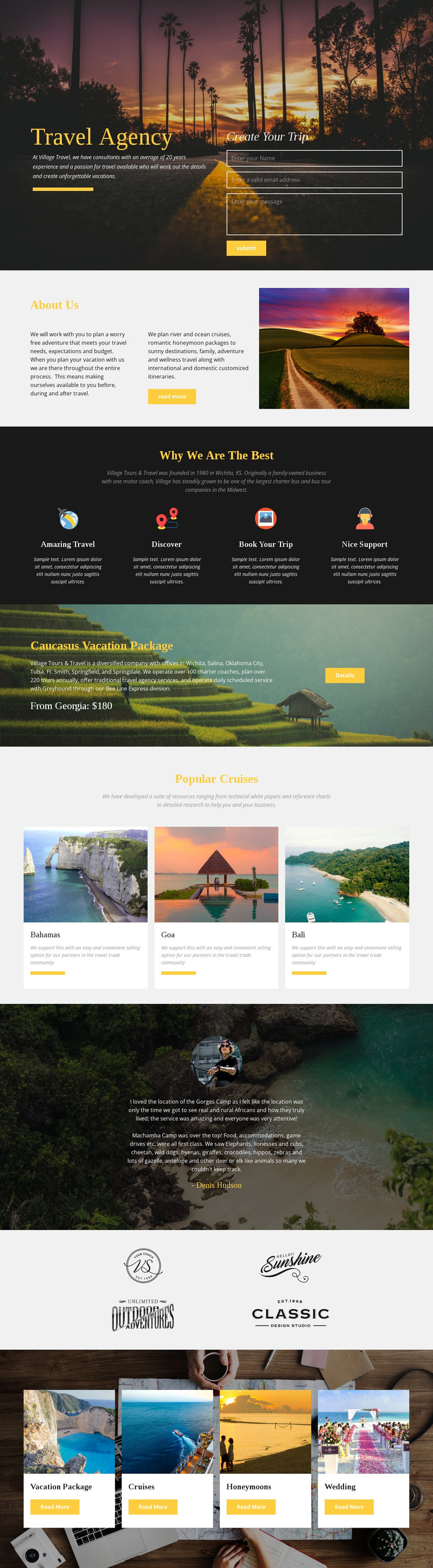
The hero establishes a clear page-oriented starting point for a WordPress-managed travel site. Its Travel Agency introduction and Create Your Trip inquiry form occupy separate sides of the same scenic block, keeping the agency message and visitor response area visually connected. The About Us section then provides a distinct place for company and travel-planning information, while the four repeated feature items create a compact content pattern for themes such as Amazing Travel, Discover, Book Your Trip, and Nice Support.
The offer sections give the design several additional content relationships to preserve in a WordPress theme. The Caucasus Vacation Package block presents one featured travel subject with a Details action, and the Popular Cruises area separates Bahamas, Goa, and Bali into three destination cards with images, labels, and descriptions. Lower category cards divide Vacation Package, Cruises, Honeymoons, and Wedding into recognizable travel directions, while the testimonial contributes a customer-focused content area and the four-image showcase adds a separate visual group.
Together, these areas suit a WordPress project that needs permanent agency information and organized travel content to share one visual system. The design does not prove that posts, categories, or blog structures already exist, but its repeated cards and clearly bounded page sections leave room for content to be expanded or maintained through WordPress without losing the relationship between inquiry, offers, destinations, and travel categories.
Customize with Nicepage
Open this ready-made template in the WordPress Website Builder and customize it visually in the Nicepage editor. Replace demo content, edit page sections, and adapt the design to your project without rebuilding the template from scratch.
Manage and Edit This Theme in WordPress
Customize and Install the WordPress Theme
Start with this ready-made theme instead of building the WordPress design from scratch. Customize its layout, content, typography, images, sections, and other design elements visually in Nicepage editor, then export and install the WordPress Theme, Plugin, and Pages on your WordPress site. The Nicepage WordPress Plugin lets you continue working with the site after installation.
Edit the Theme Directly in WordPress
After installation, you can edit the WordPress Theme directly in WordPress with the Nicepage WordPress Plugin. Use Site Style to customize site Colors, Fonts, Header, Footer, Blog, and Post Page Templates while working within your WordPress website.
Edit WordPress Pages Visually
Use the Nicepage WordPress Plugin to edit page content directly from the WordPress admin area. Open a WordPress Page with Nicepage and visually change its text, images, sections, and other page elements while continuing to manage the Page through WordPress.
WordPress Content and Theme Integration
Use the customized theme with WordPress Pages, Posts, Blog and Post Templates, menus, widgets, and other CMS-managed content. Shared theme elements such as Colors, Fonts, Header, Footer, Blog, and Post Page Templates can be managed as part of the overall site design, while WordPress provides the CMS environment for managing site content.
This workflow combines a ready-made WordPress Theme with visual customization, direct theme editing in WordPress, and continued content management through the Nicepage WordPress Plugin.





















