
Unforgettable travel WordPress Theme


Edit Template Offline
2. Create new page and search for id 18761
Edit Template Online
Create Awesome Websites


Free Nicepage Builder
Keywords
Editorial Hotel Content Has Room for WordPress Expansion
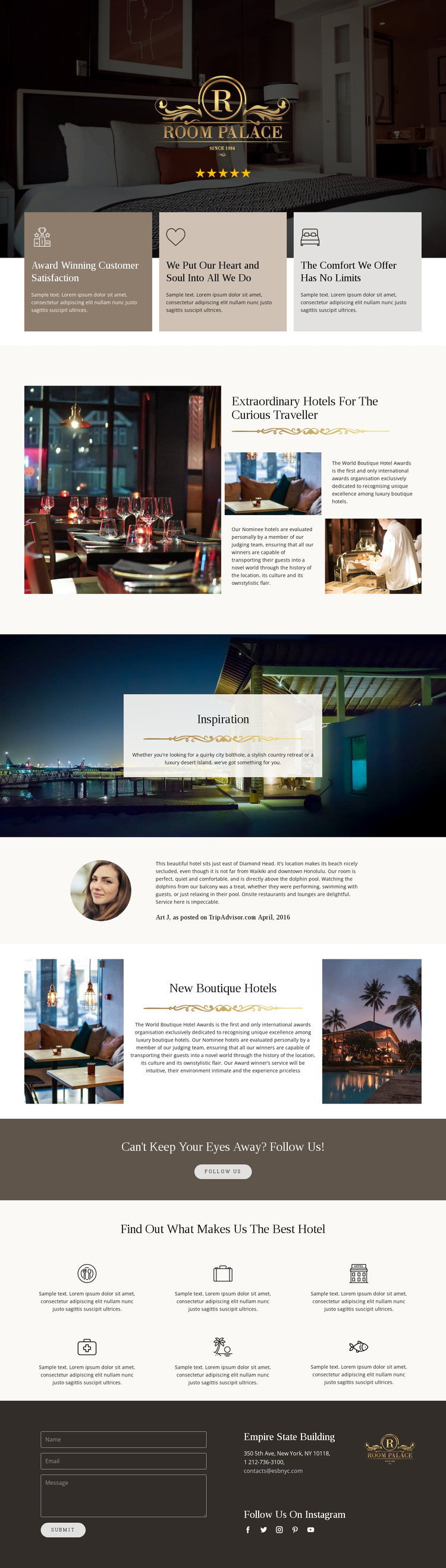
The page-oriented content is well suited to a site where permanent hospitality information can sit beside material that changes over time. The award-recognition introduction provides a clear editorial subject, using a large photograph, explanatory copy, and supporting images. The New Boutique Hotels section supplies a second content pattern built around hotel photography and descriptive text, while the Inspiration block gives destination discovery its own visual presentation.
The repeated elements support further content interpretation without claiming that WordPress Posts, categories, or blog structures already exist. Three value cards can frame stable statements about hospitality, and the six icon-led recognition items can explain the qualities used to distinguish featured hotels. The testimonial adds a separate review-oriented block, with its circular portrait and attribution functioning as a human perspective within the broader editorial page.
The closing area connects page content with ongoing visitor response. A contact form, contact details, branding, and social links occupy a dark two-column section, while the preceding follow-us band gives social engagement a distinct place in the sequence. In a WordPress project, these verified page areas could remain part of the theme’s visual system as hotel information and related editorial content are maintained. The key value is the design’s separation of permanent explanation, discovery content, recognition, and contact rather than a claim about existing CMS structures.
Customize with Nicepage
Open this ready-made template in the WordPress Website Builder and customize it visually in the Nicepage editor. Replace demo content, edit page sections, and adapt the design to your project without rebuilding the template from scratch.
Manage and Edit This Theme in WordPress
Customize and Install the WordPress Theme
Start with this ready-made theme instead of building the WordPress design from scratch. Customize its layout, content, typography, images, sections, and other design elements visually in Nicepage editor, then export and install the WordPress Theme, Plugin, and Pages on your WordPress site. The Nicepage WordPress Plugin lets you continue working with the site after installation.
Edit the Theme Directly in WordPress
After installation, you can edit the WordPress Theme directly in WordPress with the Nicepage WordPress Plugin. Use Site Style to customize site Colors, Fonts, Header, Footer, Blog, and Post Page Templates while working within your WordPress website.
Edit WordPress Pages Visually
Use the Nicepage WordPress Plugin to edit page content directly from the WordPress admin area. Open a WordPress Page with Nicepage and visually change its text, images, sections, and other page elements while continuing to manage the Page through WordPress.
WordPress Content and Theme Integration
Use the customized theme with WordPress Pages, Posts, Blog and Post Templates, menus, widgets, and other CMS-managed content. Shared theme elements such as Colors, Fonts, Header, Footer, Blog, and Post Page Templates can be managed as part of the overall site design, while WordPress provides the CMS environment for managing site content.
This workflow combines a ready-made WordPress Theme with visual customization, direct theme editing in WordPress, and continued content management through the Nicepage WordPress Plugin.





















