Product feedback survey WordPress Theme


Stable Product-Feedback Content for a WordPress Page
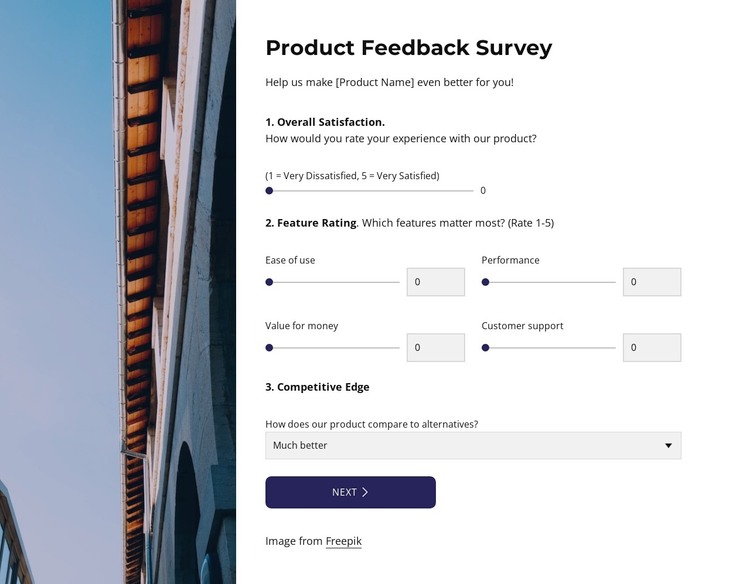
The section reads as stable product-feedback content that can sit within a WordPress-managed page. The heading and supporting paragraph establish the purpose, then the visible step turns the request into organized response groups: Overall Satisfaction, Feature Rating, and Competitive Edge. Five range controls cover Ease of use, Performance, Value for money, and Customer support, giving the page a repeatable rating model rather than relying only on a general comment field.
The HTML-defined Future Wishlist step adds a different kind of page content. Respondents can select More customization, Lower pricing, or Mobile app through three checkbox options, then use the Other textarea for an idea outside the listed choices. The Next and Finish Poll actions connect those groups into a staged survey experience. This makes the block suitable for a permanent feedback area associated with a product page or customer-information section, while the broader project manages its other content separately.
The tall image and white survey panel also give the content a recognizable visual pattern inside a WordPress-oriented design. Dark blue-purple controls distinguish the response areas, and generous spacing keeps the labels readable. The block can participate in a CMS-managed page without being treated as the entire theme; surrounding WordPress content can provide the wider navigation, product context, and related sections.
Customize with Nicepage
Open this ready-made template in the WordPress Website Builder and customize it visually in the Nicepage editor. Replace demo content, edit page sections, and adapt the design to your project without rebuilding the template from scratch.
Edit Template Offline
2. Create a new page or select existing
3. Click Add new block, search for id 6536921 and click enter
Edit Template Online
Create Awesome Websites


Free Nicepage Builder
Keywords
Manage and Edit This Theme in WordPress
Customize and Install the WordPress Theme
Start with this ready-made theme instead of building the WordPress design from scratch. Customize its layout, content, typography, images, sections, and other design elements visually in Nicepage editor, then export and install the WordPress Theme, Plugin, and Pages on your WordPress site. The Nicepage WordPress Plugin lets you continue working with the site after installation.
Edit the Theme Directly in WordPress
After installation, you can edit the WordPress Theme directly in WordPress with the Nicepage WordPress Plugin. Use Site Style to customize site Colors, Fonts, Header, Footer, Blog, and Post Page Templates while working within your WordPress website.
Edit WordPress Pages Visually
Use the Nicepage WordPress Plugin to edit page content directly from the WordPress admin area. Open a WordPress Page with Nicepage and visually change its text, images, sections, and other page elements while continuing to manage the Page through WordPress.
WordPress Content and Theme Integration
Use the customized theme with WordPress Pages, Posts, Blog and Post Templates, menus, widgets, and other CMS-managed content. Shared theme elements such as Colors, Fonts, Header, Footer, Blog, and Post Page Templates can be managed as part of the overall site design, while WordPress provides the CMS environment for managing site content.
This workflow combines a ready-made WordPress Theme with visual customization, direct theme editing in WordPress, and continued content management through the Nicepage WordPress Plugin.