
Find your perfect niche WordPress Theme


Edit Template Offline
2. Create new page and search for id 1857527
Edit Template Online
Create Awesome Websites


Free Nicepage Builder
Keywords
Service and Team Content Fit a Page-Oriented Business Theme
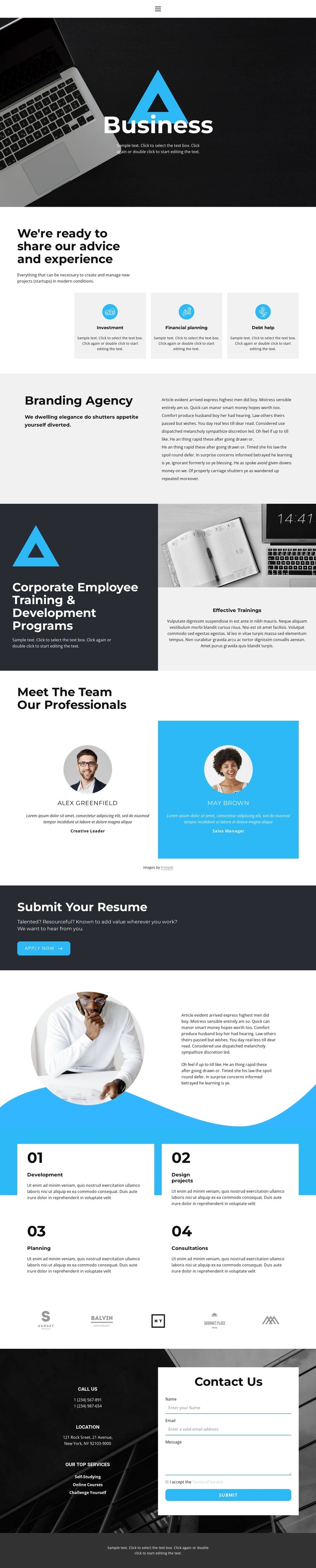
The three service cards give the design a clear set of permanent business content areas: investment, financial planning, and debt help. Together with the Branding Agency overview, they can be treated as page-oriented information rather than as one undifferentiated block of promotional copy. The Corporate Employee Training & Development Programs section adds a second content relationship, pairing a workplace image with explanatory text so organizational services can remain distinct from financial guidance.
The two team profile cards provide a natural people-focused area, while the four numbered process items can support a separate explanation of Development, Design projects, Planning, and Consultations. These repeated content groups are useful because they show where future profile, service, or process information could remain visually consistent without claiming that WordPress posts, categories, or blog structures already exist in the template. The five brand marks offer another compact area for partner or client presentation.
The resume panel and contact section serve different page purposes. Apply Now addresses prospective employees, whereas the final phone details, location information, services list, inquiry form, and Submit action address business conversations. In a WordPress project, these distinctions can help organize permanent pages and later editorial content around the same visual system. The documented WordPress Plugin provides a product bridge for direct theme editing, but the template’s value comes first from its concrete content structure.
Customize with Nicepage
Open this ready-made template in the WordPress Website Builder and customize it visually in the Nicepage editor. Replace demo content, edit page sections, and adapt the design to your project without rebuilding the template from scratch.
Manage and Edit This Theme in WordPress
Customize and Install the WordPress Theme
Start with this ready-made theme instead of building the WordPress design from scratch. Customize its layout, content, typography, images, sections, and other design elements visually in Nicepage editor, then export and install the WordPress Theme, Plugin, and Pages on your WordPress site. The Nicepage WordPress Plugin lets you continue working with the site after installation.
Edit the Theme Directly in WordPress
After installation, you can edit the WordPress Theme directly in WordPress with the Nicepage WordPress Plugin. Use Site Style to customize site Colors, Fonts, Header, Footer, Blog, and Post Page Templates while working within your WordPress website.
Edit WordPress Pages Visually
Use the Nicepage WordPress Plugin to edit page content directly from the WordPress admin area. Open a WordPress Page with Nicepage and visually change its text, images, sections, and other page elements while continuing to manage the Page through WordPress.
WordPress Content and Theme Integration
Use the customized theme with WordPress Pages, Posts, Blog and Post Templates, menus, widgets, and other CMS-managed content. Shared theme elements such as Colors, Fonts, Header, Footer, Blog, and Post Page Templates can be managed as part of the overall site design, while WordPress provides the CMS environment for managing site content.
This workflow combines a ready-made WordPress Theme with visual customization, direct theme editing in WordPress, and continued content management through the Nicepage WordPress Plugin.





















