Healthy organic food WordPress Theme


Edit Template Offline
2. Create new page and search for id 536788
Edit Template Online
Create Awesome Websites


Free Nicepage Builder
Keywords
Menu Content and Repeated Food Cards Fit a WordPress Theme Structure
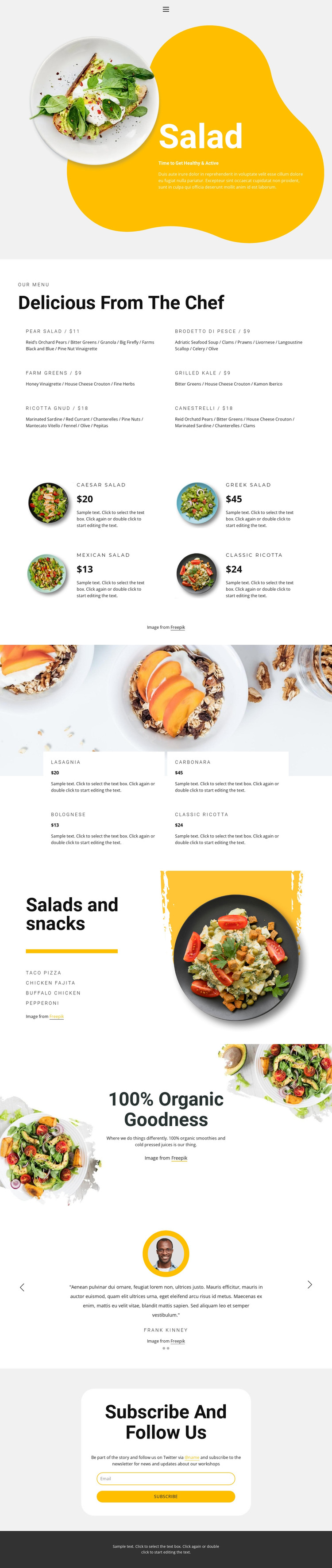
The six-item chef menu creates a clear page-oriented content area, with each dish represented through a name, ingredient description, and displayed price. The salad and pasta collections then provide repeated food-card structures that could help organize recurring restaurant content while preserving the page’s visual direction. The salads-and-snacks section adds a shorter menu feature, and the organic drinks promotion introduces a separate content area for smoothies and cold-pressed juices.
These areas give the theme more than a single hero message. They create several kinds of content relationships: detailed menu text, repeated food items, image-led category presentation, and promotional copy. The two testimonial slides add another recurring content pattern, while navigation and mobile navigation support movement between the page’s main areas. The newsletter subscription form supplies a focused communication zone rather than a generic contact claim.
In a WordPress project, these verified design regions can be adapted around CMS-managed page content, and the visual system can continue as the project adds appropriate restaurant information. However, the analysis does not verify WordPress Posts, blog categories, widgets, or a pre-existing blog structure, so none should be presented as existing template elements. The sample names, quotations, prices, and menu values are demonstration content. The theme’s main strength is its combination of page content, repeated food presentation, social-proof structure, and a newsletter endpoint within one consistent restaurant design.
Customize with Nicepage
Open this ready-made template in the WordPress Website Builder and customize it visually in the Nicepage editor. Replace demo content, edit page sections, and adapt the design to your project without rebuilding the template from scratch.
Manage and Edit This Theme in WordPress
Customize and Install the WordPress Theme
Start with this ready-made theme instead of building the WordPress design from scratch. Customize its layout, content, typography, images, sections, and other design elements visually in Nicepage editor, then export and install the WordPress Theme, Plugin, and Pages on your WordPress site. The Nicepage WordPress Plugin lets you continue working with the site after installation.
Edit the Theme Directly in WordPress
After installation, you can edit the WordPress Theme directly in WordPress with the Nicepage WordPress Plugin. Use Site Style to customize site Colors, Fonts, Header, Footer, Blog, and Post Page Templates while working within your WordPress website.
Edit WordPress Pages Visually
Use the Nicepage WordPress Plugin to edit page content directly from the WordPress admin area. Open a WordPress Page with Nicepage and visually change its text, images, sections, and other page elements while continuing to manage the Page through WordPress.
WordPress Content and Theme Integration
Use the customized theme with WordPress Pages, Posts, Blog and Post Templates, menus, widgets, and other CMS-managed content. Shared theme elements such as Colors, Fonts, Header, Footer, Blog, and Post Page Templates can be managed as part of the overall site design, while WordPress provides the CMS environment for managing site content.
This workflow combines a ready-made WordPress Theme with visual customization, direct theme editing in WordPress, and continued content management through the Nicepage WordPress Plugin.