Executive chef recipes WordPress Theme


Edit Template Offline
2. Create new page and search for id 18806
Edit Template Online
Create Awesome Websites


Free Nicepage Builder
Keywords
Menu and Catering Content Within a Restaurant Theme
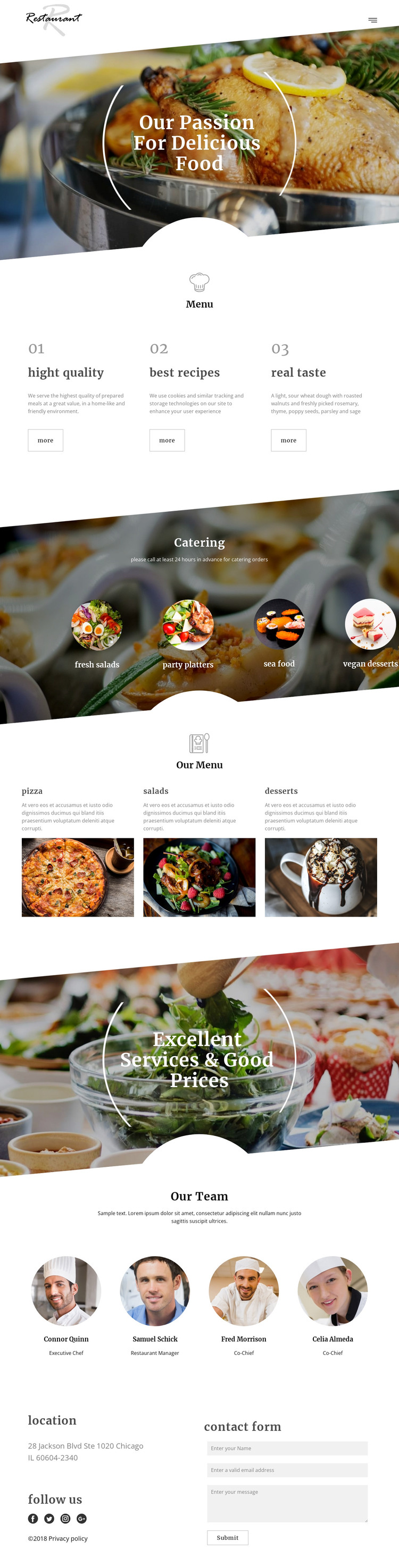
The menu and catering areas provide two different content groups that can guide a WordPress-oriented interpretation of this restaurant theme. Four catering categories—fresh salads, party platters, seafood, and vegan desserts—present prepared-food offerings through distinct visual items. The menu section then shifts to pizza, salads, and desserts, using supporting text and large imagery to organize the restaurant’s more familiar food categories. Their different roles make the page suitable for separating permanent restaurant information from content that may be expanded or updated over time, without claiming that WordPress Posts or categories already exist.
The three quality statements and the services-and-prices image section add context around those food areas. The four-person team presentation introduces the people behind the restaurant, while location details and the contact form create a page-oriented point for inquiries. These relationships allow the same visual direction to support restaurant pages, updated content, or additional informational areas as the project develops.
A WordPress Theme can therefore preserve the design’s connection between food imagery, menu content, catering, people, and contact information while the site’s content environment grows. The social-follow footer also provides a shared closing element rather than an isolated page detail. The Nicepage WordPress Plugin is an optional bridge for CMS editing, but the theme interpretation is grounded in the concrete content areas already shown.
Customize with Nicepage
Open this ready-made template in the WordPress Website Builder and customize it visually in the Nicepage editor. Replace demo content, edit page sections, and adapt the design to your project without rebuilding the template from scratch.
Manage and Edit This Theme in WordPress
Customize and Install the WordPress Theme
Start with this ready-made theme instead of building the WordPress design from scratch. Customize its layout, content, typography, images, sections, and other design elements visually in Nicepage editor, then export and install the WordPress Theme, Plugin, and Pages on your WordPress site. The Nicepage WordPress Plugin lets you continue working with the site after installation.
Edit the Theme Directly in WordPress
After installation, you can edit the WordPress Theme directly in WordPress with the Nicepage WordPress Plugin. Use Site Style to customize site Colors, Fonts, Header, Footer, Blog, and Post Page Templates while working within your WordPress website.
Edit WordPress Pages Visually
Use the Nicepage WordPress Plugin to edit page content directly from the WordPress admin area. Open a WordPress Page with Nicepage and visually change its text, images, sections, and other page elements while continuing to manage the Page through WordPress.
WordPress Content and Theme Integration
Use the customized theme with WordPress Pages, Posts, Blog and Post Templates, menus, widgets, and other CMS-managed content. Shared theme elements such as Colors, Fonts, Header, Footer, Blog, and Post Page Templates can be managed as part of the overall site design, while WordPress provides the CMS environment for managing site content.
This workflow combines a ready-made WordPress Theme with visual customization, direct theme editing in WordPress, and continued content management through the Nicepage WordPress Plugin.