Leverage agile frameworks WordPress Theme


Stable Workplace Imagery Fits a WordPress-Managed Gallery Section
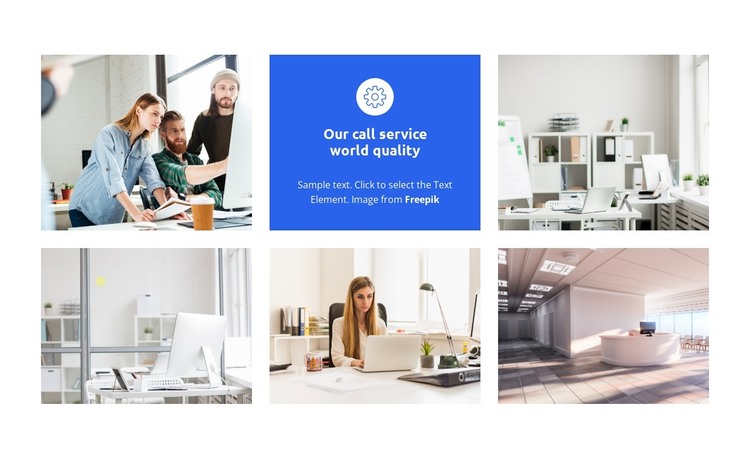
The five workplace photographs read as stable visual page content, while the blue center tile supplies a compact explanatory layer. In a WordPress-managed page, this arrangement can present office or workplace imagery as one reusable gallery section without requiring the surrounding project to treat every image as a separate content destination. The centered heading and paragraph give the image group context, and the circular icon helps distinguish the text tile from the photographic tiles.
The internal composition is straightforward: two rows contain three equal positions each, with five positions used for rectangular photographs and one position used for the blue text panel. Even gutters separate the tiles, and the light neutral image treatment keeps the workplace scenes visually related. The saturated blue background and white centered typography create a clear editorial contrast, allowing the descriptive tile to remain visible among the images. Since the interaction is static, the complete group is presented simultaneously rather than through a rotating control.
For WordPress-oriented content, the section can remain part of permanent page material while the wider site manages its other pages and publishable areas separately. The design supports a stable gallery role because its meaning depends on the relationship of all six tiles, not on a temporary update or a single featured photograph. Text and imagery can be revised as page content changes, while the two-row structure continues to provide a consistent visual container. The block therefore works as a focused workplace-gallery region within a broader WordPress theme context, not as the theme itself.
Customize with Nicepage
Open this ready-made template in the WordPress Website Builder and customize it visually in the Nicepage editor. Replace demo content, edit page sections, and adapt the design to your project without rebuilding the template from scratch.
Edit Template Offline
2. Create a new page or select existing
3. Click Add new block, search for id 4914090 and click enter
Edit Template Online
Create Awesome Websites


Free Nicepage Builder
Keywords
Manage and Edit This Theme in WordPress
Customize and Install the WordPress Theme
Start with this ready-made theme instead of building the WordPress design from scratch. Customize its layout, content, typography, images, sections, and other design elements visually in Nicepage editor, then export and install the WordPress Theme, Plugin, and Pages on your WordPress site. The Nicepage WordPress Plugin lets you continue working with the site after installation.
Edit the Theme Directly in WordPress
After installation, you can edit the WordPress Theme directly in WordPress with the Nicepage WordPress Plugin. Use Site Style to customize site Colors, Fonts, Header, Footer, Blog, and Post Page Templates while working within your WordPress website.
Edit WordPress Pages Visually
Use the Nicepage WordPress Plugin to edit page content directly from the WordPress admin area. Open a WordPress Page with Nicepage and visually change its text, images, sections, and other page elements while continuing to manage the Page through WordPress.
WordPress Content and Theme Integration
Use the customized theme with WordPress Pages, Posts, Blog and Post Templates, menus, widgets, and other CMS-managed content. Shared theme elements such as Colors, Fonts, Header, Footer, Blog, and Post Page Templates can be managed as part of the overall site design, while WordPress provides the CMS environment for managing site content.
This workflow combines a ready-made WordPress Theme with visual customization, direct theme editing in WordPress, and continued content management through the Nicepage WordPress Plugin.