Too busy making a living WordPress Theme


A Reusable WordPress Page Area for Direct Vehicle Contact
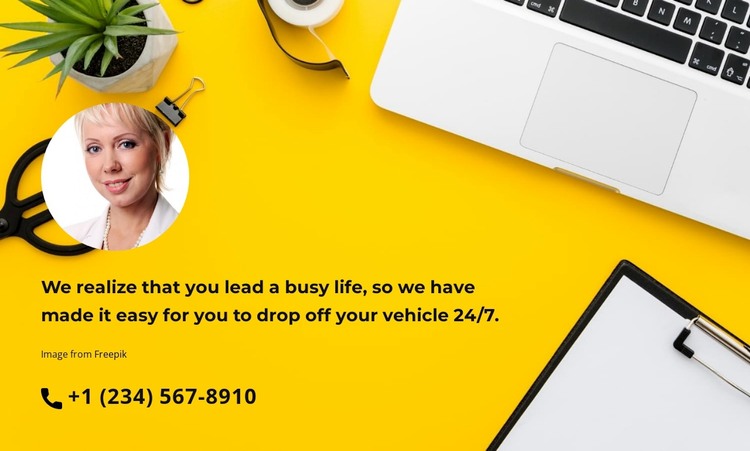
The heading gives the section a practical service role: it explains that vehicle drop-off is available 24/7 for people with busy schedules. Beneath that message, the phone number +1 (234) 567-8910 is presented as a direct contact link, so the block can support a visitor who needs to make contact without introducing a form or another interaction. The circular portrait adds a personal point of recognition above the text, while the black phone icon helps identify the response channel immediately.
As page content in a WordPress-managed project, this block can remain a stable contact or service-information area that is reused where the same message is appropriate. Its full-width photographic background establishes a strong visual boundary, and the bright yellow image contrasts with the bold white, left-aligned typography. That relationship keeps the statement and contact detail together while allowing the containing page to handle other content around it. The static presentation is suited to permanent page material rather than a rotating feed or expandable content component. The image credit is retained within the section, and neighboring WordPress-managed content can provide broader automotive service explanations, opening information, or additional contact options. The block therefore contributes a focused phone-based contact point while preserving its identity as one section inside a larger page.
Customize with Nicepage
Open this ready-made template in the WordPress Website Builder and customize it visually in the Nicepage editor. Replace demo content, edit page sections, and adapt the design to your project without rebuilding the template from scratch.
Edit Template Offline
2. Create a new page or select existing
3. Click Add new block, search for id 3453639 and click enter
Edit Template Online
Create Awesome Websites


Free Nicepage Builder
Keywords
Manage and Edit This Theme in WordPress
Customize and Install the WordPress Theme
Start with this ready-made theme instead of building the WordPress design from scratch. Customize its layout, content, typography, images, sections, and other design elements visually in Nicepage editor, then export and install the WordPress Theme, Plugin, and Pages on your WordPress site. The Nicepage WordPress Plugin lets you continue working with the site after installation.
Edit the Theme Directly in WordPress
After installation, you can edit the WordPress Theme directly in WordPress with the Nicepage WordPress Plugin. Use Site Style to customize site Colors, Fonts, Header, Footer, Blog, and Post Page Templates while working within your WordPress website.
Edit WordPress Pages Visually
Use the Nicepage WordPress Plugin to edit page content directly from the WordPress admin area. Open a WordPress Page with Nicepage and visually change its text, images, sections, and other page elements while continuing to manage the Page through WordPress.
WordPress Content and Theme Integration
Use the customized theme with WordPress Pages, Posts, Blog and Post Templates, menus, widgets, and other CMS-managed content. Shared theme elements such as Colors, Fonts, Header, Footer, Blog, and Post Page Templates can be managed as part of the overall site design, while WordPress provides the CMS environment for managing site content.
This workflow combines a ready-made WordPress Theme with visual customization, direct theme editing in WordPress, and continued content management through the Nicepage WordPress Plugin.