
Billabong WordPress Theme


Edit Template Offline
2. Create new page and search for id 28780
Edit Template Online
Create Awesome Websites


Free Nicepage Builder
Keywords
Editorial collections and contact content suit WordPress-managed pages
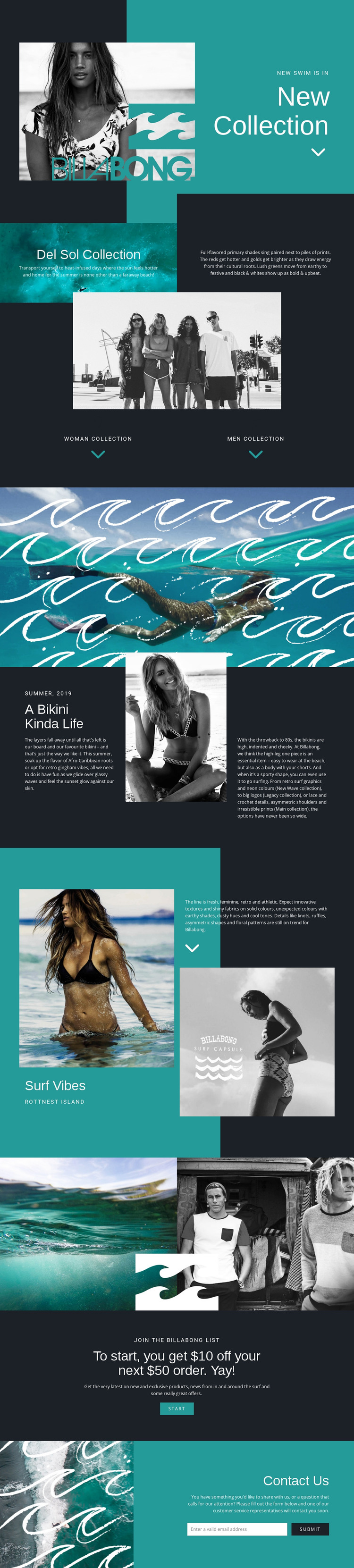
The New Collection and Del Sol sections provide clear page-oriented content for a WordPress project: a seasonal introduction followed by an editorial explanation of a specific collection. The women’s and men’s collection labels add another content relationship by dividing the brand direction into audience-focused areas. These facts make the design suitable for permanent page content without claiming that WordPress categories, posts, or other CMS structures already exist in the template.
The middle sections offer a second interpretation based on recurring editorial material. A Bikini Kinda Life combines seasonal language with portrait imagery, while Surf Vibes pairs photographs with trend and location text connected to Rottnest Island. Those areas could support publishable fashion or surf stories when the project adds regularly updated content, while the paired gallery and full-width ocean image preserve the visual character around that content. The important relationship is between editorial subject matter and a reusable brand presentation, not between the design and an invented blog structure.
At the end, the Join the Billabong List promotion and Contact Us form create practical communication areas beside the permanent collection content. In a WordPress-oriented project, the visual system can therefore connect collection pages, editorial material, promotional messaging, and customer inquiries without making the CMS workflow the main subject. The design’s strongest contribution is a consistent framework for managing different kinds of content while retaining the same surf-fashion identity.
Customize with Nicepage
Open this ready-made template in the WordPress Website Builder and customize it visually in the Nicepage editor. Replace demo content, edit page sections, and adapt the design to your project without rebuilding the template from scratch.
Manage and Edit This Theme in WordPress
Customize and Install the WordPress Theme
Start with this ready-made theme instead of building the WordPress design from scratch. Customize its layout, content, typography, images, sections, and other design elements visually in Nicepage editor, then export and install the WordPress Theme, Plugin, and Pages on your WordPress site. The Nicepage WordPress Plugin lets you continue working with the site after installation.
Edit the Theme Directly in WordPress
After installation, you can edit the WordPress Theme directly in WordPress with the Nicepage WordPress Plugin. Use Site Style to customize site Colors, Fonts, Header, Footer, Blog, and Post Page Templates while working within your WordPress website.
Edit WordPress Pages Visually
Use the Nicepage WordPress Plugin to edit page content directly from the WordPress admin area. Open a WordPress Page with Nicepage and visually change its text, images, sections, and other page elements while continuing to manage the Page through WordPress.
WordPress Content and Theme Integration
Use the customized theme with WordPress Pages, Posts, Blog and Post Templates, menus, widgets, and other CMS-managed content. Shared theme elements such as Colors, Fonts, Header, Footer, Blog, and Post Page Templates can be managed as part of the overall site design, while WordPress provides the CMS environment for managing site content.
This workflow combines a ready-made WordPress Theme with visual customization, direct theme editing in WordPress, and continued content management through the Nicepage WordPress Plugin.





















