Architecture city guide WordPress Theme


Edit Template Offline
2. Create new page and search for id 27321
Edit Template Online
Create Awesome Websites


Free Nicepage Builder
Keywords
Editorial Stories and Repeatable Project Cards Fit a Content-Managed Theme
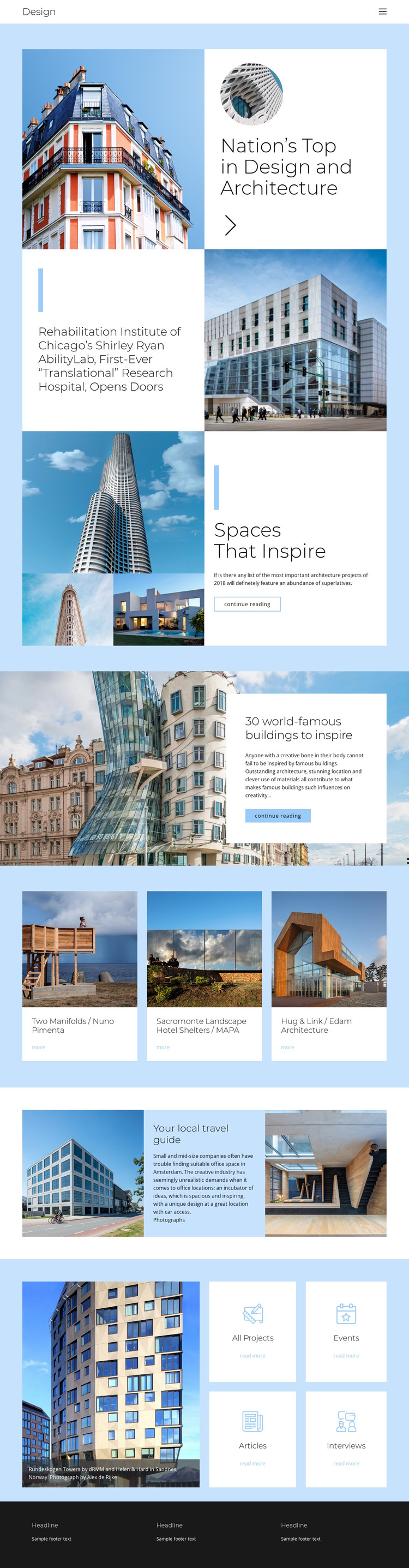
The page-oriented content is divided into clear areas that can support ongoing architecture publishing. The Shirley Ryan AbilityLab feature provides a substantial project story with a headline and building image, while Spaces That Inspire and the world-famous buildings article show how longer editorial subjects can sit alongside visual material. The opening feature and the compact Design header create a recognizable frame for these content areas, rather than treating every story as an isolated page fragment.
The three-card gallery offers a repeatable presentation for project-oriented content. Two Manifolds by Nuno Pimenta, Sacromonte Landscape Hotel Shelters by MAPA, and Hug & Link by Edam Architecture are shown as distinct visual references, giving the theme a natural place for recurring work, designers, or case-study entries. The category tiles add another content relationship through All Projects, Events, Articles, and Interviews, which can guide visitors between different kinds of architecture information without changing the visual language. The Your local travel guide section contributes a more location-oriented editorial format by combining exterior photography, centered text, and an interior image. Shared navigation and the dark three-column footer provide continuity around these page areas. In a WordPress-oriented project, the design therefore suits a site where permanent architecture stories, project references, and regularly expanded editorial content need to remain within one coherent visual system.
Customize with Nicepage
Open this ready-made template in the WordPress Website Builder and customize it visually in the Nicepage editor. Replace demo content, edit page sections, and adapt the design to your project without rebuilding the template from scratch.
Manage and Edit This Theme in WordPress
Customize and Install the WordPress Theme
Start with this ready-made theme instead of building the WordPress design from scratch. Customize its layout, content, typography, images, sections, and other design elements visually in Nicepage editor, then export and install the WordPress Theme, Plugin, and Pages on your WordPress site. The Nicepage WordPress Plugin lets you continue working with the site after installation.
Edit the Theme Directly in WordPress
After installation, you can edit the WordPress Theme directly in WordPress with the Nicepage WordPress Plugin. Use Site Style to customize site Colors, Fonts, Header, Footer, Blog, and Post Page Templates while working within your WordPress website.
Edit WordPress Pages Visually
Use the Nicepage WordPress Plugin to edit page content directly from the WordPress admin area. Open a WordPress Page with Nicepage and visually change its text, images, sections, and other page elements while continuing to manage the Page through WordPress.
WordPress Content and Theme Integration
Use the customized theme with WordPress Pages, Posts, Blog and Post Templates, menus, widgets, and other CMS-managed content. Shared theme elements such as Colors, Fonts, Header, Footer, Blog, and Post Page Templates can be managed as part of the overall site design, while WordPress provides the CMS environment for managing site content.
This workflow combines a ready-made WordPress Theme with visual customization, direct theme editing in WordPress, and continued content management through the Nicepage WordPress Plugin.