Modern Interiors WordPress Theme


Edit Template Offline
2. Create new page and search for id 31797
Edit Template Online
Create Awesome Websites


Free Nicepage Builder
Keywords
Case Studies and Interior Topics Fit a Magazine-Style Content Structure
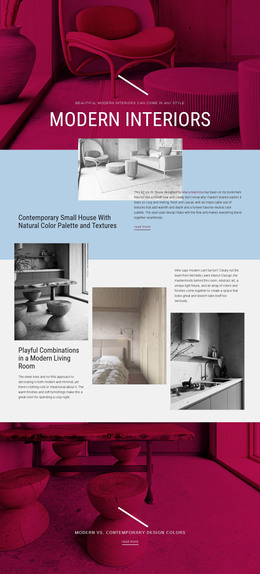
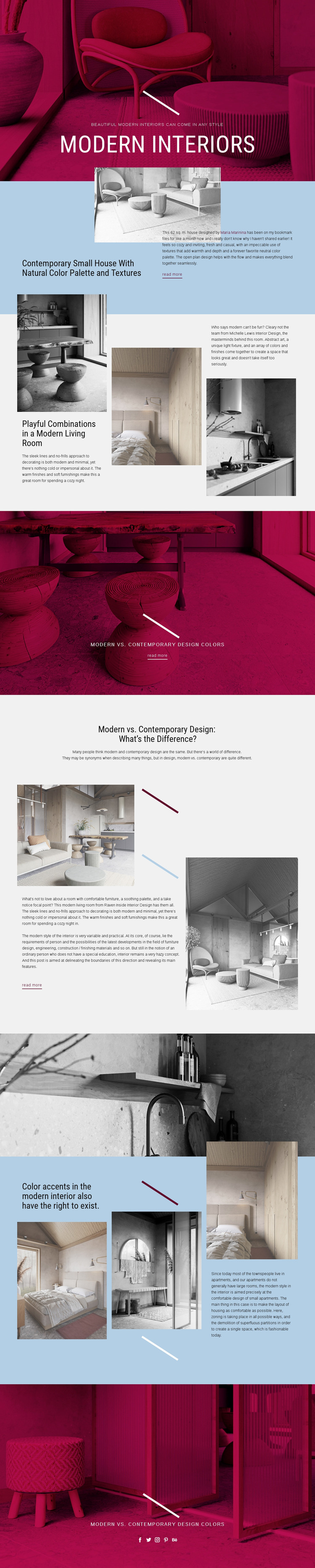
The featured house section gives the design a strong page-oriented content anchor: a 62 sq. m. interior is presented with a heading, photograph, descriptive text, and a “read more” link. That pattern can translate naturally to permanent editorial content in a WordPress-managed site without claiming that posts or categories already exist in the template. The three living-room examples offer a different relationship, grouping several shorter visual stories inside one broader topic.
The comparison between modern and contemporary design, together with the sections on natural textures, color accents, zoning, and small-apartment layouts, suggests several content directions that could be expanded over time. A WordPress project could use the design’s visual system around those areas while keeping each article or page focused on its own subject. The pale blue backgrounds are well suited to explanatory copy, while magenta banners can distinguish featured stories or recurring editorial transitions.
The repeated “read more” treatment points toward continued content discovery, and the final Facebook, Twitter, Instagram, Pinterest, and Behance links provide a clear shared social area. The design’s value in a WordPress context is therefore not a claim about existing CMS structures; it is the way its image-led case study, grouped examples, and educational comparisons can support a managed stream of interior content. The visual language remains recognizable as the editorial material grows.
Customize with Nicepage
Open this ready-made template in the WordPress Website Builder and customize it visually in the Nicepage editor. Replace demo content, edit page sections, and adapt the design to your project without rebuilding the template from scratch.
Manage and Edit This Theme in WordPress
Customize and Install the WordPress Theme
Start with this ready-made theme instead of building the WordPress design from scratch. Customize its layout, content, typography, images, sections, and other design elements visually in Nicepage editor, then export and install the WordPress Theme, Plugin, and Pages on your WordPress site. The Nicepage WordPress Plugin lets you continue working with the site after installation.
Edit the Theme Directly in WordPress
After installation, you can edit the WordPress Theme directly in WordPress with the Nicepage WordPress Plugin. Use Site Style to customize site Colors, Fonts, Header, Footer, Blog, and Post Page Templates while working within your WordPress website.
Edit WordPress Pages Visually
Use the Nicepage WordPress Plugin to edit page content directly from the WordPress admin area. Open a WordPress Page with Nicepage and visually change its text, images, sections, and other page elements while continuing to manage the Page through WordPress.
WordPress Content and Theme Integration
Use the customized theme with WordPress Pages, Posts, Blog and Post Templates, menus, widgets, and other CMS-managed content. Shared theme elements such as Colors, Fonts, Header, Footer, Blog, and Post Page Templates can be managed as part of the overall site design, while WordPress provides the CMS environment for managing site content.
This workflow combines a ready-made WordPress Theme with visual customization, direct theme editing in WordPress, and continued content management through the Nicepage WordPress Plugin.