Keto birthday cake WordPress Theme


Stable Recipe Content for a WordPress-Managed Page
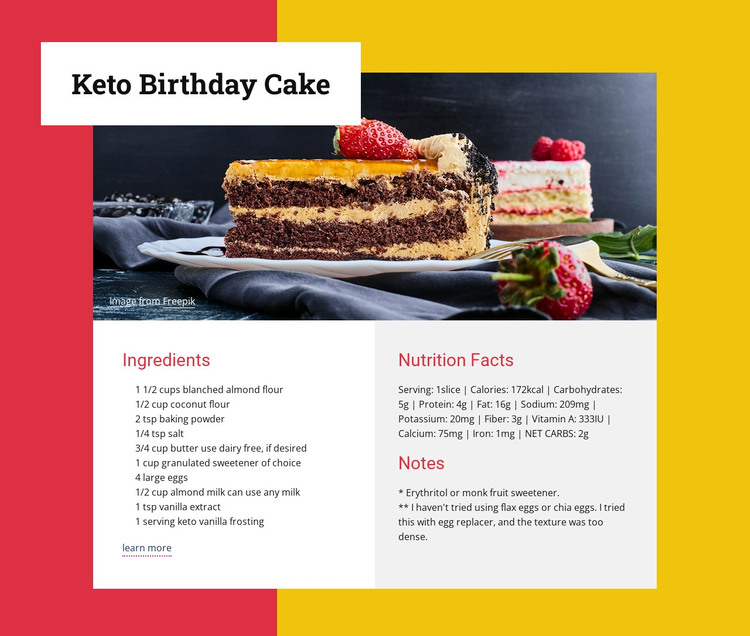
The recipe’s content model suits a stable page section: a named cake recipe, one large image, ten ingredient entries, nutrition information, notes, and a learn more link. The overlapping title panel gives the section a consistent visual introduction, while the lower two-column layout keeps the ingredients separate from the supporting information. In a WordPress-oriented project, this block can remain a durable recipe area while the wider site manages other page content around it.
The ingredient group provides the strongest publishable subject matter. It includes almond flour, coconut flour, baking powder, butter, eggs, almond milk, vanilla extract, and keto vanilla frosting, with ten visible entries in total. The adjacent Nutrition Facts section presents serving size, calories, macronutrients, minerals, fiber, and net carbohydrates. Notes remain their own group, so editorial changes to preparation guidance do not need to be mixed into the nutrition text.
The block’s visual system supports consistent page content as well. Red headings stand out against white and light-gray columns, the cake photograph supplies a clear image focus, and the white title panel overlaps the image to distinguish the recipe heading. A broader WordPress-managed site could place this section among other food content while retaining its own layout and purpose. The block is therefore best understood as reusable recipe content within a theme and page context, not as a standalone theme itself.
Customize with Nicepage
Open this ready-made template in the WordPress Website Builder and customize it visually in the Nicepage editor. Replace demo content, edit page sections, and adapt the design to your project without rebuilding the template from scratch.
Edit Template Offline
2. Create a new page or select existing
3. Click Add new block, search for id 240414 and click enter
Edit Template Online
Create Awesome Websites


Free Nicepage Builder
Keywords
Manage and Edit This Theme in WordPress
Customize and Install the WordPress Theme
Start with this ready-made theme instead of building the WordPress design from scratch. Customize its layout, content, typography, images, sections, and other design elements visually in Nicepage editor, then export and install the WordPress Theme, Plugin, and Pages on your WordPress site. The Nicepage WordPress Plugin lets you continue working with the site after installation.
Edit the Theme Directly in WordPress
After installation, you can edit the WordPress Theme directly in WordPress with the Nicepage WordPress Plugin. Use Site Style to customize site Colors, Fonts, Header, Footer, Blog, and Post Page Templates while working within your WordPress website.
Edit WordPress Pages Visually
Use the Nicepage WordPress Plugin to edit page content directly from the WordPress admin area. Open a WordPress Page with Nicepage and visually change its text, images, sections, and other page elements while continuing to manage the Page through WordPress.
WordPress Content and Theme Integration
Use the customized theme with WordPress Pages, Posts, Blog and Post Templates, menus, widgets, and other CMS-managed content. Shared theme elements such as Colors, Fonts, Header, Footer, Blog, and Post Page Templates can be managed as part of the overall site design, while WordPress provides the CMS environment for managing site content.
This workflow combines a ready-made WordPress Theme with visual customization, direct theme editing in WordPress, and continued content management through the Nicepage WordPress Plugin.