Eat best organic food WordPress Theme


Edit Template Offline
2. Create new page and search for id 17318
Edit Template Online
Create Awesome Websites


Free Nicepage Builder
Keywords
Produce Categories and Farm Stories Fit Page-Oriented Content
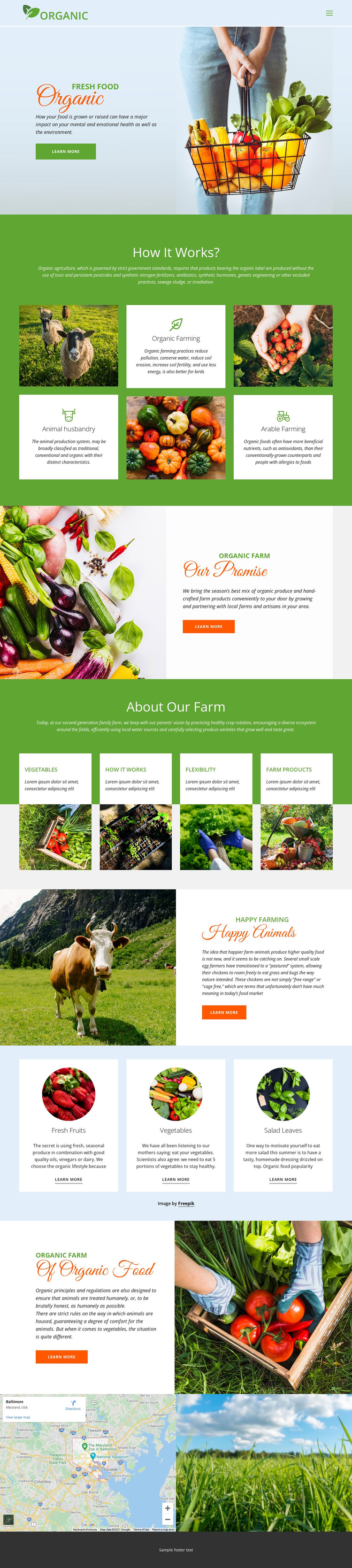
The design separates permanent farm information into clear page-oriented areas. The Organic hero can introduce the project’s main subject, while the three How it Works? cards create distinct content for animal husbandry, organic farming, and arable farming. This arrangement gives a WordPress-managed site a practical basis for presenting explanatory pages or sections without treating the sample labels as fixed business data.
The product-facing cards for fresh fruits, vegetables, and salad leaves offer another useful content relationship. They sit in a dedicated light blue band with circular images and learn-more links, making them recognizable as categories that could lead to fuller produce information. Alongside them, the Our Promise, About Our Farm, Happy Animals, and Of Organic Food sections support longer-lived page content about local production, crop rotation, ecosystems, water use, and animal care. Agricultural image tiles and the map add visual and location context, while the shared header and footer keep these areas connected. In a WordPress project, permanent farm pages could remain visually coordinated with future regularly updated content, but the analysis does not verify existing posts, blog structures, or WordPress-specific elements. The theme’s main strength is therefore its organized set of farm, method, category, and contact-oriented regions within one reusable design direction.
Customize with Nicepage
Open this ready-made template in the WordPress Website Builder and customize it visually in the Nicepage editor. Replace demo content, edit page sections, and adapt the design to your project without rebuilding the template from scratch.
Manage and Edit This Theme in WordPress
Customize and Install the WordPress Theme
Start with this ready-made theme instead of building the WordPress design from scratch. Customize its layout, content, typography, images, sections, and other design elements visually in Nicepage editor, then export and install the WordPress Theme, Plugin, and Pages on your WordPress site. The Nicepage WordPress Plugin lets you continue working with the site after installation.
Edit the Theme Directly in WordPress
After installation, you can edit the WordPress Theme directly in WordPress with the Nicepage WordPress Plugin. Use Site Style to customize site Colors, Fonts, Header, Footer, Blog, and Post Page Templates while working within your WordPress website.
Edit WordPress Pages Visually
Use the Nicepage WordPress Plugin to edit page content directly from the WordPress admin area. Open a WordPress Page with Nicepage and visually change its text, images, sections, and other page elements while continuing to manage the Page through WordPress.
WordPress Content and Theme Integration
Use the customized theme with WordPress Pages, Posts, Blog and Post Templates, menus, widgets, and other CMS-managed content. Shared theme elements such as Colors, Fonts, Header, Footer, Blog, and Post Page Templates can be managed as part of the overall site design, while WordPress provides the CMS environment for managing site content.
This workflow combines a ready-made WordPress Theme with visual customization, direct theme editing in WordPress, and continued content management through the Nicepage WordPress Plugin.