Starbucks Coffee WordPress Theme


Edit Template Offline
2. Create new page and search for id 17223
Edit Template Online
Create Awesome Websites


Free Nicepage Builder
Keywords
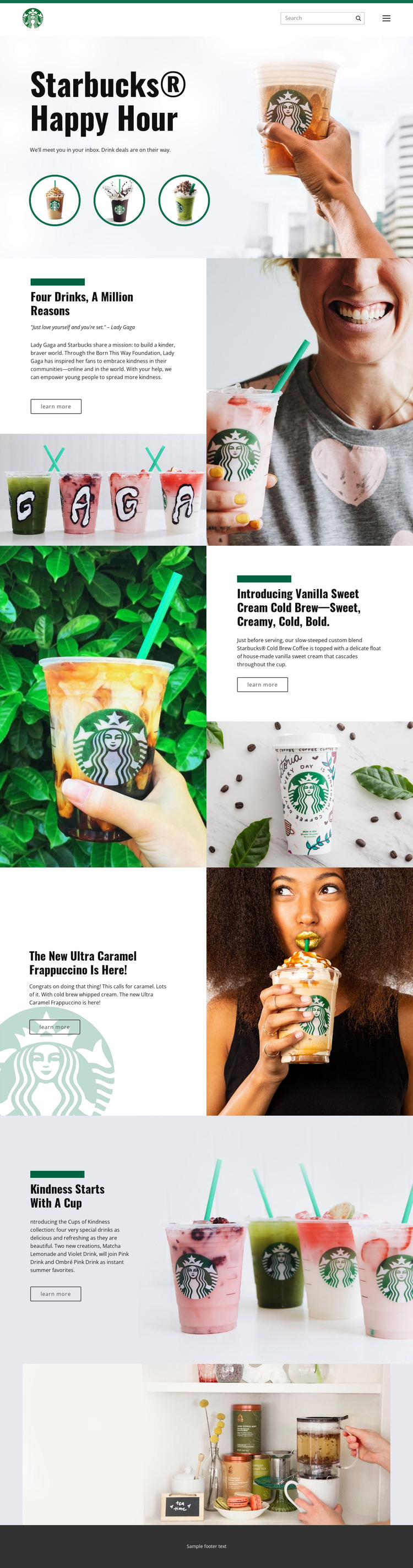
Product Features and Campaign Stories Within One Content Direction
The page contains several kinds of permanent content that can be interpreted naturally in a WordPress-managed environment. The Happy Hour hero works as a prominent campaign introduction, while the Vanilla Sweet Cream Cold Brew and Ultra Caramel Frappuccino sections provide focused product-oriented content. Their separate headings, descriptions, images, and Learn more links make them easier to treat as distinct page content than as one undifferentiated promotional paragraph.
The Cups of Kindness collection adds another relationship: several named drinks, including Matcha Lemonade, Violet Drink, Pink Drink, and Ombré Pink Drink, are presented through a shared campaign theme. The Four drinks, a million reasons section adds editorial context through the Lady Gaga and Born This Way Foundation association. Together, these areas give a WordPress project a visual framework for combining permanent campaign pages with regularly updated beverage or editorial content, without claiming that Posts or categories already exist in the source template.
Navigation, search, and the dark footer provide shared site elements around these content areas. A WordPress adaptation can therefore preserve the page's brand character while organizing product descriptions, campaign stories, and collection information as managed content. The key relationship is between content type and visual treatment: focused drink features remain image-led, while campaign material receives broader storytelling space.
Customize with Nicepage
Open this ready-made template in the WordPress Website Builder and customize it visually in the Nicepage editor. Replace demo content, edit page sections, and adapt the design to your project without rebuilding the template from scratch.
Manage and Edit This Theme in WordPress
Customize and Install the WordPress Theme
Start with this ready-made theme instead of building the WordPress design from scratch. Customize its layout, content, typography, images, sections, and other design elements visually in Nicepage editor, then export and install the WordPress Theme, Plugin, and Pages on your WordPress site. The Nicepage WordPress Plugin lets you continue working with the site after installation.
Edit the Theme Directly in WordPress
After installation, you can edit the WordPress Theme directly in WordPress with the Nicepage WordPress Plugin. Use Site Style to customize site Colors, Fonts, Header, Footer, Blog, and Post Page Templates while working within your WordPress website.
Edit WordPress Pages Visually
Use the Nicepage WordPress Plugin to edit page content directly from the WordPress admin area. Open a WordPress Page with Nicepage and visually change its text, images, sections, and other page elements while continuing to manage the Page through WordPress.
WordPress Content and Theme Integration
Use the customized theme with WordPress Pages, Posts, Blog and Post Templates, menus, widgets, and other CMS-managed content. Shared theme elements such as Colors, Fonts, Header, Footer, Blog, and Post Page Templates can be managed as part of the overall site design, while WordPress provides the CMS environment for managing site content.
This workflow combines a ready-made WordPress Theme with visual customization, direct theme editing in WordPress, and continued content management through the Nicepage WordPress Plugin.