Modern Military Defense WordPress Theme


Edit Template Offline
2. Create new page and search for id 6663841
Edit Template Online
Create Awesome Websites


Free Nicepage Builder
Keywords
Service Pages, Repeated Training Content, and Consultation Fit WordPress
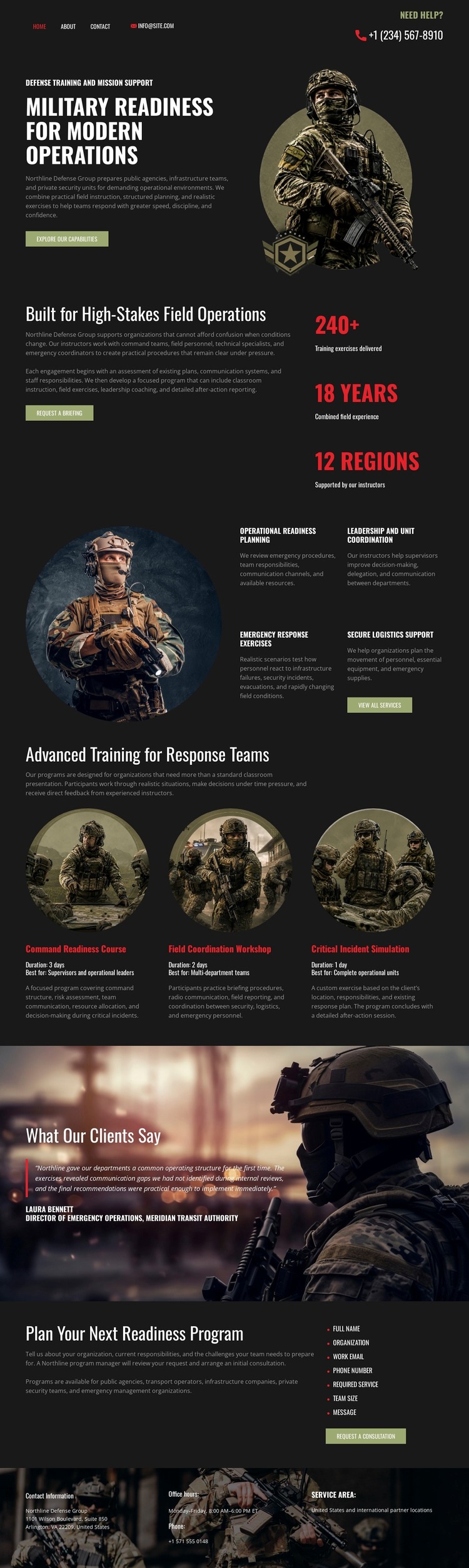
The page separates permanent informational content into areas that can translate naturally into a WordPress-oriented site structure. The main readiness introduction establishes the primary page message, while operational readiness planning, leadership and unit coordination, emergency response exercises, and specialized equipment provide distinct service-oriented content groups. The three advanced-training cards add repeated capability content, making them useful reference points for related program descriptions or future publishable material without claiming that WordPress Posts or categories already exist here.
The testimonial section has a different role from the service areas: it provides client-oriented supporting content over a wide military image. The final readiness-program block then gathers the information into a consultation action, while the footer supplies navigation, office information, and service-area context. Together, these relationships give a WordPress project both page-oriented content and repeatable areas that can be expanded around the same visual system.
A WordPress theme interpretation should preserve the design’s separation between capability explanation, supporting proof, and response. The Nicepage WordPress Plugin is a verified product capability for working with WordPress content, but no installation or editing workflow is needed to explain this particular design. Its strongest value is the way the existing sections can frame managed page content: durable readiness information remains visually coordinated, while future editorial or organizational updates can occupy clearly defined areas around the original layout.
Customize with Nicepage
Open this ready-made template in the WordPress Website Builder and customize it visually in the Nicepage editor. Replace demo content, edit page sections, and adapt the design to your project without rebuilding the template from scratch.
Manage and Edit This Theme in WordPress
Customize and Install the WordPress Theme
Start with this ready-made theme instead of building the WordPress design from scratch. Customize its layout, content, typography, images, sections, and other design elements visually in Nicepage editor, then export and install the WordPress Theme, Plugin, and Pages on your WordPress site. The Nicepage WordPress Plugin lets you continue working with the site after installation.
Edit the Theme Directly in WordPress
After installation, you can edit the WordPress Theme directly in WordPress with the Nicepage WordPress Plugin. Use Site Style to customize site Colors, Fonts, Header, Footer, Blog, and Post Page Templates while working within your WordPress website.
Edit WordPress Pages Visually
Use the Nicepage WordPress Plugin to edit page content directly from the WordPress admin area. Open a WordPress Page with Nicepage and visually change its text, images, sections, and other page elements while continuing to manage the Page through WordPress.
WordPress Content and Theme Integration
Use the customized theme with WordPress Pages, Posts, Blog and Post Templates, menus, widgets, and other CMS-managed content. Shared theme elements such as Colors, Fonts, Header, Footer, Blog, and Post Page Templates can be managed as part of the overall site design, while WordPress provides the CMS environment for managing site content.
This workflow combines a ready-made WordPress Theme with visual customization, direct theme editing in WordPress, and continued content management through the Nicepage WordPress Plugin.