Emergency Plumbing Services WordPress Theme


Edit Template Offline
2. Create new page and search for id 6475664
Edit Template Online
Create Awesome Websites


Free Nicepage Builder
Keywords
Page Content and Repeated Service Cards in a Plumbing Theme
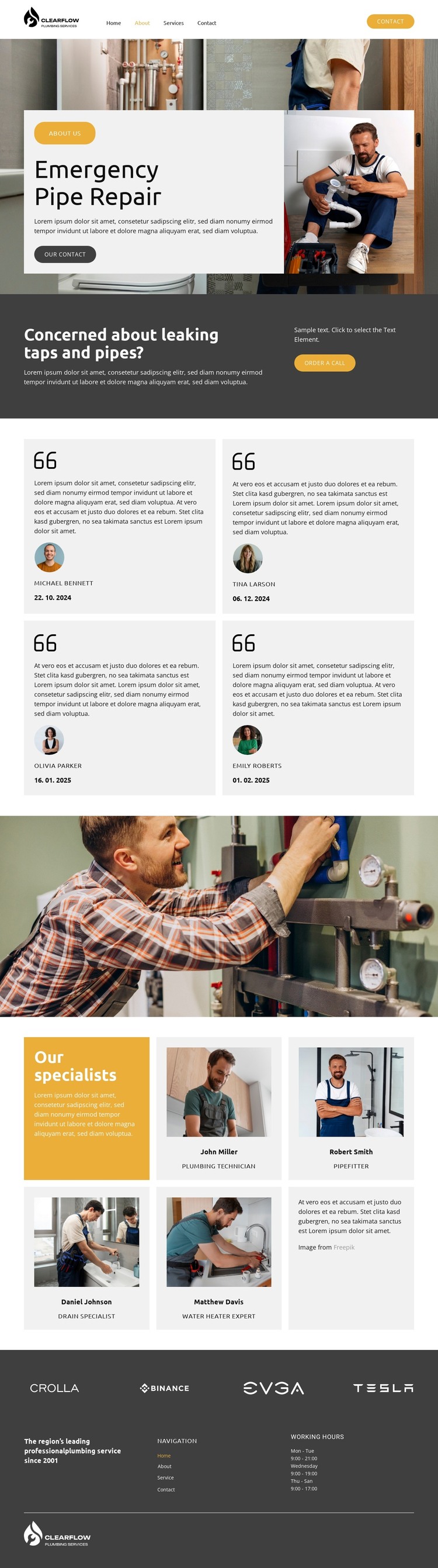
The permanent page content is clearly divided into areas that can remain part of a WordPress-managed plumbing site. Emergency Pipe Repair supplies the main service introduction, with a large plumbing photograph giving the page a strong visual entry. The adjacent contact action and the later dark panel about leaking taps and pipes create page-oriented content for explaining an urgent problem and inviting an order-a-call response. These areas can remain stable while the wording, images, and service details evolve.
The repeated content is especially useful for interpreting the design as a theme. Four testimonial cards form a consistent proof pattern, and five specialist cards organize staff information by role, including Plumbing Technician, Pipefitter, Drain Specialist, and Water Heater Expert. Together, they show how recurring content can share one visual treatment while carrying different text and images. The full-width plumbing photograph provides a separate media section, and the horizontal sequence of twelve logos adds another repeatable presentation area without changing the core page character.
Navigation, mobile navigation, working hours, and the service statement in the footer connect these page areas to broader site content. A WordPress project could therefore keep the established visual direction around permanent service and team information while adding or updating related content through its CMS environment. The design is not presented as containing verified blog or post structures; its stronger foundation is the combination of service information, proof, profiles, brand references, and contact-oriented site navigation.
Customize with Nicepage
Open this ready-made template in the WordPress Website Builder and customize it visually in the Nicepage editor. Replace demo content, edit page sections, and adapt the design to your project without rebuilding the template from scratch.
Manage and Edit This Theme in WordPress
Customize and Install the WordPress Theme
Start with this ready-made theme instead of building the WordPress design from scratch. Customize its layout, content, typography, images, sections, and other design elements visually in Nicepage editor, then export and install the WordPress Theme, Plugin, and Pages on your WordPress site. The Nicepage WordPress Plugin lets you continue working with the site after installation.
Edit the Theme Directly in WordPress
After installation, you can edit the WordPress Theme directly in WordPress with the Nicepage WordPress Plugin. Use Site Style to customize site Colors, Fonts, Header, Footer, Blog, and Post Page Templates while working within your WordPress website.
Edit WordPress Pages Visually
Use the Nicepage WordPress Plugin to edit page content directly from the WordPress admin area. Open a WordPress Page with Nicepage and visually change its text, images, sections, and other page elements while continuing to manage the Page through WordPress.
WordPress Content and Theme Integration
Use the customized theme with WordPress Pages, Posts, Blog and Post Templates, menus, widgets, and other CMS-managed content. Shared theme elements such as Colors, Fonts, Header, Footer, Blog, and Post Page Templates can be managed as part of the overall site design, while WordPress provides the CMS environment for managing site content.
This workflow combines a ready-made WordPress Theme with visual customization, direct theme editing in WordPress, and continued content management through the Nicepage WordPress Plugin.