Private Math Tutor WordPress Theme


Edit Template Offline
2. Create new page and search for id 6627346
Edit Template Online
Create Awesome Websites


Free Nicepage Builder
Keywords
Subject and Student Content Fit a Page-Oriented Theme Structure
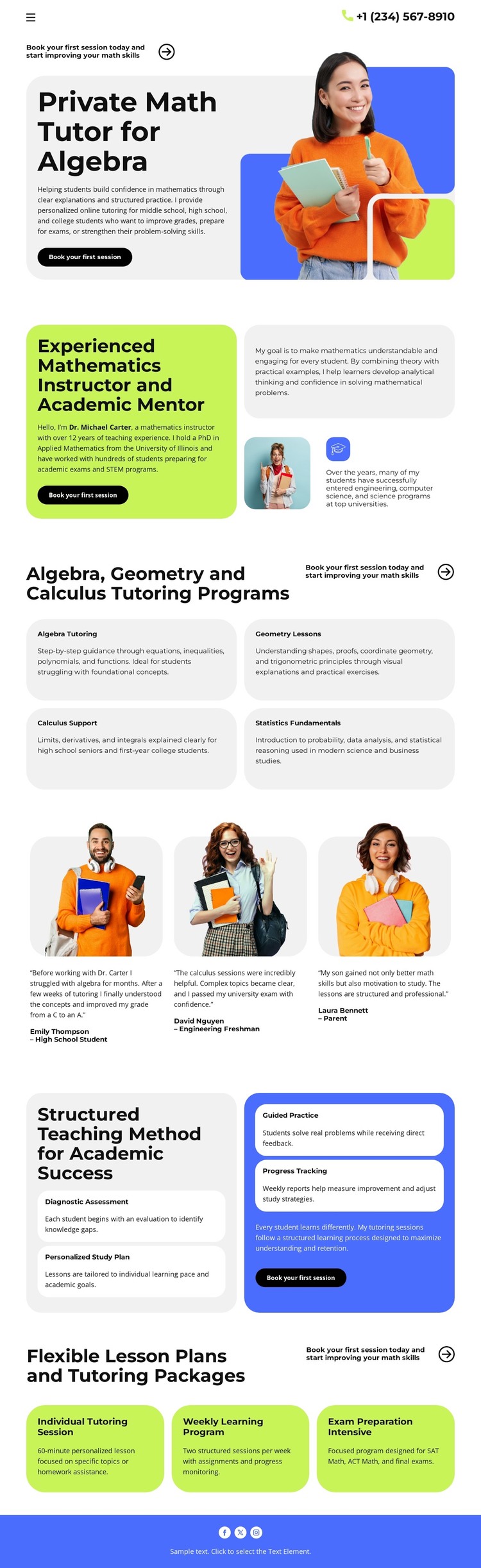
The four mathematics subject cards create clear permanent content areas for a tutoring site: Algebra Tutoring, Geometry Lessons, Calculus Support, and Statistics Fundamentals. Their related but separate roles make them suitable for organizing page-oriented information around different academic needs, while the instructor introduction can carry the personal profile of the tutor. These are stable service areas rather than claims about WordPress posts, categories, or blog content already existing in the template.
The three testimonial cards add a different content relationship. They place student-oriented feedback beside the program information, helping a WordPress project keep experience-based content visually connected to the pages that explain the tutoring offer. The four method cards then provide a process framework through Diagnostic Assessment, Personalized Study Plan, Guided Practice, and Progress Tracking. That sequence can support explanatory page content while maintaining the same visual direction as the service cards.
The three package options—Individual Tutoring, Weekly Learning, and Intensive Preparation—give the design another page-level content group for comparing lesson arrangements. A header phone contact and recurring booking actions keep communication visible across the presentation. In a WordPress-oriented project, these permanent service, profile, feedback, method, package, and contact areas can remain part of one theme character while content is expanded or maintained through the CMS. The template analysis does not verify WordPress-specific posts or widgets, so the interpretation stays grounded in the actual page structure.
Customize with Nicepage
Open this ready-made template in the WordPress Website Builder and customize it visually in the Nicepage editor. Replace demo content, edit page sections, and adapt the design to your project without rebuilding the template from scratch.
Manage and Edit This Theme in WordPress
Customize and Install the WordPress Theme
Start with this ready-made theme instead of building the WordPress design from scratch. Customize its layout, content, typography, images, sections, and other design elements visually in Nicepage editor, then export and install the WordPress Theme, Plugin, and Pages on your WordPress site. The Nicepage WordPress Plugin lets you continue working with the site after installation.
Edit the Theme Directly in WordPress
After installation, you can edit the WordPress Theme directly in WordPress with the Nicepage WordPress Plugin. Use Site Style to customize site Colors, Fonts, Header, Footer, Blog, and Post Page Templates while working within your WordPress website.
Edit WordPress Pages Visually
Use the Nicepage WordPress Plugin to edit page content directly from the WordPress admin area. Open a WordPress Page with Nicepage and visually change its text, images, sections, and other page elements while continuing to manage the Page through WordPress.
WordPress Content and Theme Integration
Use the customized theme with WordPress Pages, Posts, Blog and Post Templates, menus, widgets, and other CMS-managed content. Shared theme elements such as Colors, Fonts, Header, Footer, Blog, and Post Page Templates can be managed as part of the overall site design, while WordPress provides the CMS environment for managing site content.
This workflow combines a ready-made WordPress Theme with visual customization, direct theme editing in WordPress, and continued content management through the Nicepage WordPress Plugin.