About me block with icons WordPress Theme


Stable Profile Content With Four Publishable Capability Areas
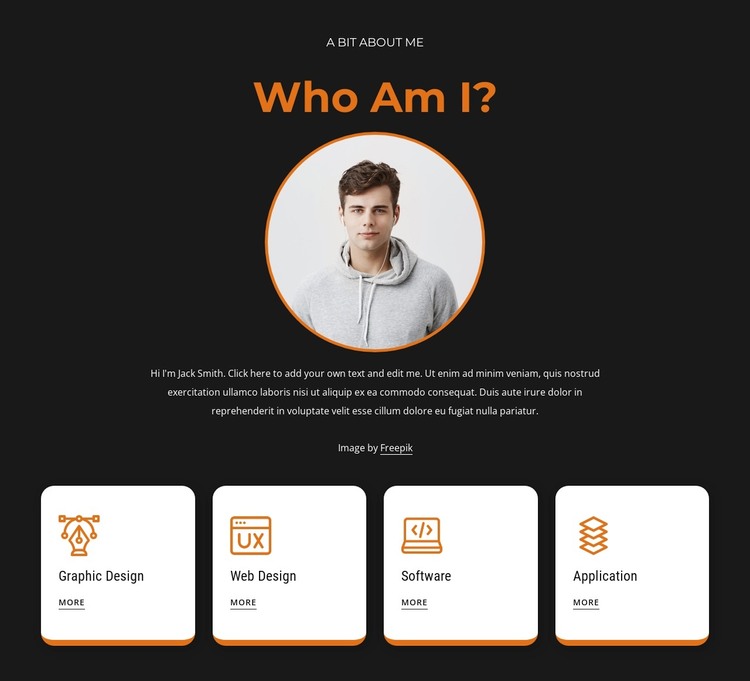
The headings and portrait establish the block as personal profile content rather than a time-sensitive list of updates. “A Bit About Me” and “Who Am I?” provide the introductory frame, and the circular portrait gives the profile a clear visual subject before the supporting paragraph adds context. Below, the four repeated cards turn that personal introduction into separate capability areas: Graphic Design, Web Design, Software, and Application.
In a WordPress-oriented project, this arrangement can remain a stable section on a page while the broader site manages other content around it. The card pattern is especially useful for keeping the four areas visually comparable. Icons give each category a quick identifier, and the “more” links can point toward deeper information when the surrounding page structure provides those destinations. The block itself remains focused on presenting the profile and capability overview rather than becoming a complete theme or CMS system.
Its visual styling supports long-term consistency. The dark background, orange heading and portrait ring, and white rounded cards create recognizable roles that can be maintained when the section is placed beside other page content. A WordPress-managed site may therefore use this block as a permanent about or profile region, while separate content areas handle portfolios, articles, contact details, or other site functions. The section contributes publishable page content without requiring blog, category, or widget assumptions.
Customize with Nicepage
Open this ready-made template in the WordPress Website Builder and customize it visually in the Nicepage editor. Replace demo content, edit page sections, and adapt the design to your project without rebuilding the template from scratch.
Edit Template Offline
2. Create a new page or select existing
3. Click Add new block, search for id 2999428 and click enter
Edit Template Online
Create Awesome Websites


Free Nicepage Builder
Keywords
Manage and Edit This Theme in WordPress
Customize and Install the WordPress Theme
Start with this ready-made theme instead of building the WordPress design from scratch. Customize its layout, content, typography, images, sections, and other design elements visually in Nicepage editor, then export and install the WordPress Theme, Plugin, and Pages on your WordPress site. The Nicepage WordPress Plugin lets you continue working with the site after installation.
Edit the Theme Directly in WordPress
After installation, you can edit the WordPress Theme directly in WordPress with the Nicepage WordPress Plugin. Use Site Style to customize site Colors, Fonts, Header, Footer, Blog, and Post Page Templates while working within your WordPress website.
Edit WordPress Pages Visually
Use the Nicepage WordPress Plugin to edit page content directly from the WordPress admin area. Open a WordPress Page with Nicepage and visually change its text, images, sections, and other page elements while continuing to manage the Page through WordPress.
WordPress Content and Theme Integration
Use the customized theme with WordPress Pages, Posts, Blog and Post Templates, menus, widgets, and other CMS-managed content. Shared theme elements such as Colors, Fonts, Header, Footer, Blog, and Post Page Templates can be managed as part of the overall site design, while WordPress provides the CMS environment for managing site content.
This workflow combines a ready-made WordPress Theme with visual customization, direct theme editing in WordPress, and continued content management through the Nicepage WordPress Plugin.