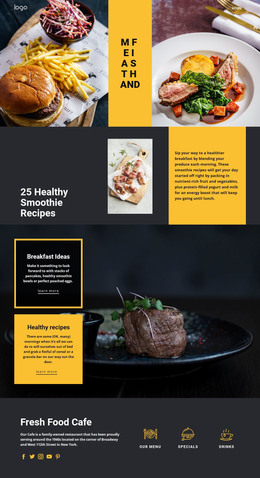
Craft coffee in New York WordPress Theme



Edit Template Offline
2. Create new page and search for id 2610259
Edit Template Online
Create Awesome Websites


Free Nicepage Builder
Keywords
Page Content and Repeated Dish Cards Support an Editorial Cafe Site
The design separates permanent cafe information into clear page-oriented regions. The hero can introduce the NYC cafe and direct visitors toward the menu, while Coffee & Cakes provides a focused explanation of the main offer. The four numbered cards create recurring informational areas for About Us, Our Food, Our Drinks, and Excellent coffee. These regions are distinct enough to support stable page content while remaining part of one visual system.
The six dessert tiles and six Popular Dishes cards offer a second interpretation of the design. The tiles organize broad choices such as sorbets, sundaes, smoothies, and drinks, whereas the dish cards show individual desserts with names, prices, images, and Buy now actions. A WordPress-managed project could treat those areas as content that changes or expands over time, without claiming that Posts, categories, or product records are already present in the template.
The Vegetarian Menu section supplies a focused food feature, and the six-image gallery gives the cafe a visual content area that can sit alongside the more permanent menu information. The Manhattan specialty block adds local context before the Contact Us form closes the page. Navigation, mobile navigation, shared visual styling, and the footer help keep these page areas connected. If the project later adds regularly updated cafe stories or announcements, the existing content structure can continue to frame them without replacing the core design character.
Customize with Nicepage
Open this ready-made template in the WordPress Website Builder and customize it visually in the Nicepage editor. Replace demo content, edit page sections, and adapt the design to your project without rebuilding the template from scratch.
Manage and Edit This Theme in WordPress
Customize and Install the WordPress Theme
Start with this ready-made theme instead of building the WordPress design from scratch. Customize its layout, content, typography, images, sections, and other design elements visually in Nicepage editor, then export and install the WordPress Theme, Plugin, and Pages on your WordPress site. The Nicepage WordPress Plugin lets you continue working with the site after installation.
Edit the Theme Directly in WordPress
After installation, you can edit the WordPress Theme directly in WordPress with the Nicepage WordPress Plugin. Use Site Style to customize site Colors, Fonts, Header, Footer, Blog, and Post Page Templates while working within your WordPress website.
Edit WordPress Pages Visually
Use the Nicepage WordPress Plugin to edit page content directly from the WordPress admin area. Open a WordPress Page with Nicepage and visually change its text, images, sections, and other page elements while continuing to manage the Page through WordPress.
WordPress Content and Theme Integration
Use the customized theme with WordPress Pages, Posts, Blog and Post Templates, menus, widgets, and other CMS-managed content. Shared theme elements such as Colors, Fonts, Header, Footer, Blog, and Post Page Templates can be managed as part of the overall site design, while WordPress provides the CMS environment for managing site content.
This workflow combines a ready-made WordPress Theme with visual customization, direct theme editing in WordPress, and continued content management through the Nicepage WordPress Plugin.