Motosport WordPress Theme


Edit Template Offline
2. Create new page and search for id 16938
Edit Template Online
Create Awesome Websites


Free Nicepage Builder
Keywords
Review and Racing Sections Suit WordPress Content Areas
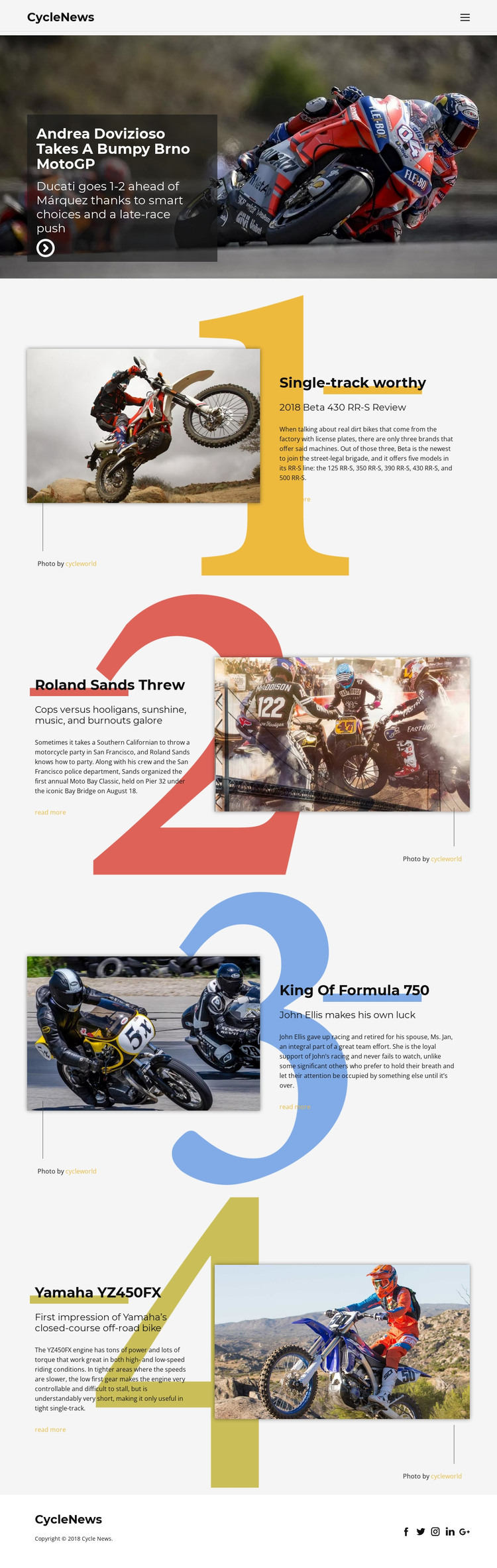
The page provides several permanent content areas that can be interpreted naturally within a WordPress-managed publication. The CycleNews header and navigation establish shared site content, while the opening MotoGP story works as the most prominent page-oriented feature. The four numbered sections then create a useful editorial grouping: the Beta 430 RR-S and Yamaha YZ450FX areas present motorcycle reviews, the Moto Bay Classic section covers an event, and the Formula 750 feature adds a historical racing story. Their differences give a WordPress project room for varied content without changing the visual direction.
The repeated article presentation is the key relationship. Each story combines a prominent image, a heading, supporting copy, and a Read more destination, so additional editorial material could follow the same visual pattern while remaining recognizable as CycleNews content. The social footer and publication identity provide shared site elements around those content areas. The source does not verify existing WordPress Posts, categories, or blog templates, so those structures should not be presented as already included. If the project later adds regularly updated articles or announcements, WordPress Pages and Posts may provide a suitable content interpretation. The Nicepage WordPress Plugin is an optional bridge for working with WordPress-managed content, but the template's concrete value comes from its differentiated review, event, racing, and navigation regions.
Customize with Nicepage
Open this ready-made template in the WordPress Website Builder and customize it visually in the Nicepage editor. Replace demo content, edit page sections, and adapt the design to your project without rebuilding the template from scratch.
Manage and Edit This Theme in WordPress
Customize and Install the WordPress Theme
Start with this ready-made theme instead of building the WordPress design from scratch. Customize its layout, content, typography, images, sections, and other design elements visually in Nicepage editor, then export and install the WordPress Theme, Plugin, and Pages on your WordPress site. The Nicepage WordPress Plugin lets you continue working with the site after installation.
Edit the Theme Directly in WordPress
After installation, you can edit the WordPress Theme directly in WordPress with the Nicepage WordPress Plugin. Use Site Style to customize site Colors, Fonts, Header, Footer, Blog, and Post Page Templates while working within your WordPress website.
Edit WordPress Pages Visually
Use the Nicepage WordPress Plugin to edit page content directly from the WordPress admin area. Open a WordPress Page with Nicepage and visually change its text, images, sections, and other page elements while continuing to manage the Page through WordPress.
WordPress Content and Theme Integration
Use the customized theme with WordPress Pages, Posts, Blog and Post Templates, menus, widgets, and other CMS-managed content. Shared theme elements such as Colors, Fonts, Header, Footer, Blog, and Post Page Templates can be managed as part of the overall site design, while WordPress provides the CMS environment for managing site content.
This workflow combines a ready-made WordPress Theme with visual customization, direct theme editing in WordPress, and continued content management through the Nicepage WordPress Plugin.