Red oval truck transportaion WordPress Theme


Edit Template Offline
2. Create new page and search for id 18275
Edit Template Online
Create Awesome Websites


Free Nicepage Builder
Keywords
Product Pages and Editorial Company Content Share One Truck Visual System
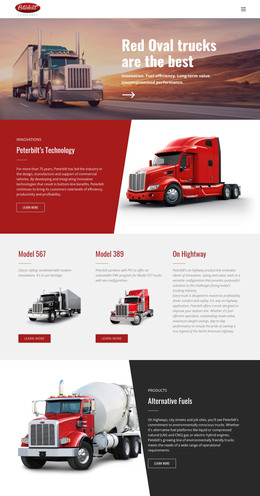
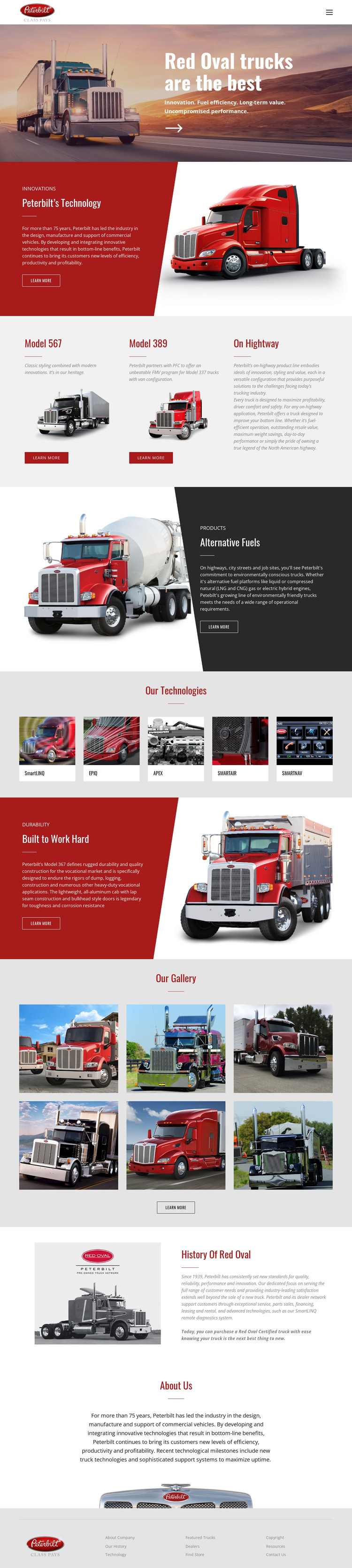
The design separates permanent company information from repeated product-oriented content in a way that can translate naturally to a WordPress-managed site. The hero and About Us section provide page-level brand content, while the three model cards create a clear starting point for organizing information about Model 567, Model 389, and On Highway. Each model is already presented as a distinct visual item with a label, description, image, and Learn More action.
The technology sections offer another content relationship. Peterbilt’s Technology and Alternative Fuels can introduce durable informational subjects, while the five technology tiles provide a compact visual index for related topics. The six-photo gallery supports image-led content that can sit alongside those product and technical areas, rather than replacing them. History Of Red Oval adds a separate company narrative, giving the design an editorial layer beyond model promotion.
The navigation, shared brand mark, and footer help keep these different content types within one theme direction. In a WordPress project, permanent pages could carry the company overview and history, while recurring model, technology, or visual content could be expanded according to the site’s publishing needs. The important point is the relationship between the existing areas: product choices, technical subjects, imagery, and company background already have different roles, so the theme can support managed content without reducing every section to the same kind of page.
Customize with Nicepage
Open this ready-made template in the WordPress Website Builder and customize it visually in the Nicepage editor. Replace demo content, edit page sections, and adapt the design to your project without rebuilding the template from scratch.
Manage and Edit This Theme in WordPress
Customize and Install the WordPress Theme
Start with this ready-made theme instead of building the WordPress design from scratch. Customize its layout, content, typography, images, sections, and other design elements visually in Nicepage editor, then export and install the WordPress Theme, Plugin, and Pages on your WordPress site. The Nicepage WordPress Plugin lets you continue working with the site after installation.
Edit the Theme Directly in WordPress
After installation, you can edit the WordPress Theme directly in WordPress with the Nicepage WordPress Plugin. Use Site Style to customize site Colors, Fonts, Header, Footer, Blog, and Post Page Templates while working within your WordPress website.
Edit WordPress Pages Visually
Use the Nicepage WordPress Plugin to edit page content directly from the WordPress admin area. Open a WordPress Page with Nicepage and visually change its text, images, sections, and other page elements while continuing to manage the Page through WordPress.
WordPress Content and Theme Integration
Use the customized theme with WordPress Pages, Posts, Blog and Post Templates, menus, widgets, and other CMS-managed content. Shared theme elements such as Colors, Fonts, Header, Footer, Blog, and Post Page Templates can be managed as part of the overall site design, while WordPress provides the CMS environment for managing site content.
This workflow combines a ready-made WordPress Theme with visual customization, direct theme editing in WordPress, and continued content management through the Nicepage WordPress Plugin.