Auto Dealer Listings WordPress Theme



Edit Template Offline
2. Create new page and search for id 6644470
Edit Template Online
Create Awesome Websites


Free Nicepage Builder
Keywords
Vehicle Pages, Categories, and Dealer Information Share One Theme Direction
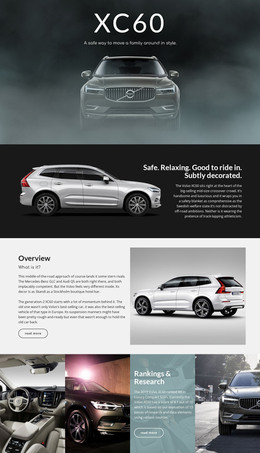
The design’s page-oriented content is easiest to see in the relationship between the search panel and the repeated vehicle cards. Condition, make, and model controls introduce a way to find relevant inventory, while four featured cards provide concrete vehicle content through images, names, prices, and specifications. A second group of three cards can represent additional page content or a separate inventory emphasis, but the analysis does not require treating these demo vehicles as real stock.
The category tiles add persistent subject areas for SUV, Sedan, Hatchback, and Electric vehicles. They give the dealership a clear way to organize related content while preserving the same visual system. The About Us section supplies another permanent area through customer-focused copy, service bullets, and a representative image. If regularly updated editorial or announcement content is added later, it can sit beside these established page sections rather than changing the core dealership character.
The closing Book a Test Drive and Contact Dealer actions connect managed content to visitor response. A WordPress-oriented implementation can therefore keep page content, vehicle categories, repeated listing information, and dealer context within one coordinated theme direction. The design’s value is not an unsupported claim that WordPress content already exists, but the clear mapping between its verified page areas and a CMS-managed dealership project.
Customize with Nicepage
Open this ready-made template in the WordPress Website Builder and customize it visually in the Nicepage editor. Replace demo content, edit page sections, and adapt the design to your project without rebuilding the template from scratch.
Manage and Edit This Theme in WordPress
Customize and Install the WordPress Theme
Start with this ready-made theme instead of building the WordPress design from scratch. Customize its layout, content, typography, images, sections, and other design elements visually in Nicepage editor, then export and install the WordPress Theme, Plugin, and Pages on your WordPress site. The Nicepage WordPress Plugin lets you continue working with the site after installation.
Edit the Theme Directly in WordPress
After installation, you can edit the WordPress Theme directly in WordPress with the Nicepage WordPress Plugin. Use Site Style to customize site Colors, Fonts, Header, Footer, Blog, and Post Page Templates while working within your WordPress website.
Edit WordPress Pages Visually
Use the Nicepage WordPress Plugin to edit page content directly from the WordPress admin area. Open a WordPress Page with Nicepage and visually change its text, images, sections, and other page elements while continuing to manage the Page through WordPress.
WordPress Content and Theme Integration
Use the customized theme with WordPress Pages, Posts, Blog and Post Templates, menus, widgets, and other CMS-managed content. Shared theme elements such as Colors, Fonts, Header, Footer, Blog, and Post Page Templates can be managed as part of the overall site design, while WordPress provides the CMS environment for managing site content.
This workflow combines a ready-made WordPress Theme with visual customization, direct theme editing in WordPress, and continued content management through the Nicepage WordPress Plugin.